Hi flywire,
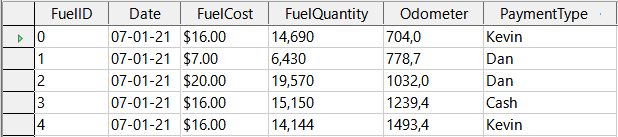
    1. Numbers are not aligned right by default eg

https://books.libreoffice.org/en/GS72/GS7208-GettingStartedWithBase-img/GS7208-GettingStartedWithBase-img043.png
You could report a bug/enhancement request for this. If I create a table
the alignment will be set to horizontal alignment "default". But
"default" will never be saved. It will be "left" instead. Could be it is
planned but not implemented yet.
    2. Maybe it's because numbers are converted to strings to display eg

https://books.libreoffice.org/en/GS72/GS7208-GettingStartedWithBase-img/GS7208-GettingStartedWithBase-img049.png
No, test it with a new table. You could see every content is aligned
left in the table.
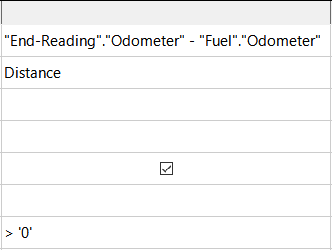
I don't understand why different quote treatments are required for numbers
here:
Step 4 1) Type >0 in the Criterion cell under FuelID in the query table.
Step 8 4) Type > '0' in the Criterion cell.
If I test it with LO 7.3.0.3 there are no quotes around numbers in the
GUI. If I try to set quotes here it give a warning:
The entered criterion cannot be compared with this field.
I could only set quotes in SQL view but it will end with an error if I
set it back to design view.
The quotes in the example are wrong for the GUI of Base and LO 7.3.0.3
It seems also the screenshots were made with different county format.
There is a decimal separator '.' for $ and a decimal separator ',' for
all other decimals.
Regards

Robert
--
Homepage: https://www.familiegrosskopf.de/robert

--
To unsubscribe e-mail to: [email protected]
Problems? https://www.libreoffice.org/get-help/mailing-lists/how-to-unsubscribe/
Posting guidelines + more: https://wiki.documentfoundation.org/Netiquette
List archive: https://listarchives.libreoffice.org/global/documentation/
Privacy Policy: https://www.documentfoundation.org/privacy