I'm having the exact same problem. It may be a font conflict, though I
haven't seen those since OS 9. Very annoying.
Tim

On Jul 20, 9:16 pm, Kieran <[email protected]> wrote:
> Hi,
>
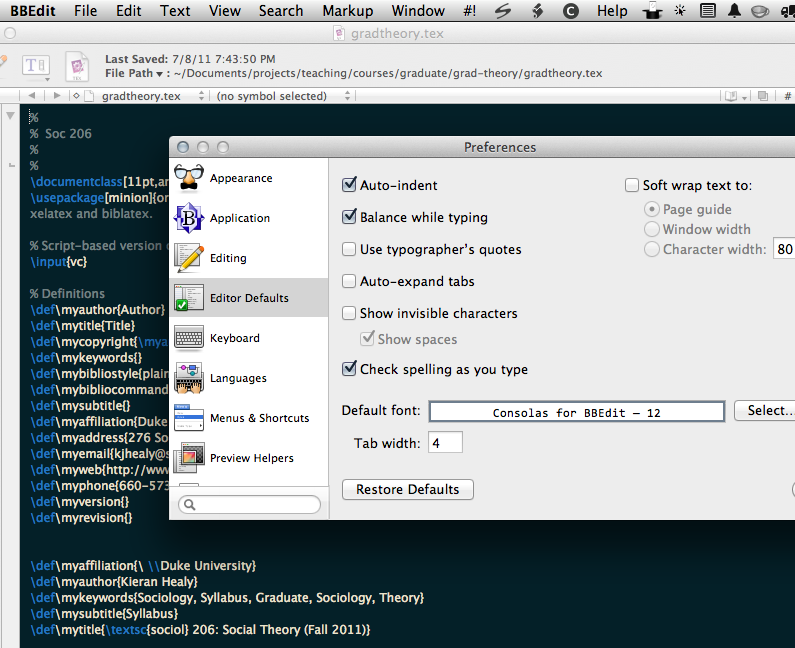
> I'm trying out BBEdit 10.0 and have run into an odd font issue on
> 10.6.8 and 10.7. I want to change the default font via Preferences >
> Editor Defaults. This works fine for most of the fonts I have
> installed, but for some selecting them does not work properly.
> Selecting the font causes BBEdit instead to display its default font,
> Lucida Grande. The fonts I'm trying to select do display properly in
> the preview box inside the preference pane (showing their name and
> point size), but BBEdit switches to Lucida Grande in the main window.
>
> This happens with my preferred monospace font, PragmataPro, but also
> with some standard fonts, most notably the bundled Consolas for
> BBEdit. The problem fonts are visible to and usable by other
> applications (e.g., Textmate, Emacs). Here's a link to a screenshot
> showing how the selected font is shown in the preview box but Lucida
> Grande displays in the main window:
>
> http://kieranhealy.org/files/misc/bbedit-font-issue.png
>
> Clearing the system's font caches does not resolve the issue. Has
> anyone else encountered this?
>
> Thanks,
>
> Kieran

--
You received this message because you are subscribed to the
"BBEdit Talk" discussion group on Google Groups.
To post to this group, send email to [email protected]
To unsubscribe from this group, send email to
[email protected]
For more options, visit this group at
<http://groups.google.com/group/bbedit?hl=en>
If you have a feature request or would like to report a problem,
please email "[email protected]" rather than posting to the group.
Follow @bbedit on Twitter: <http://www.twitter.com/bbedit>