Hi,

I'm trying out BBEdit 10.0 and have run into an odd font issue on
10.6.8 and 10.7. I want to change the default font via Preferences >
Editor Defaults. This works fine for most of the fonts I have
installed, but for some selecting them does not work properly.
Selecting the font causes BBEdit instead to display its default font,
Lucida Grande. The fonts I'm trying to select do display properly in
the preview box inside the preference pane (showing their name and
point size), but BBEdit switches to Lucida Grande in the main window.
This happens with my preferred monospace font, PragmataPro, but also
with some standard fonts, most notably the bundled Consolas for
BBEdit. The problem fonts are visible to and usable by other
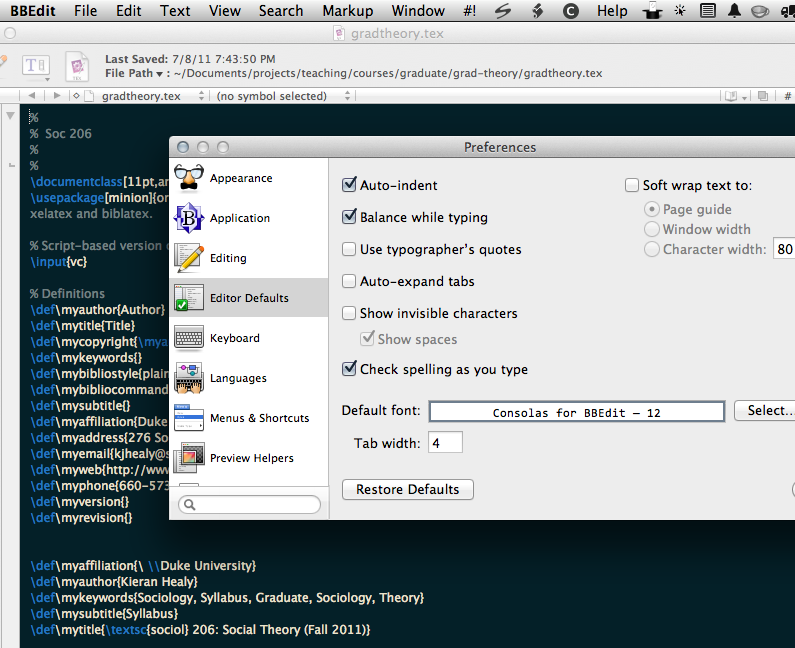
applications (e.g., Textmate, Emacs). Here's a link to a screenshot
showing how the selected font is shown in the preview box but Lucida
Grande displays in the main window:

http://kieranhealy.org/files/misc/bbedit-font-issue.png

Clearing the system's font caches does not resolve the issue. Has
anyone else encountered this?

Thanks,

Kieran

--
You received this message because you are subscribed to the
"BBEdit Talk" discussion group on Google Groups.
To post to this group, send email to [email protected]
To unsubscribe from this group, send email to
[email protected]
For more options, visit this group at
<http://groups.google.com/group/bbedit?hl=en>
If you have a feature request or would like to report a problem,
please email "[email protected]" rather than posting to the group.
Follow @bbedit on Twitter: <http://www.twitter.com/bbedit>