Hey,

I've uploaded the files:
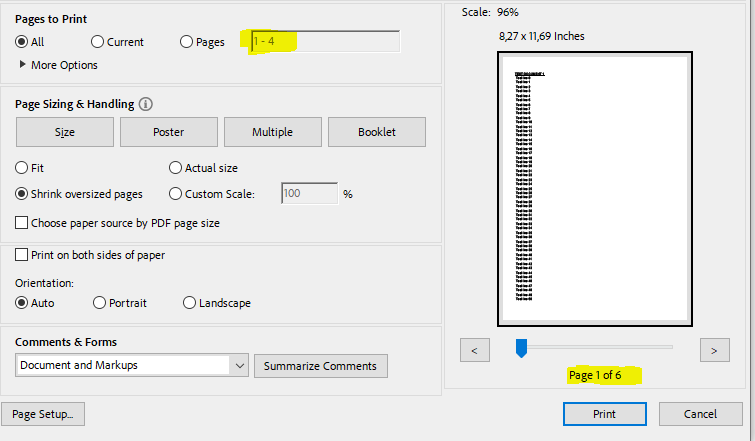
Screenshot of the Acrobat Reader print dialogue:
https://sirconic-group.de/wp-content/uploads/pdfbox/acrobatreaderprint.png
Test pdf 1 (2 pages):
https://www.sirconic-group.de/wp-content/uploads/pdfbox/testdocument1_2_pages.pdf
Test pdf 2 (4 pages):
https://www.sirconic-group.de/wp-content/uploads/pdfbox/testdocument2_4_pages.pdf
Merged PDF (6 pages):
https://www.sirconic-group.de/wp-content/uploads/pdfbox/mergeddocument_6_pages.pdf
Thanks again!

Am 16.11.2023 um 11:59 schrieb [email protected]:
Hi,

the PDFs didn't make it to the mailing list. Can you upload these to a
public location?

BR
Maruan

Am Donnerstag, dem 16.11.2023 um 11:49 +0100 schrieb Christian
Puritscher:
Hello,
we have an issue with the merged PDF created with the PDFBox
PDFMerger (problem exists in 2.x and 3.x) in Acrobat Reader (current
version 2023.006.20380, but also older versions, tested on Windows
and Mac):
When we merge two (or more) PDFs then the merged PDF seems fine. For
example when we merge a 2 page PDF and a 4 page PDF the resulting PDF
is 6 pages long and displays perfectly fine (the used example PDFs
have been attached to the mail).
Also when printing the entire document it works fine.
But when we want to print specific pages, Acrobat Reader only allows
to set a range spanning the pages of the last document added to the
merged pdf (so in our example when we added a 2 page PDF and a 4 page
pdf to a 6 page pdf we now can only choose to print a specific page
from page 1-4, it does not allow any other input, nor print the
correct pages):
Using a different PDF Viewer (for example the built-in PFD Viewer
from Firefox) instead of Acrobat Reader it seems to work fine, but we
can hardly convince our customers to change their default PDF viewer.
Any idea how we can handle this issue?
Thanks!
---------------------------------------------------------------------
To unsubscribe, e-mail: [email protected]
For additional commands, e-mail: [email protected]
---------------------------------------------------------------------
To unsubscribe, e-mail: [email protected]
For additional commands, e-mail: [email protected]
---------------------------------------------------------------------
To unsubscribe, e-mail: [email protected]
For additional commands, e-mail: [email protected]