Hi,

I added support for setting the avatar from camera to Empathy through libcheese.
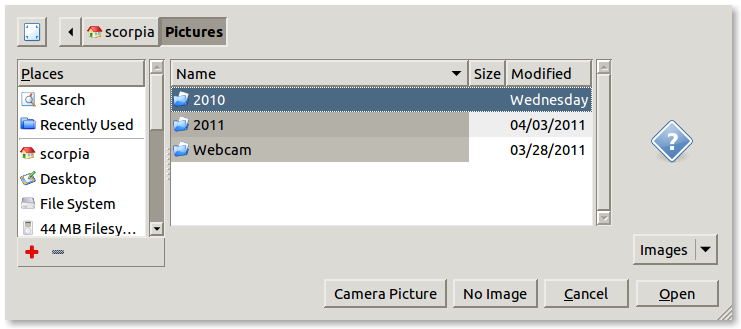
I added a button "Camera Picture" to the file selection dialog.
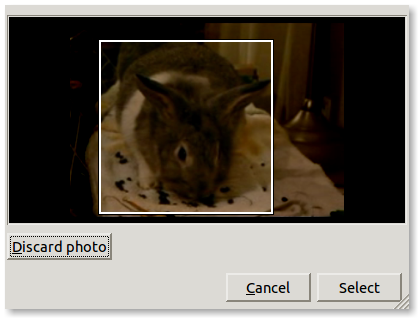
Pressing that button opens the Cheese-camera-chooser dialog.

Some screenshots:

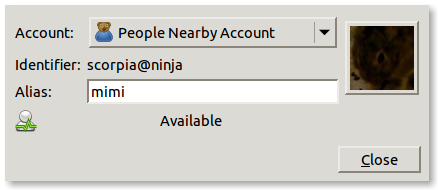
1. personal info before setting avatar from cheese:
http://swarm.cs.pub.ro/~raluca/empathy/Empathy-Personal-Information-dialog.png

2. clicking on the image opens the file chooser dialog (with a new
"Camera Picture" button):
http://swarm.cs.pub.ro/~raluca/empathy/Empathy-Select-Your-Avatar-Image-dialog.png

3. clicking the "Camera Picture" dialog opens the Cheese-camera-chooser dialog:
http://swarm.cs.pub.ro/~raluca/empathy/Empathy-Take-a-photo-dialog.png

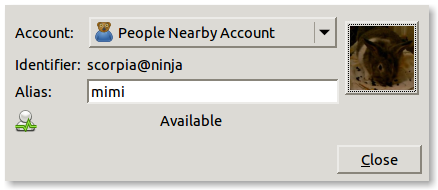
4. after taking a picture/cropping it and clicking "Select" the avatar
is updated:
http://swarm.cs.pub.ro/~raluca/empathy/Empathy-Personal-Information-after-taking-new-avatar.png

Source code: https://github.com/raluca-elena/empathy-cheese

What do you think about this new feature and the way is designed? Do
you think that it should be done in another way?

--
Raluca-Elena
_______________________________________________
telepathy mailing list
[email protected]
http://lists.freedesktop.org/mailman/listinfo/telepathy