On Sun, Jan 30, 2022 at 4:27 AM Craig Bradney <[email protected]> wrote:
>
>
> > On 30 Jan 2022, at 01:15, Gregory Pittman <[email protected]> wrote:
> >
> > On 1/29/22 17:20, Kevin Cole wrote:
> >> How do I "ungroup" the cells of a table and then regroup after
> tinkering?
> >> Actually, I want to remove the border from the left and bottom side of
> >> the bottom-left cell of a table and the rather limited documentation I
> >> found suggests ungrouping and regrouping.
> >> But, when I select the table, followed by Item -> Grouping -> ..., the
> >> available options are all disabled.
> >
> > Hi Kevin,
> >
> > Tables are something that I think has never been very fully developed in
> Scribus. As of 1.5.8, it seems that any ability to selectively cause
> individual borders to exist in the parts of a table has disappeared. Item >
> Grouping doesn't apply to tables.
> >
> > Greg
> >
>
> Hi Greg
>
> That’s achievable in the properties palette.
>
> Craig
>

Hi Craig,

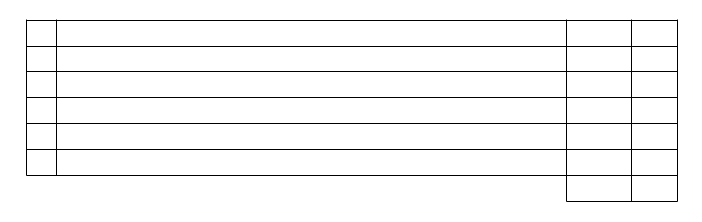
Achievable on an individual cell level?  See attachment. I was trying to
get the effect shown in the bottom left, without making two tables, and
aligning them, etc. -- which, now that I think about it, the two table
solution doesn't sound THAT bad. I was just thinking that individual cell
formatting would be a thing.
-------------- next part --------------
An HTML attachment was scrubbed...
URL:
<http://lists.scribus.net/pipermail/scribus/attachments/20220130/68ab2b08/attachment.htm>
-------------- next part --------------
A non-text attachment was scrubbed...
Name: scribus-table.png
Type: image/png
Size: 1286 bytes
Desc: not available
URL:
<http://lists.scribus.net/pipermail/scribus/attachments/20220130/68ab2b08/attachment.png>
___
Scribus Mailing List: [email protected]
Edit your options or unsubscribe:
http://lists.scribus.net/mailman/listinfo/scribus
See also:
http://wiki.scribus.net
http://forums.scribus.net