tir. 4. feb. 2020 kl. 00.26 skrev Frank <[email protected]>:

>
> On 3. Feb 2020, at 19:10, M E [email protected] wrote:
>
> man. 3. feb. 2020 kl. 06.59 skrev Frank <[email protected]>:
>
>>
>> On 3. Feb 2020, at 01:07, M E [email protected] wrote:
>>
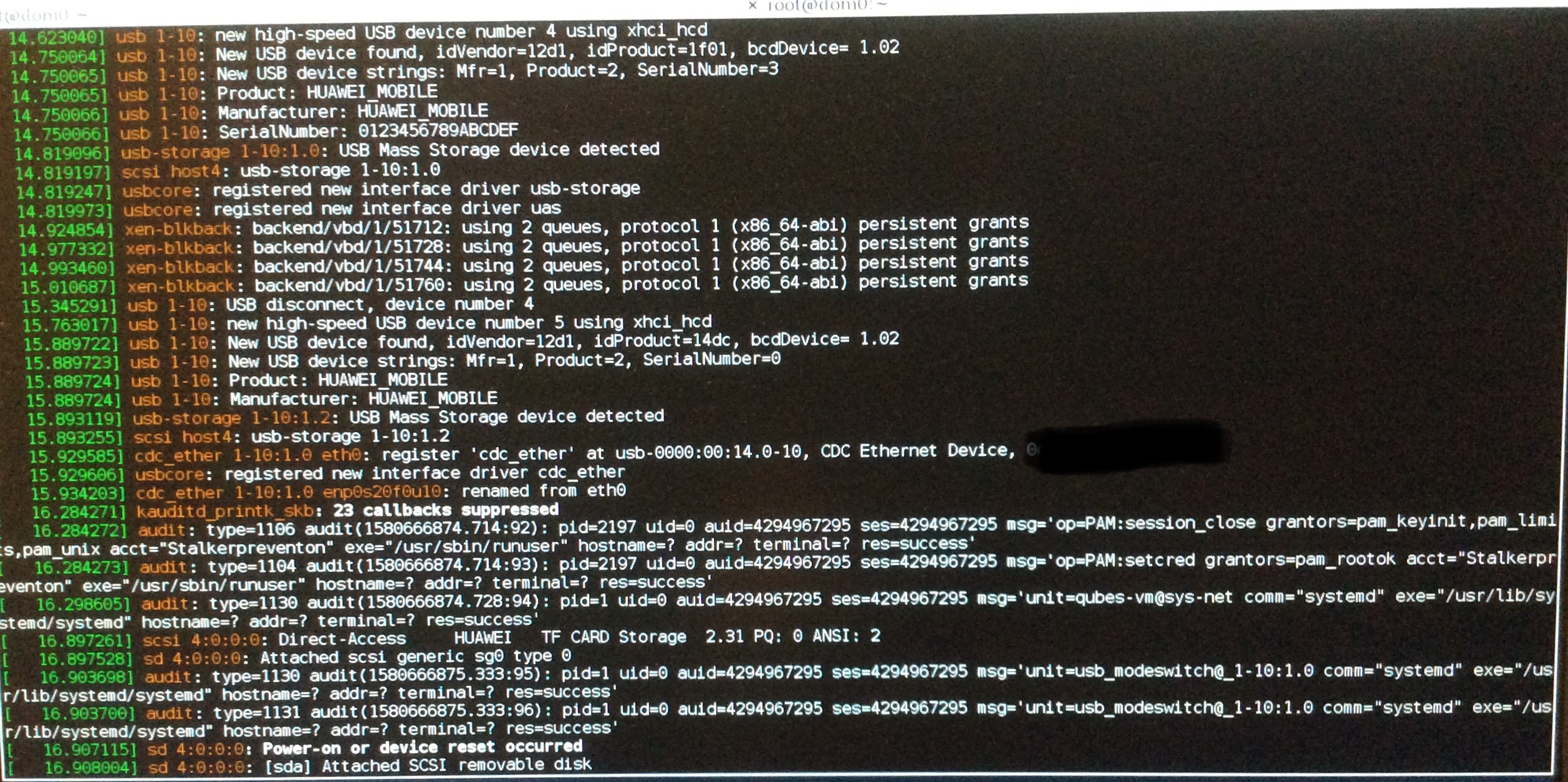
>> <7A330E21-63FF-420D-9745-EF562F243634.jpeg>
> If you can’t see the picture, here is a link to it:
>
>
> https://13366229192823780453.googlegroups.com/attach/100126185e473c/4B89147B-20D5-40EE-A9BB-C71175811C5E.jpeg?part=0.1&view=1&vt=ANaJVrECT01L2y8o5GwqdnJROLrBq8aKok0PabHMta-x2aY0Ob1KwhJoE_Snqv2pAtXYHNzEbvoZ7nyYlTG0CRXzUxozMo_uhBFSozVSFPdSHxms06amRS4
>
> I got the “dmesg”-output by logging in to the root account and use the
> dom0-terminal. I couldn’t run the command in a dom0 terminal when I logged
> in as a user.
>
> I got this answer at “www.draisberghof.de”:
>
> “The cdc_ether driver has bound to your dongle, has created an eth0
> device which immediately got auto renamed to enp0s20f0u10 and this device
> should be visible under Mobile Broadband in NetworkManager.
> There are 3 required setting in NetworkManager for a Mobile Broadband
> connection and they are Country, Provider, APN where after you will get a
> connection.
> If you don't then it is not a question for this forum, usb_modeswitch has
> done what it should do.”
>
> Then the problem seems to be related to either ModemManager,
> NetworkManager or Qubes OS as I know the USB modem works.
>
> According to this page (link:
> https://distrowatch.com/table.php?distribution=qubes&pkglist=true&version=4.0.3#pkglist
>  )
> Qubes OS 4.0.3 comes with these packages:
>
>   •  ModemManager-glib-1.6.4-1.fc25.x86_64.rpm
>
>   •  NetworkManager-1.4.6-1.fc25.x86_64.rpm
>   •  NetworkManager-glib-1.4.6-1.fc25.x86_64.rpm
>   •  NetworkManager-libnm-1.4.6-1.fc25.x86_64.rpm
>   •  NetworkManager-team-1.4.6-1.fc25.x86_64.rpm
>   •  NetworkManager-wifi-1.4.6-1.fc25.x86_64.rpm
>
> The latest version of:
>      ModemManager is 1.12.0
>      NetworkManager is 1.22.4
>
>
> Here we are with a basic problem in your understanding of how Qubes
> works... ;-)
>
> If you got this dmesg output in a dom0 terminal, this is the worst place
> possible this USB stick can show up.
>
> A Qubes system usually has a sys-net VM that gets all network devices
> assigned, so they won‘t show up in dom0 and pose a security risk there,
> since dom0 controls everything and you don’t want to give anybody a chance
> to get into dom0 and take control of it. That is - by the way - also the
> reason, why there is no network connection available in dom0, even in fully
> functional systems.
>
> Most Qubes systems also have a sys-usb VM that will get assigned all the
> USB controllers to get those away from dom0 as well. To use any of those
> assigned devices, the VM having those devices assigned to must be running.
>
> There is also the possibility to combine sys-usb and sys-net into one VM.
> Having an USB-Stick providing a network interface, this might be a good
> idea.
>
> Anyway, once you assigned the USB controller 0000:00:14.1 to one of those
> VMs, your modem will show up in that VM and not anymore in dom0. This VM
> will have a far newer version of Linux running (i.e. Fedora 30 or Debian
> 10) than dom0 (Fedora 25 in Qubes 4.0.3) and thus far newer versions of
> NetworkManager and ModemManager available than in dom0.
>
> If any of the above is completely over your head, I suggest that you read
> some of the Qubes OS documentation before going on, since the above is the
> fundamental concept of Qubes...
>
> Regards, Frank
>
> --
> You received this message because you are subscribed to a topic in the
> Google Groups "qubes-users" group.
> To unsubscribe from this topic, visit
> https://groups.google.com/d/topic/qubes-users/LRZzJfkHER0/unsubscribe.
> To unsubscribe from this group and all its topics, send an email to
> [email protected].
> To view this discussion on the web visit
> https://groups.google.com/d/msgid/qubes-users/17122-1580772359-818194%40sneakemail.com
> <https://groups.google.com/d/msgid/qubes-users/17122-1580772359-818194%40sneakemail.com?utm_medium=email&utm_source=footer>
> .
>
It says here (link:https://en.m.wikipedia.org/wiki/Dmesg ) that by
executing the command “dmesg” in the terminal, it returns the content of a
logfile that contains all the messages that is received by the message
buffer of the kernel, and their by contains the messages that the device
drivers produce.

So I guess this alone doesn’t mean that the USB devices are connected to
dom0. Or am I wrong... ?

When I installed Qubes OS 4.0.3, a USB mouse and keyboard was connected to
the pc, and therefore Qubes OS made a sys-net VM to manage both USB devices
and network - if I understand it correctly.

But if I login as a user and execute the command “lsusb” in the dom0
terminal, it list the Huawei device as one of the USB devices. I don’t know
if it shouldn’t be listed here or not. But I have seen that others have
observed the same in Qubes OS. See for example here:
https://groups.google.com/forum/m/#!topic/qubes-users/lGAx_KGzF2o
But I have also read that the listed devices doesn’t mean that dom0 has
access to them: “dom0 devices are listed, even though it's impossible to
attach them.” But again I don’t know whether this have changed since then.
It is mentioned here: https://github.com/QubesOS/qubes-issues/issues/3564 .

I have also tried to use the qvm-usb command in the dom0 user terminal and
in the sys-net terminal. According to
https://www.qubes-os.org/doc/usb-devices/ this command should list the
attached USB devices. But none USB devices is listed when I use the command
in the dom0 terminal - not even the connected USB mouse and keyboard. And
the sys-net terminal doesn’t recognize the command.

Yesterday I also recognized that when I tried to add a new mobile broadband
connection, I couldn’t choose which device it should be for. It was grayed
out with “Any device”. So it seems I somehow have to get the sys-net VM to
recognize the USB modem, as Frank also mentioned.

When I execute the “qvm-pci” command in the user dom0 terminal, there is
only listed one USB controller: 00:14.0 .

I have tried earlier to add this USB controller as a device in the sys-net
settings, and that ended up with that I couldn’t use my USB keyboard and
mouse after the PCI device had been reset.

Then there seems to be only two options:

1)  Use of no-strict-reset as mentioned here:
https://www.qubes-os.org/doc/pci-devices/#additional-attach-options
     But some unwanted security risk applies to this:
https://www.qubes-os.org/doc/device-handling-security/#pci-security

or

2)  Connecting the USB modem to the PC’s LAN port by using a router like
the TP-Link TL-MR3420 (link:
https://www.tp-link.com/dk/home-networking/3g-4g-router/tl-mr3420/  )

Does anyone have any experience using the last option with Qubes OS... ? -
I make a new thread about this option.


Also

The last version of usb_modeswitch is 2.6.0.

According to this page (link:
https://distrowatch.com/table.php?distribution=qubes&pkglist=true&version=4.0.3#pkglist
)
Qubes OS 4.0.3 comes with this version of usb_modeswitch:

      usb_modeswitch-2.4.0-5.fc25.x86_64.rpm

--
You received this message because you are subscribed to the Google Groups
"qubes-users" group.
To unsubscribe from this group and stop receiving emails from it, send an email
to [email protected].
To view this discussion on the web visit
https://groups.google.com/d/msgid/qubes-users/CABRRaUHE6dYmO-JgTwB3b0RupZWWNNch%3DxnhF---04T8AtP4aw%40mail.gmail.com.