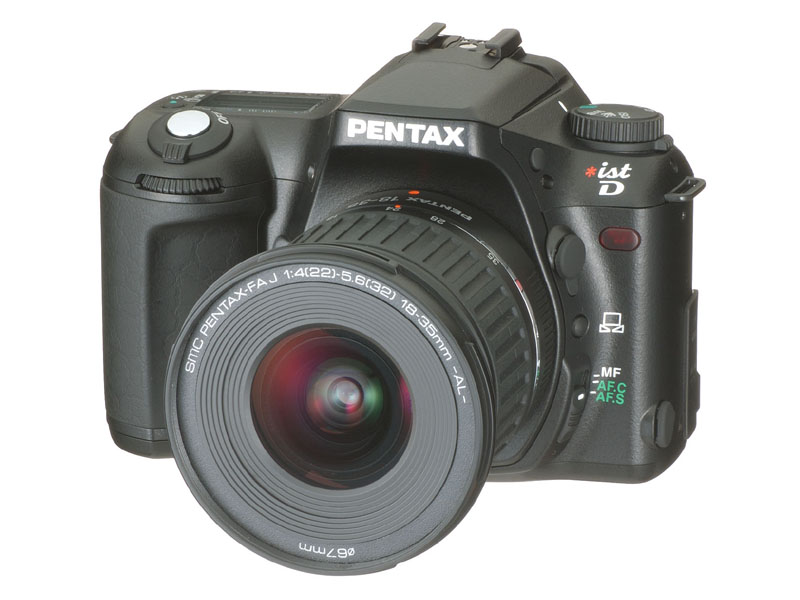
It doesn't look like a lens release.  My guess is that's it's a menu
button of some sort, and that you use it in conjunction with one of the
comman dials to change settings, kinda like how you change the aperture
from the body when using an MZ-7.
chris


On Thu, 27 Feb 2003, Shaun Canning wrote:

> I saw that too Stan, and the only thing I could think of was it might be
> the lens release button, but it really is a weird little icon. It'll
> probably make perfect sense once we know what it is, but the meaning
> isn't particularly intuitive.
>
> Cheers
>
> Shaun
>
> Stan Halpin wrote:
> > on 2/26/03 10:39 PM, Shaun Canning at [EMAIL PROTECTED] wrote:
> >
> >
> >>Ken, you have scooped the pool. Well done. I want one already...
> >>
> >>Shaun
> >>
> >>KT Takeshita wrote:
> >>
> >>>Comrades!
> >>>
> >>>http://www.digitalcamera.jp/html/HotNews/image/2003-02/27/ist-D-1L.jpg
> >>>
> >>>http://www.digitalcamera.jp/html/HotNews/image/2003-02/27/ist-D-2L.jpg
> >>>
> >>
> >
> > Can anyone explain the icon on the front for me? It shows an open rectangle
> > sitting on two inward sloping wedges or ramps or something. The icon is next
> > to the button just above the manual-auto focus slide switch.
> >
> > My brain does not process icons well. I still find it a 50-50 proposition
> > selecting between O and I when I want to power on new computer equipment - I
> > have no idea if O means On or empty or Off or what.
> >
> > stan (muttering in his beard about all this fancy newfangled stuff....)
> >
> > .
> >
>
>
> --
> ++++++++++++++++++++++++++++++++++++++++++++++++++++++++++++++++++++++++
> Shaun Canning
> Cultural Heritage Services
> High Street, Broadford,
> Victoria, 3658.
>
> www.heritageservices.com.au/
>
> Phone: 0414-967644
> e-mail: [EMAIL PROTECTED]
> ++++++++++++++++++++++++++++++++++++++++++++++++++++++++++++++++++++++++
>
>
>
>