This is an automated email from the ASF dual-hosted git repository.

yilialin pushed a commit to branch master
in repository https://gitbox.apache.org/repos/asf/apisix-website.git
The following commit(s) were added to refs/heads/master by this push:
new d09d1674efb blog: add
configure-apisix-in-a-single-command-with-apisix-mcp (#1921)
d09d1674efb is described below
commit d09d1674efb3e2099c1ee641cd545ff5b6dae236
Author: Yilia Lin <[email protected]>
AuthorDate: Fri Jun 13 15:06:41 2025 +0800
blog: add configure-apisix-in-a-single-command-with-apisix-mcp (#1921)
---
...e-apisix-in-a-single-command-with-apisix-mcp.md | 263 +++++++++++++++++++++
...e-apisix-in-a-single-command-with-apisix-mcp.md | 258 ++++++++++++++++++++
2 files changed, 521 insertions(+)
diff --git
a/blog/en/blog/2025/06/04/configure-apisix-in-a-single-command-with-apisix-mcp.md
b/blog/en/blog/2025/06/04/configure-apisix-in-a-single-command-with-apisix-mcp.md
new file mode 100644
index 00000000000..f50a0292b96
--- /dev/null
+++
b/blog/en/blog/2025/06/04/configure-apisix-in-a-single-command-with-apisix-mcp.md
@@ -0,0 +1,263 @@
+---
+title: "Configure APISIX in a Single Command with APISIX-MCP"
+authors:
+ - name: Zhihuang Lin
+ title: author
+ url: https://github.com/oil-oil
+ image_url: https://github.com/oil-oil.png
+ - name: Yilia Lin
+ title: Technical Writer
+ url: https://github.com/Yilialinn
+ image_url: https://github.com/Yilialinn.png
+keywords:
+ - open source
+ - API gateway
+ - Apache APISIX
+ - AI gateway
+ - APISIX AI gateway
+description: This article is based on Zhihuang Lin's presentation at the
APISIX Shenzhen Meetup on April 12, 2025.
+tags: [Case Studies]
+image: https://static.apiseven.com/uploads/2024/12/25/dxrwyegf_api7-cover.png
+---
+
+> Author: Zihuang Lin, Frontend Developer & Product Manager at API7.ai. This
article is based on Zhihuang Lin's presentation at the APISIX Shenzhen Meetup
on April 12, 2025.
+<!--truncate-->
+
+This presentation is divided into five sections: limitations of large AI
language models, what MCP is and its utility, the implementation principles and
advantages of MCP, APISIX's practice based on MCP, and an APISIX-MCP demo.
+
+## Current Applications of AI Large Language Models
+
+AI has integrated into various aspects of our lives. Here are some application
scenarios for large AI language models:
+
+- **Interactive**: Interview simulations, language practice, intelligent
customer service.
+- **Content Generation**: Paper editing, technical documentation organization,
video script creation.
+- **Programming Assistance**: Code suggestions (e.g., Cursor/Windsurf) and
generation, bug troubleshooting.
+- **Multimodal**: Image, audio, and video generation.
+
+As AI capabilities continuously improve and costs decrease, our expectations
for it are rising. We are no longer satisfied with single-point functions; we
hope to form a complete demand closed-loop. Let's look at three typical
scenarios:
+
+- **Scenario 1, Daily Office**: "Help me send a follow-up email to Manager
Zhang, attach yesterday's meeting minutes PDF, and schedule a call with him
next Tuesday at 3 PM."
+- **Scenario 2, Development**: "Develop an application for a sports wristband
to record daily water intake, with a button counting function and chart
statistics, then publish it to the app store."
+- **Scenario 3, Operations**: "Server CPU load has continuously exceeded 90%.
Help me investigate the cause and try to fix it."
+
+However, even the most advanced AI currently struggles to handle these
scenarios perfectly, primarily due to the inherent limitations of large
language models.
+
+## Limitations of AI LLMs
+
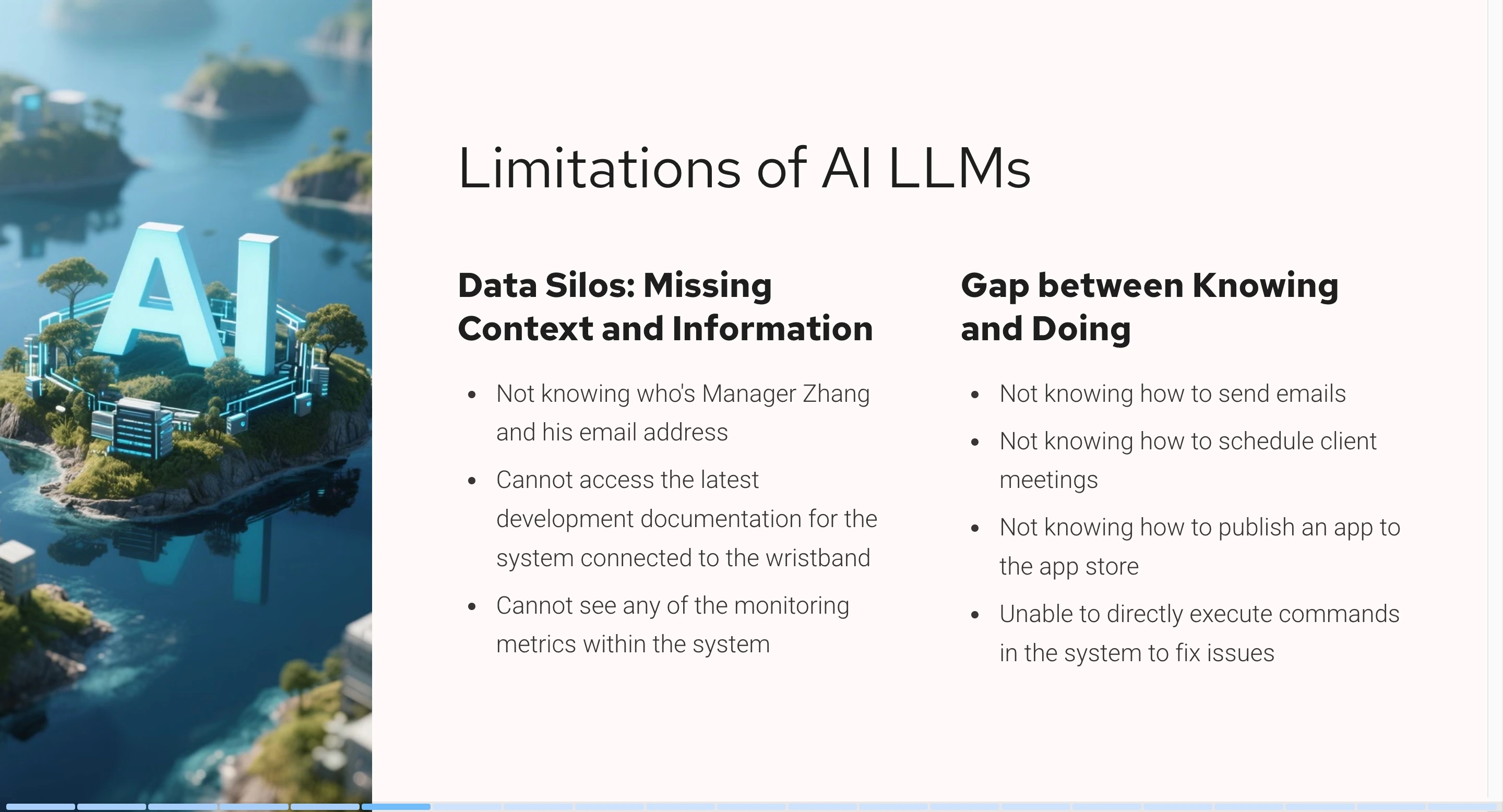
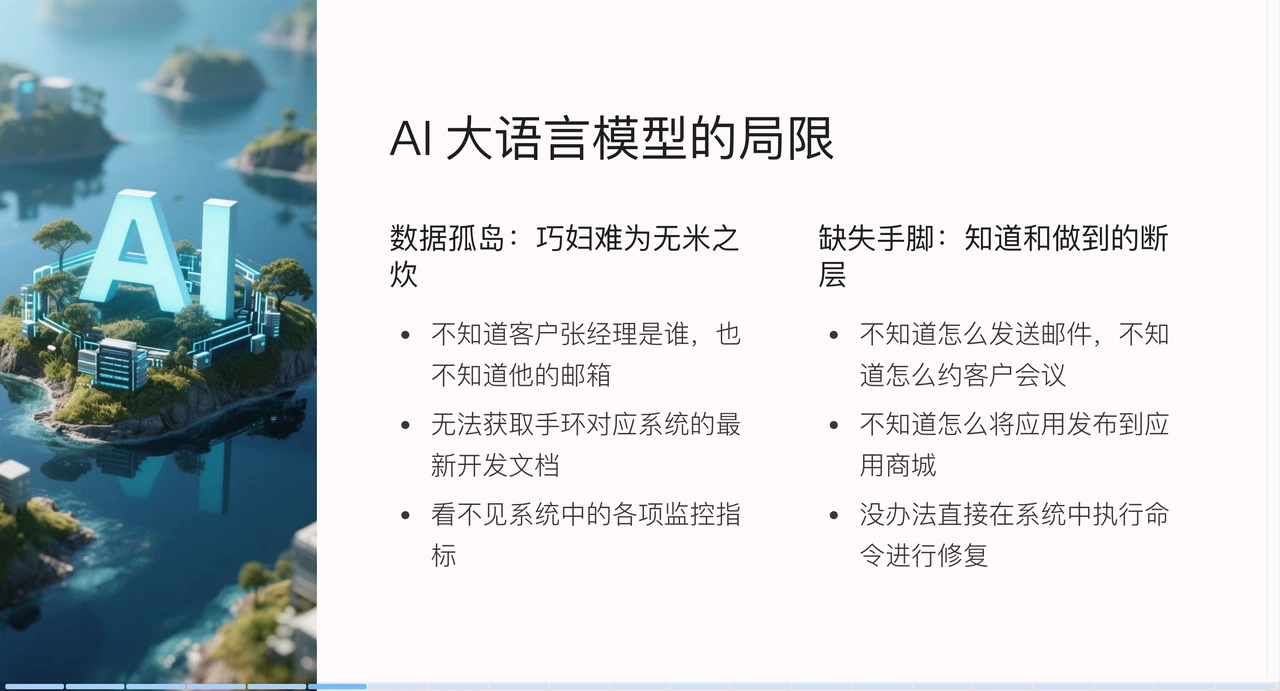
+Current model limitations are mainly in two aspects: data silos and the
"missing hands and feet" problem.
+
+The data silo problem is like "a clever housewife cannot cook without rice."
The knowledge of large AI language models is based on a knowledge snapshot from
a past point in time. For example, if you ask it to send an email to Manager
Zhang, it might not know who Manager Zhang is or what his email address is.
Similarly, for wristband app development or CPU load troubleshooting, without
the latest documentation or system context information, AI has no way to start.
+
+
+
+The second limitation is the lack of "hands and feet." Models are good at
generating content but lack execution capabilities.
+
+Want AI to actually send emails? We might need to provide it with
email-related APIs. Expecting automatic app publication to a store? It requires
integration with the app store's publishing interface. Handling server
failures? Ultimately, operations personnel still need to manually execute
troubleshooting commands.
+
+The AI content consumption process includes four stages:
+
+1. **User Query (Provide more detailed information)**: The user provides basic
background information (text, images, etc.) and asks a question.
+2. **Content Generation (Model fine-tuning)**: The large AI model generates
content such as text, images, audio, or video.
+3. **Content Consumption (Provide tools for corresponding actions)**: Requires
manual execution by the user or automated execution of tasks through tools.
+4. **Task Completion (Provide tools to check execution results)**: Finally,
the user or system obtains the execution results.
+
+To optimize this process, we can:
+
+1. First, in the user query stage, we need to provide as much detailed context
information as possible. For example, in the email scenario, if we need to send
an email to a specific user, we directly provide the email address to the large
AI language model or provide system metrics to help the AI model generate more
accurate content.
+2. In the content generation stage, through model fine-tuning, the large AI
model can specifically learn special capabilities in a certain field to enhance
its knowledge base.
+3. In the content consumption and task confirmation stages, provide tools for
the large AI language model. For example, after an email is sent, provide an
API to read sent emails so that the large AI language model can determine if
the operation was successful by checking the send response.
+
+### Existing Solutions
+
+Although large AI language models have their limitations, some corresponding
solutions already exist.
+
+
+
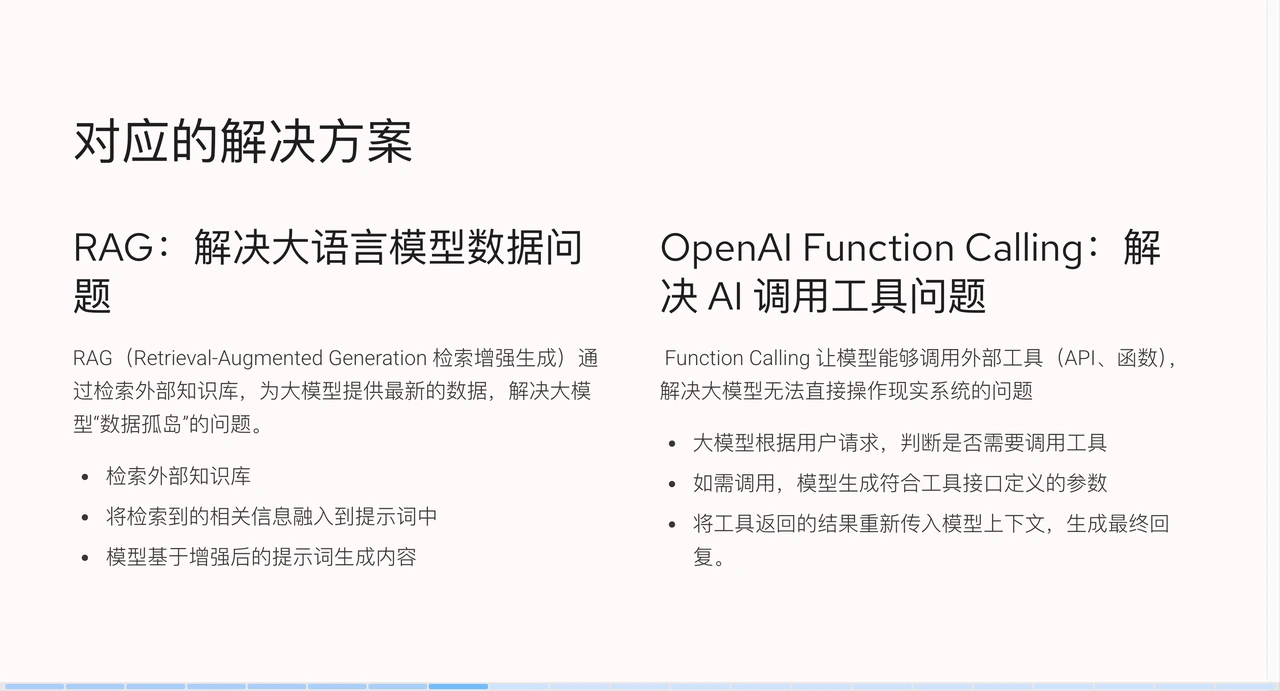
+#### RAG (Retrieval-Augmented Generation)
+
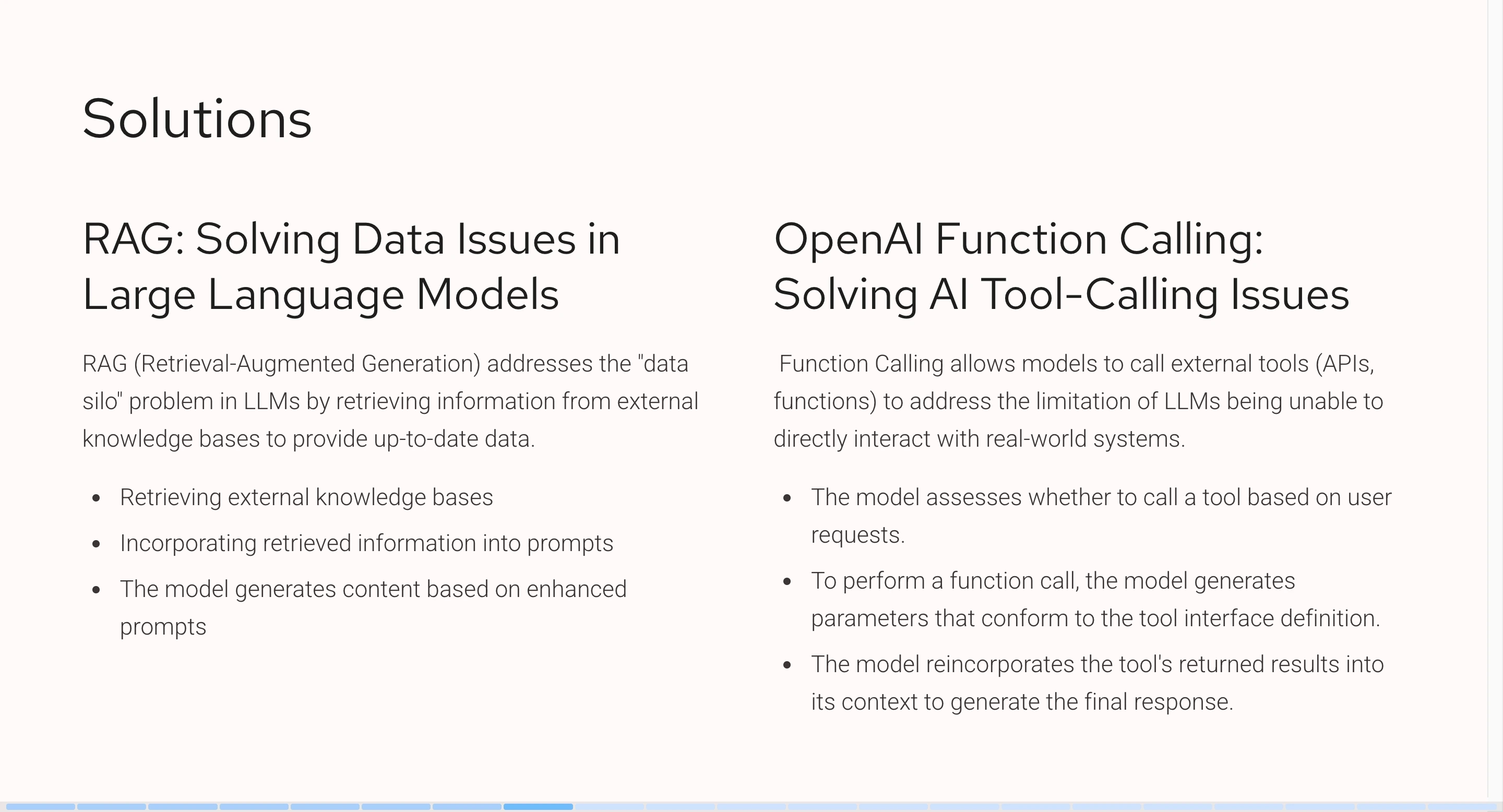
+First is RAG (Retrieval-Augmented Generation), which allows large AI language
models to access external knowledge bases and obtain the latest data. For
example, by integrating wristband development documentation, the AI can learn
specifically about it. When we ask a question, it first retrieves relevant
information from the knowledge base, then sends this information along with the
question to the AI, allowing the AI to generate more accurate content.
+
+#### Function Calling
+
+Next is OpenAI's Function Calling, which solves the problem of large AI
language models calling tools. With it, we can enable AI to call external
tools, such as APIs or functions, thereby addressing the issue of AI not being
able to directly operate real-world systems.
+
+When conversing with AI, we can specify some tools, such as providing an email
sending API and specifying the recipient when sending an email. The AI will
analyze the semantics, identify the need to send an email, call the
corresponding tool, generate parameters based on the context, and finally pass
the tool execution result back to the model to generate the final reply.
+
+### Limitations of Existing Tools
+
+
+
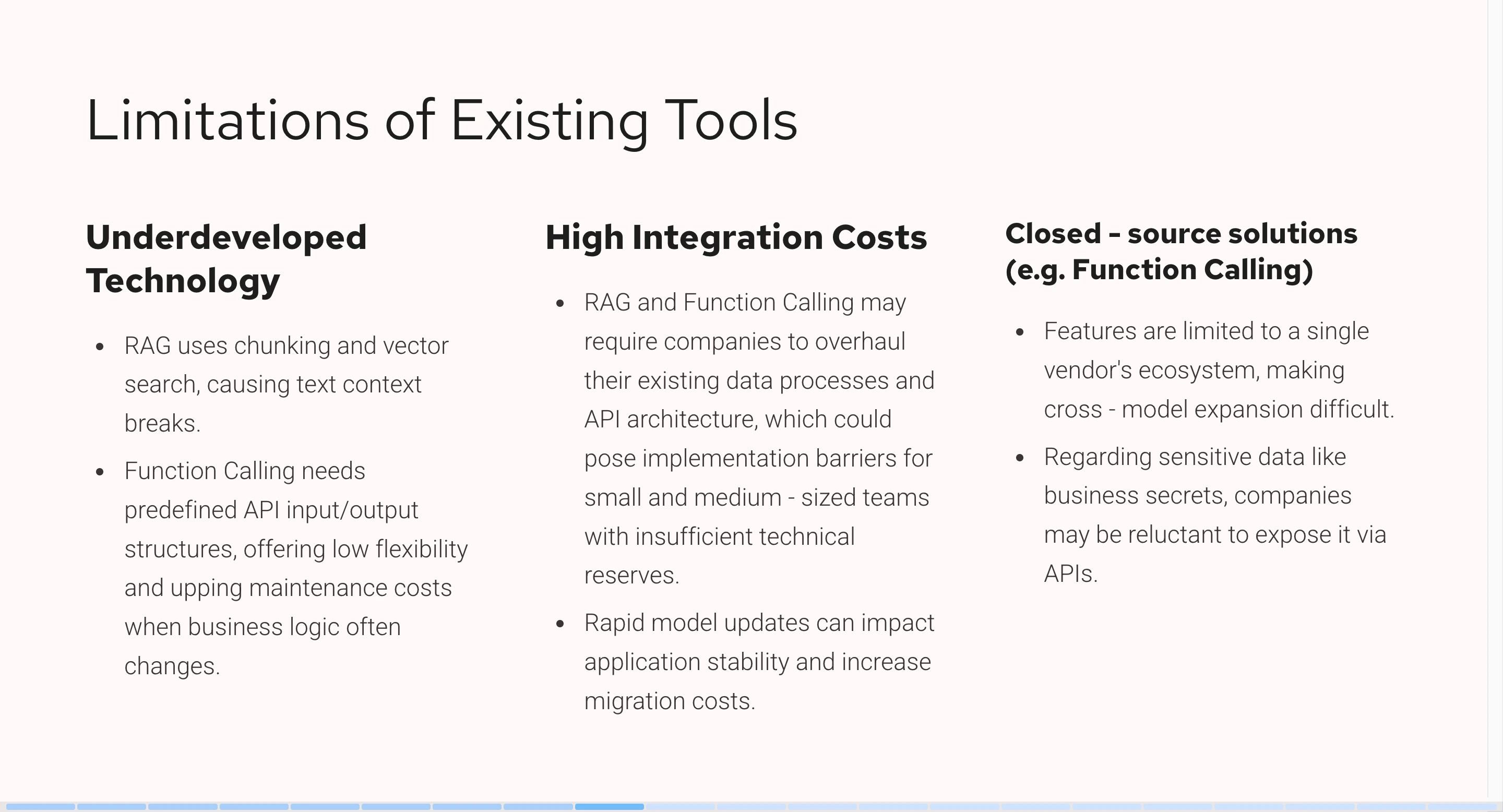
+Despite these solutions, the three scenarios mentioned earlier still cannot be
perfectly resolved because existing tools also have some limitations.
+
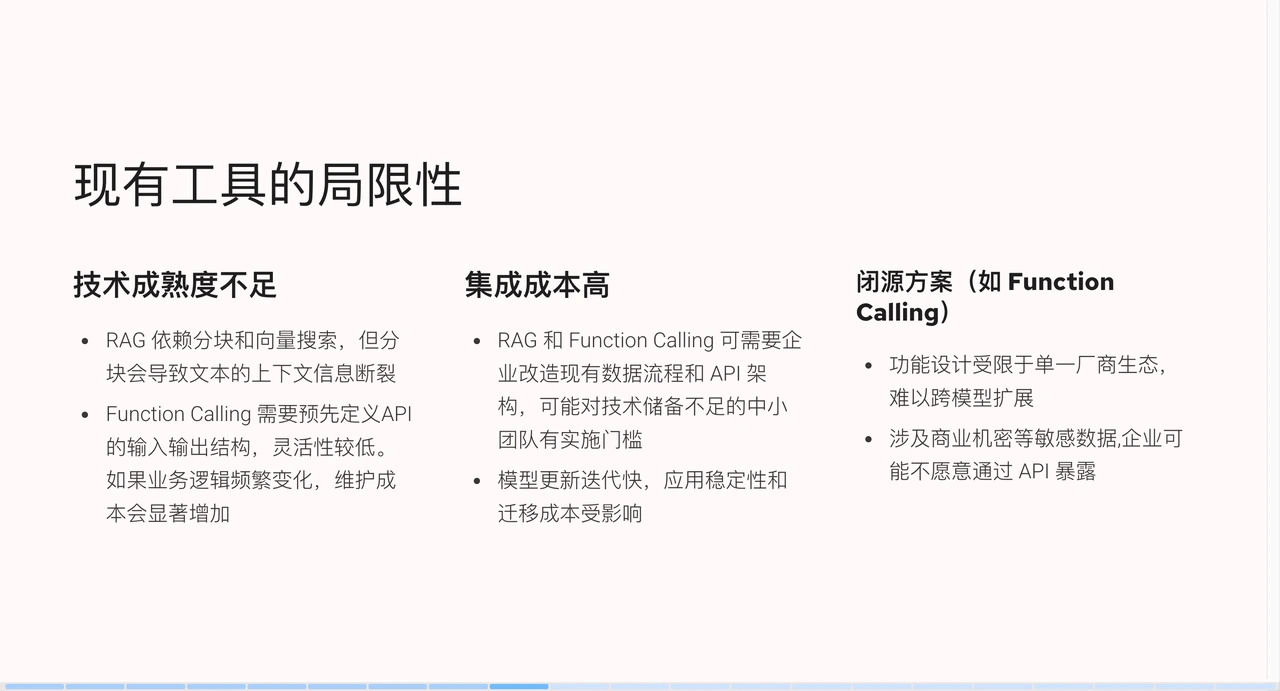
+First, the technical maturity is insufficient. RAG technology relies on
chunking and vector search, where chunking can lead to text context information
discontinuity. Although knowledge bases seemingly provide additional knowledge,
their actual performance is not as ideal. For example, a Markdown document,
originally with a complete introduction and summary, might only retrieve a part
of it after chunking. Meanwhile, Function Calling technology requires
pre-defining the input and output [...]
+
+Second, integration costs are high. Whether it's RAG or Function Calling,
enterprises need to modify existing data structures or API architectures, which
is high-cost and low-return for small teams with insufficient technical
reserves. Moreover, models iterate quickly; what works well today might perform
worse after a model update tomorrow. Additionally, Function Calling is a
closed-source solution, leading to vendor lock-in issues and making cross-model
expansion difficult. When enterpr [...]
+
+## Detailed Introduction to MCP
+
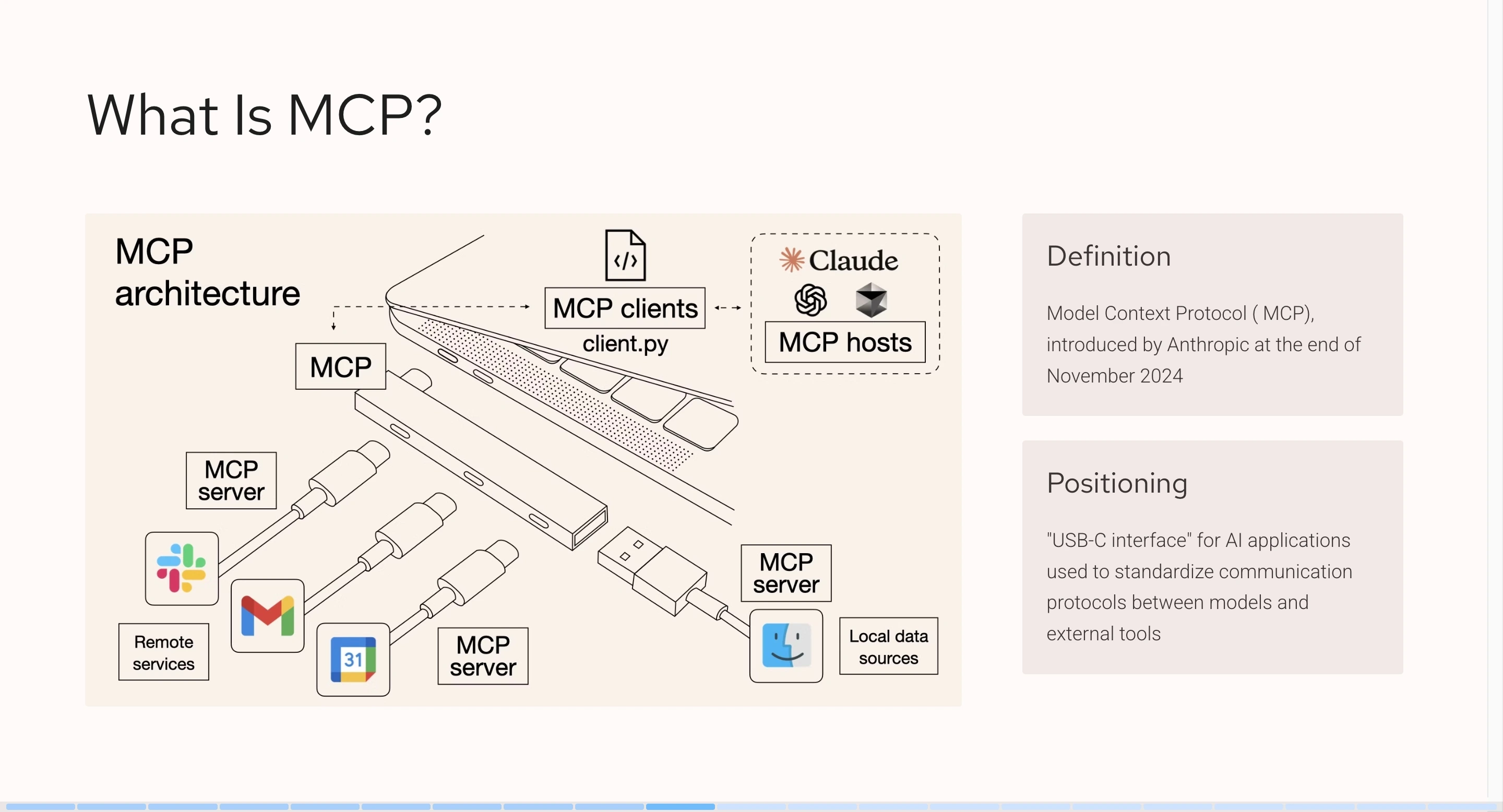
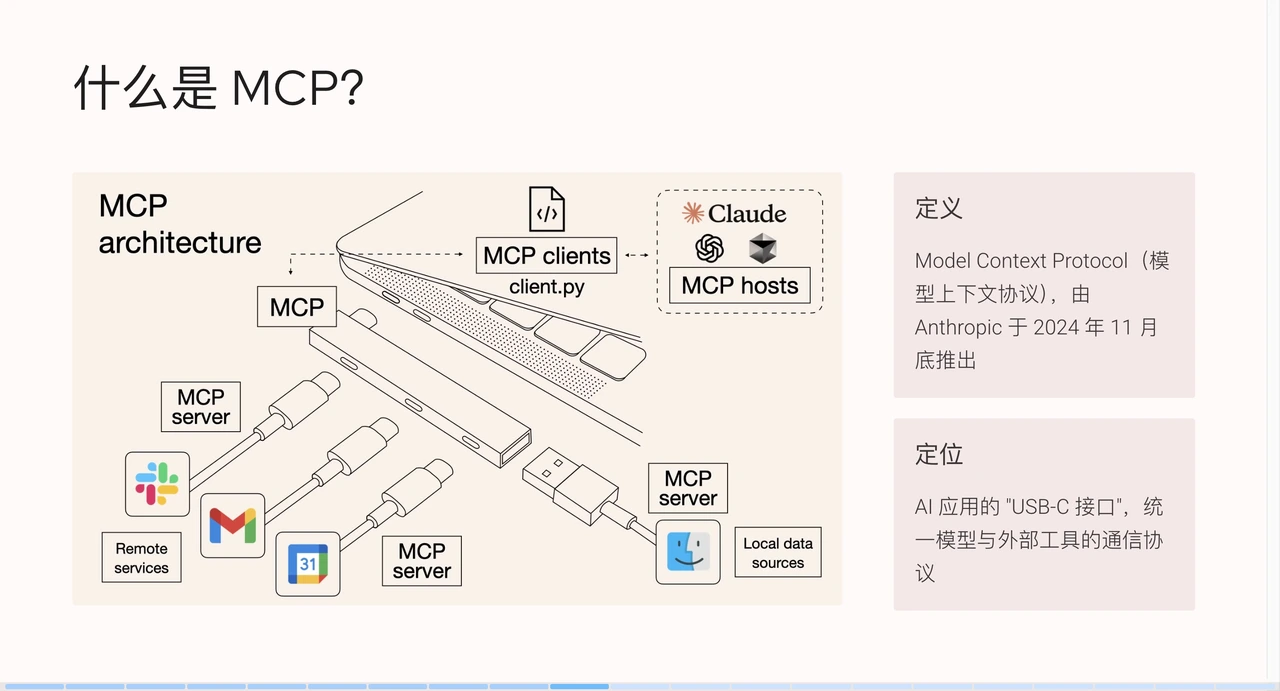
+The emergence of MCP (Model Context Protocol) addresses some of the
limitations of existing tools. MCP was introduced by Anthropic in late November
2024, aiming to become the USB-C interface for AI applications, unifying the
communication protocol between models and external tools.
+
+
+
+This image is widely circulated in the community and vividly illustrates the
role of MCP: comparing a computer to an MCP client, the MCP protocol to a
docking station, and different MCP services to data cables. Through the docking
station and data cables, the MCP client can quickly connect to various external
services, such as Slack, Gmail, Facebook, etc.
+
+### MCP Usage Scenarios
+
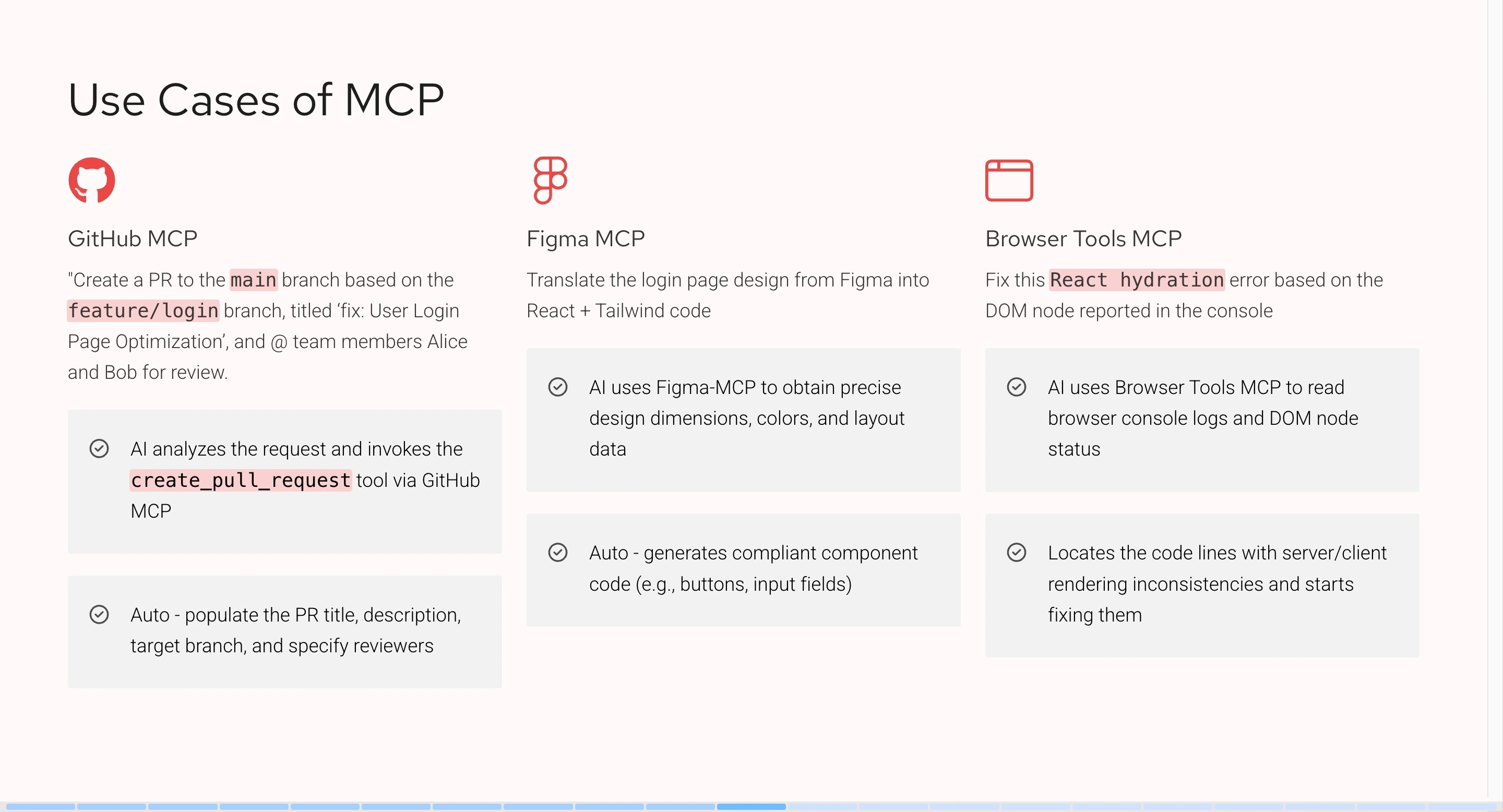
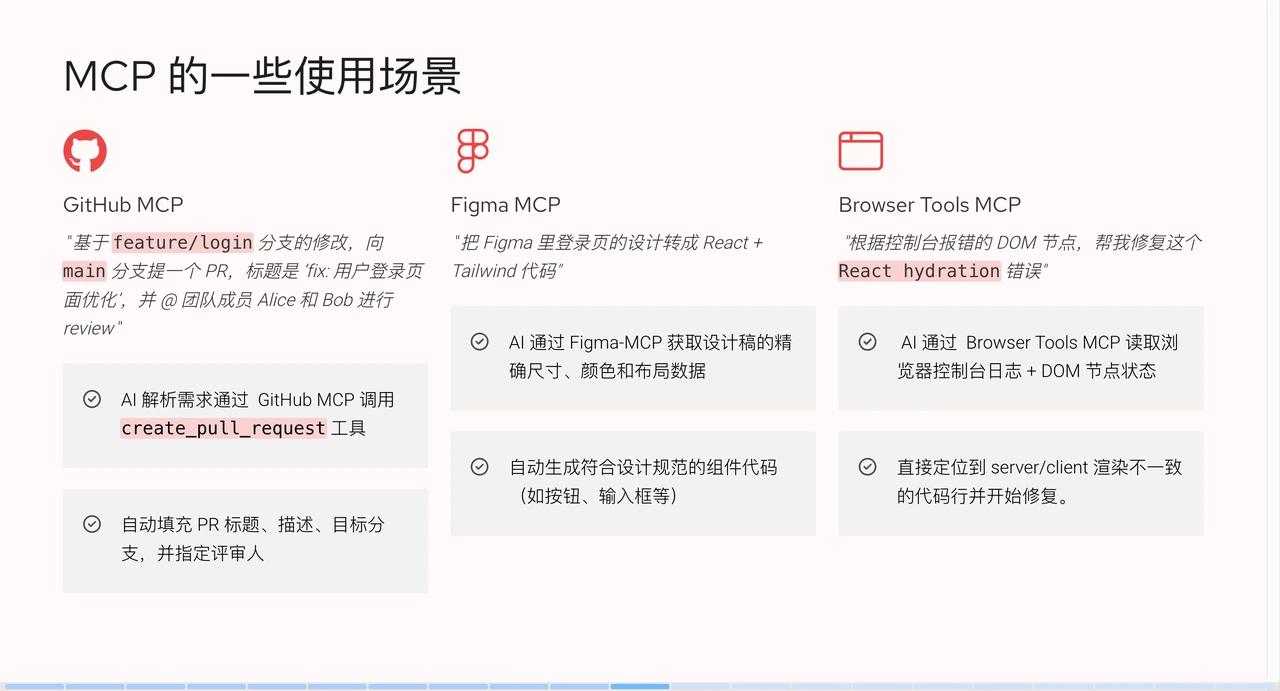
+Let's look at what MCP does in practical scenarios.
+
+
+
+- **GitHub MCP**: We can instruct the large AI language model to "create a PR
to the `main` branch based on modifications in the `feature/login` branch, with
the title 'fix: user login page optimization', and @ team members Alice and Bob
for review." After receiving the request, the large AI language model will
analyze the semantics, then call the `create_pull_request` tool, generate and
populate parameters based on the context information.
+
+- **Figma MCP**: We can tell AI: "Convert the login page design in Figma into
React + Tailwind code." After analyzing the semantics, AI uses Figma MCP to
obtain precise dimensions, colors, and layout data from the design draft. By
integrating Figma's open API, we obtain specific layer data and convert it into
corresponding code as required.
+
+- **Browser Tools MCP**: We can tell AI: "Help me fix this `React hydration`
error based on the DOM node reported in the console." The MCP tool will help AI
obtain browser console logs or DOM node data. After AI reads and analyzes them,
it can locate and fix the code issue.
+
+### MCP Ecosystem
+
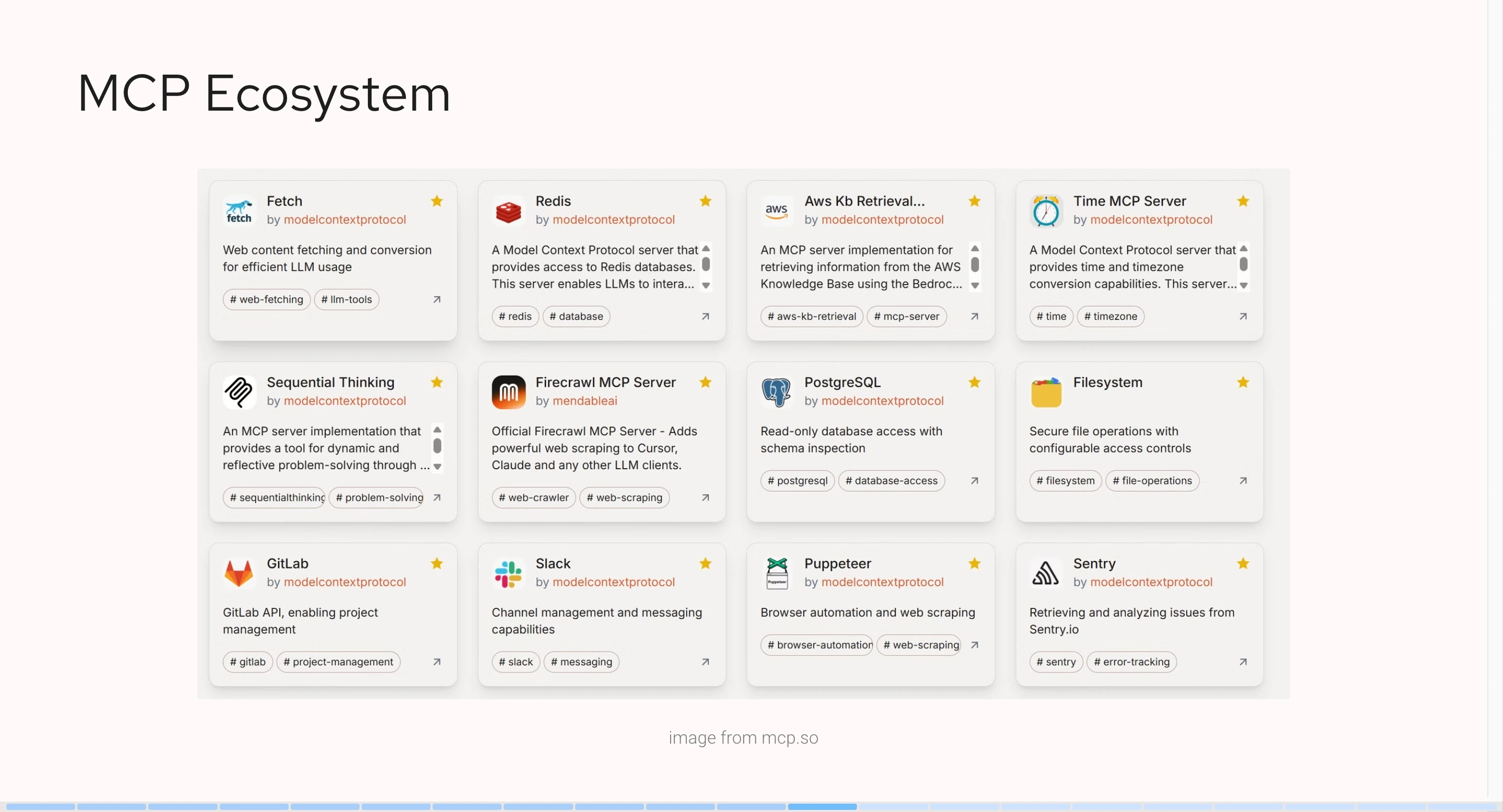
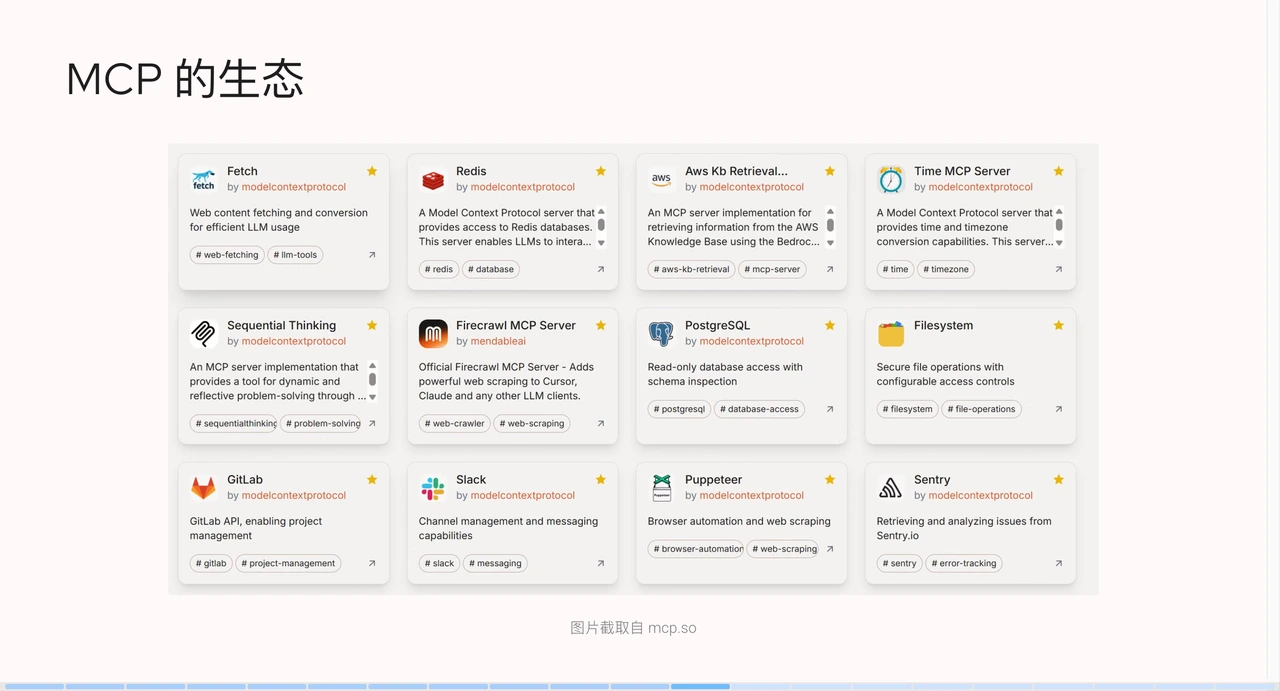
+The MCP service ecosystem is thriving. The following screenshot is from an MCP
resource hub (mcp.so). It lists existing MCP services, including file systems,
alert systems, automation testing databases, or sending requests. Many brands
and vendors have launched their own MCP services.
+
+
+
+### Reasons for MCP's Rapid Growth
+
+MCP has gained rapid popularity for the following reasons:
+
+**1. The "Last Mile" for AI Agent Implementation**
+
+MCP solves practical problems by allowing AI to easily connect to various
tools, such as database APIs and enterprise software. By the end of 2024,
enterprises are pursuing AI implementation, and MCP fills the most critical gap.
+
+**2. Explosive Growth of Community and Ecosystem**
+
+- Initially, MCP was not very popular. However, large enterprises like Block,
Replit, and Codeium were the first to adopt MCP for functional implementation,
setting an example and building confidence for other developers and enterprises.
+
+- Developer-friendly: The MCP protocol provides SDKs, sample code, and
documentation, significantly lowering development barriers. Although the early
MCP service ecosystem was not perfect, mainstream MCP services like Figma and
GitHub were widely used by developers due to their convenience and ease of use.
As demand increased, the number of developers grew, and the MCP ecosystem
gradually formed.
+
+**3. The "Lingua Franca" of the AI World**
+
+- MCP is compatible with various models such as Claude, ChatGPT-4, and
DeepSeek, without vendor lock-in, and is led by Anthropic, providing industry
endorsement.
+
+- It is based on the LSP (Language Server Protocol) architecture, which is
similar to how editors like VS Code and Cursor support multiple programming
languages. The LSP architecture helps editors quickly integrate various
language features, standardizing behaviors for developers to implement specific
logic.
+
+**4. Continuously Evolving Protocol Standards**
+
+The MCP protocol is constantly evolving. Anthropic continues to actively
promote its development after release, adding more features to enterprise
protocols and ecosystems, such as identity authentication, cloud-connected
central registries, and other enterprise-grade new features. At the same time,
Anthropic actively participates in AI conferences and seminars to promote this
technology.
+
+### MCP Architecture
+
+
+
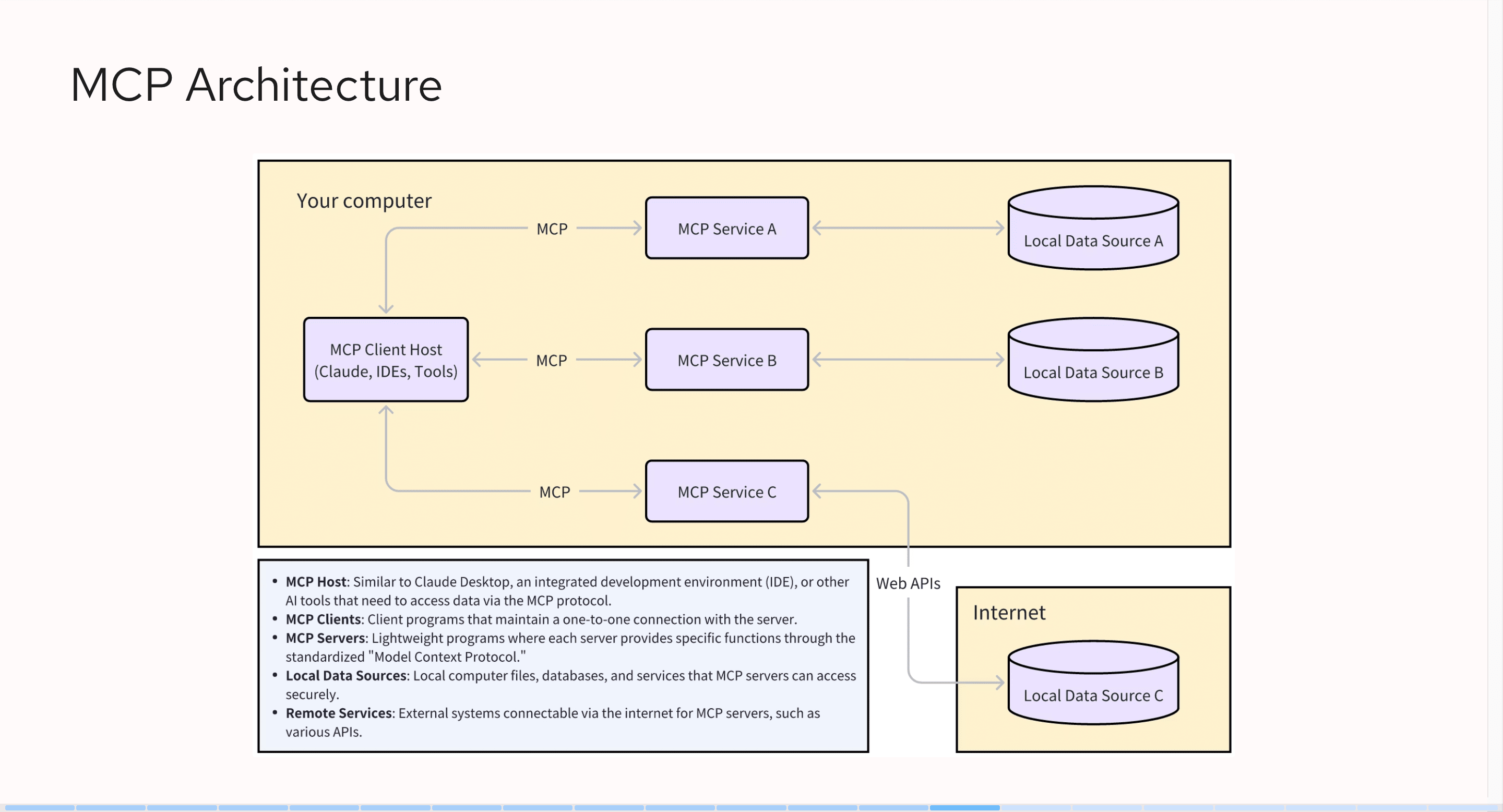
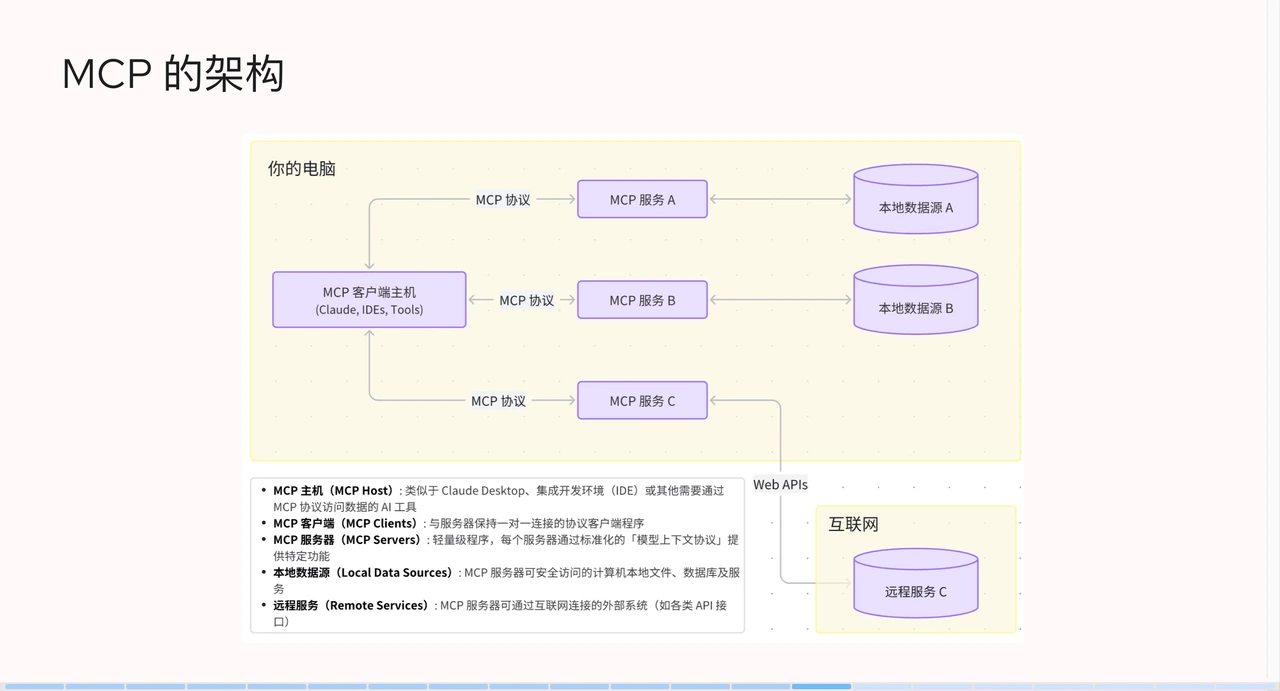
+On the far left is the MCP client host, which refers to the AI clients we
usually use, such as Claude, Cursor, or Windsurf. They interface with MCP
services via the MCP protocol. An MCP client host can connect to multiple MCP
services, such as GitHub MCP or Figma MCP. We can even combine these services,
for example, by pulling code from GitHub first and then generating Figma design
drafts.
+
+In addition to interacting with client hosts, MCP services also interact with
local data sources or internet data sources. For instance, through GitHub's
open API, when using an MCP service, we pass a token to access GitHub data. The
overall MCP architecture is relatively simple; it does not directly interact
with large AI language models but rather through client hosts.
+
+### Core Concepts in MCP
+
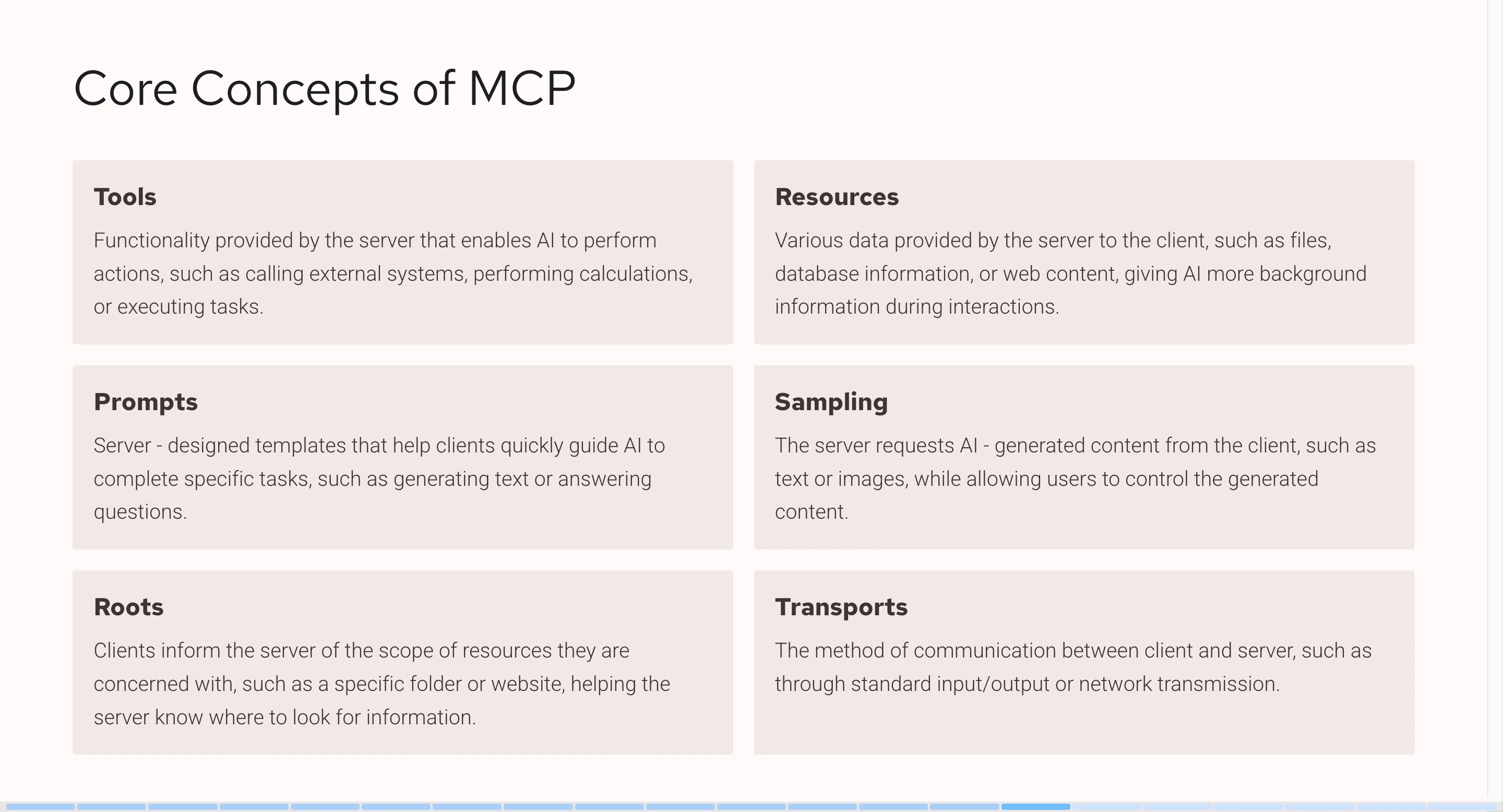
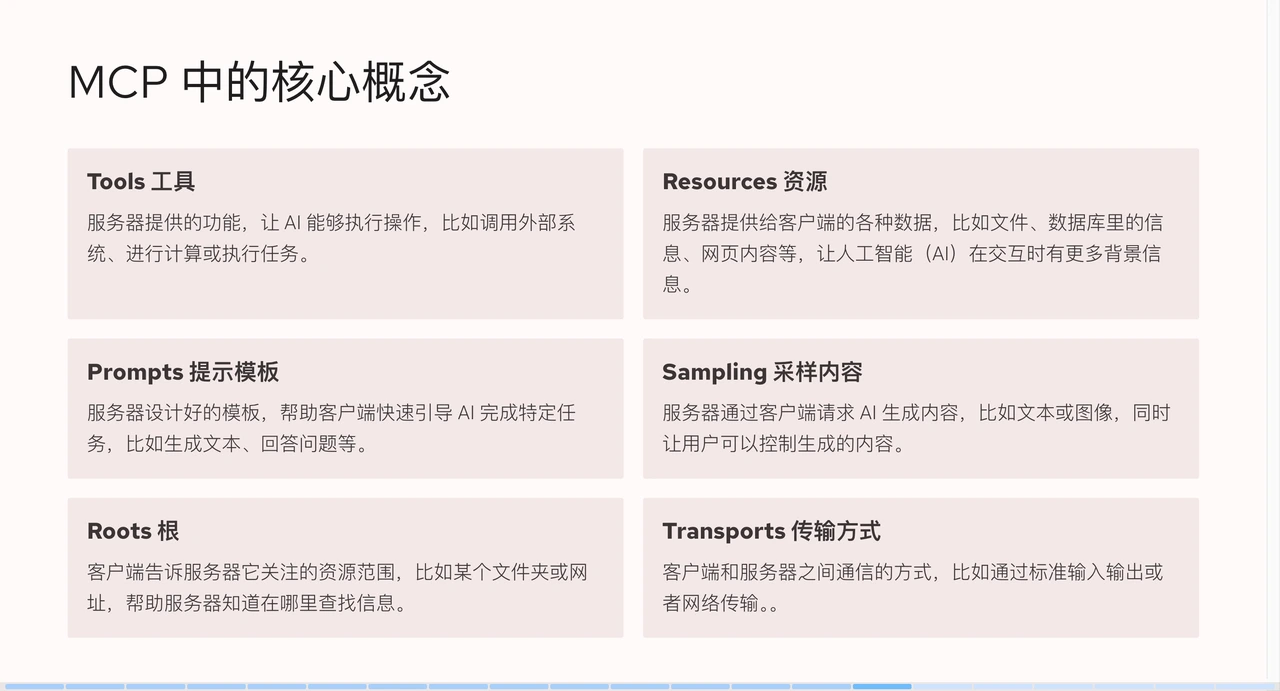
+There are 6 core concepts in MCP: Tools, Resources, Prompts, Sampling, Roots,
and Transports. Among these concepts, Tools are the most commonly used, with
95% of MCP services utilizing them.
+
+
+
+#### Tools
+
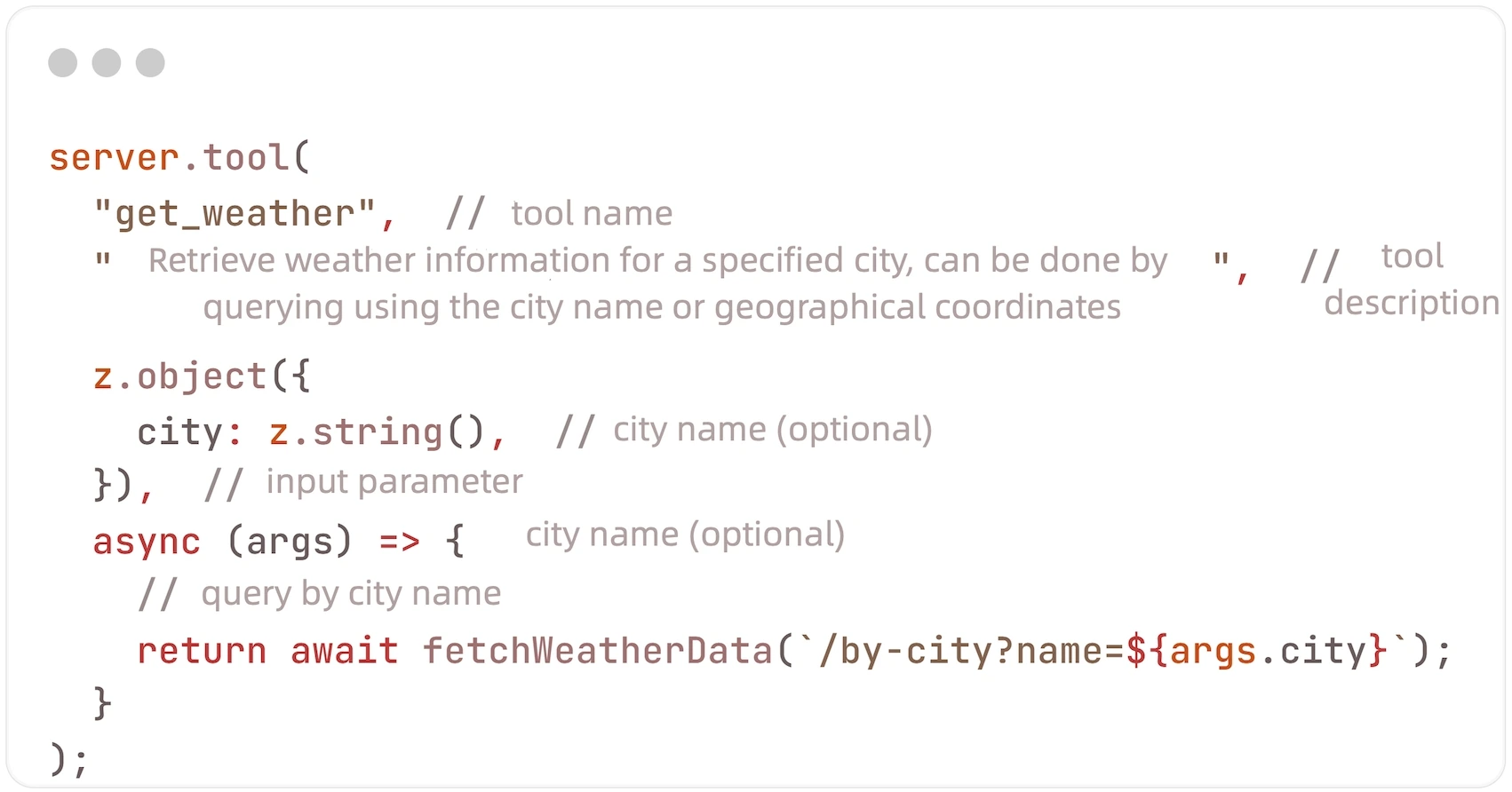
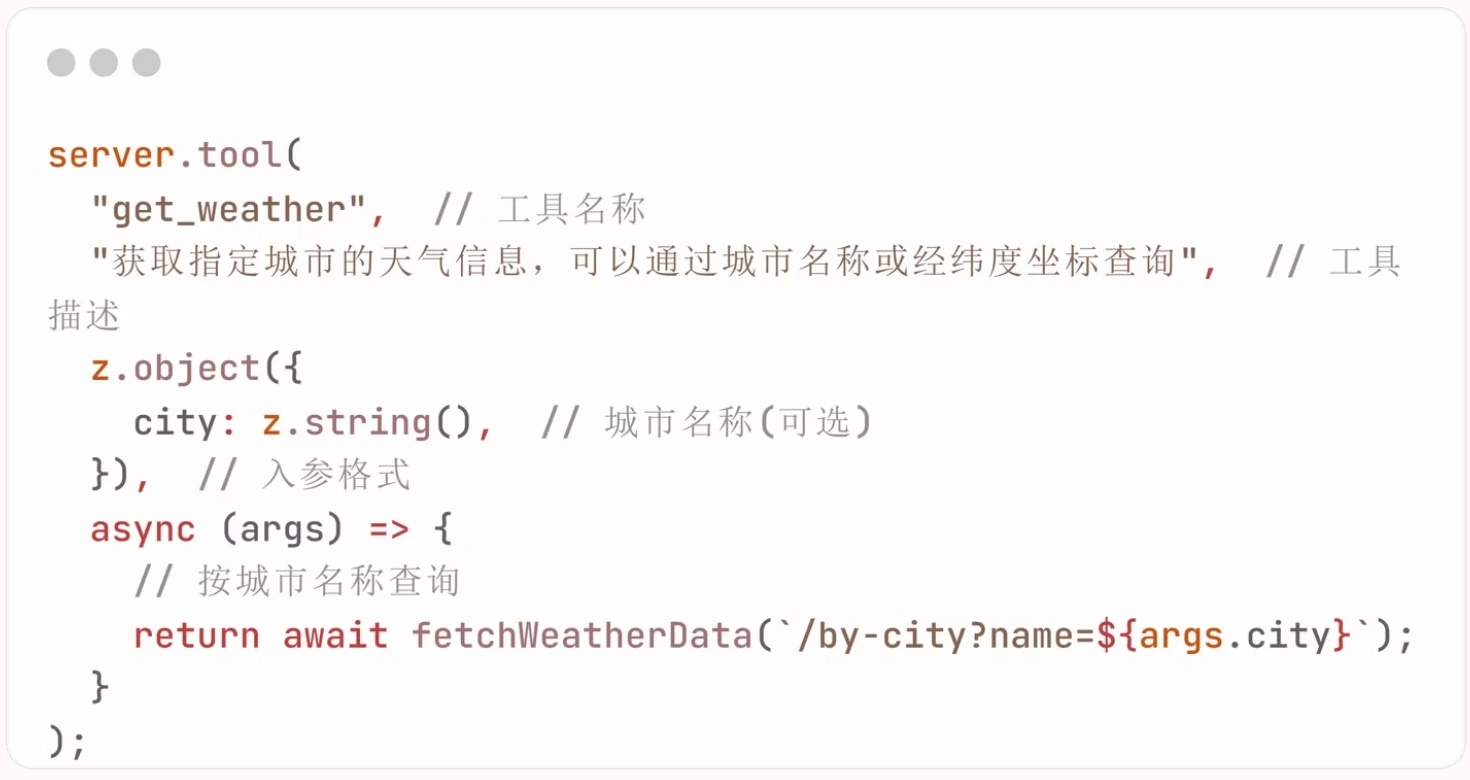
+Tools are the way MCP services expose functionalities to the client. Through
tools, AI can interact with external systems, perform computations, and take
actions in the real world. Its implementation structure is: `tool(tool name,
tool description, input parameter format, callback function)`.
+
+
+
+Tools can be used by MCP services to expose executable content to clients.
Through tools, large AI language models can interact with external systems to
perform computations. A tool is a function on the MCP instance that can accept
up to four parameters.
+
+For example, suppose we want to implement a tool to obtain weather data. We
can name the tool `get_weather`, and the tool description would be "Retrieve
weather information for a specified city, which can be queried by city name or
longitude and latitude coordinates." The large AI language model will refer to
the tool name and description for semantic analysis when deciding whether to
call an MCP tool. The third parameter is the input parameter format, which
describes how the AI needs to [...]
+
+The fourth parameter is the callback function, which determines what operation
we need to perform after the large AI model calls our tool. For instance, we
can write an operation that simulates sending a request. When the large AI
language model calls our tool, we will send a request to an external weather
service, retrieve the data, and then return it to the large AI language model.
+
+
+
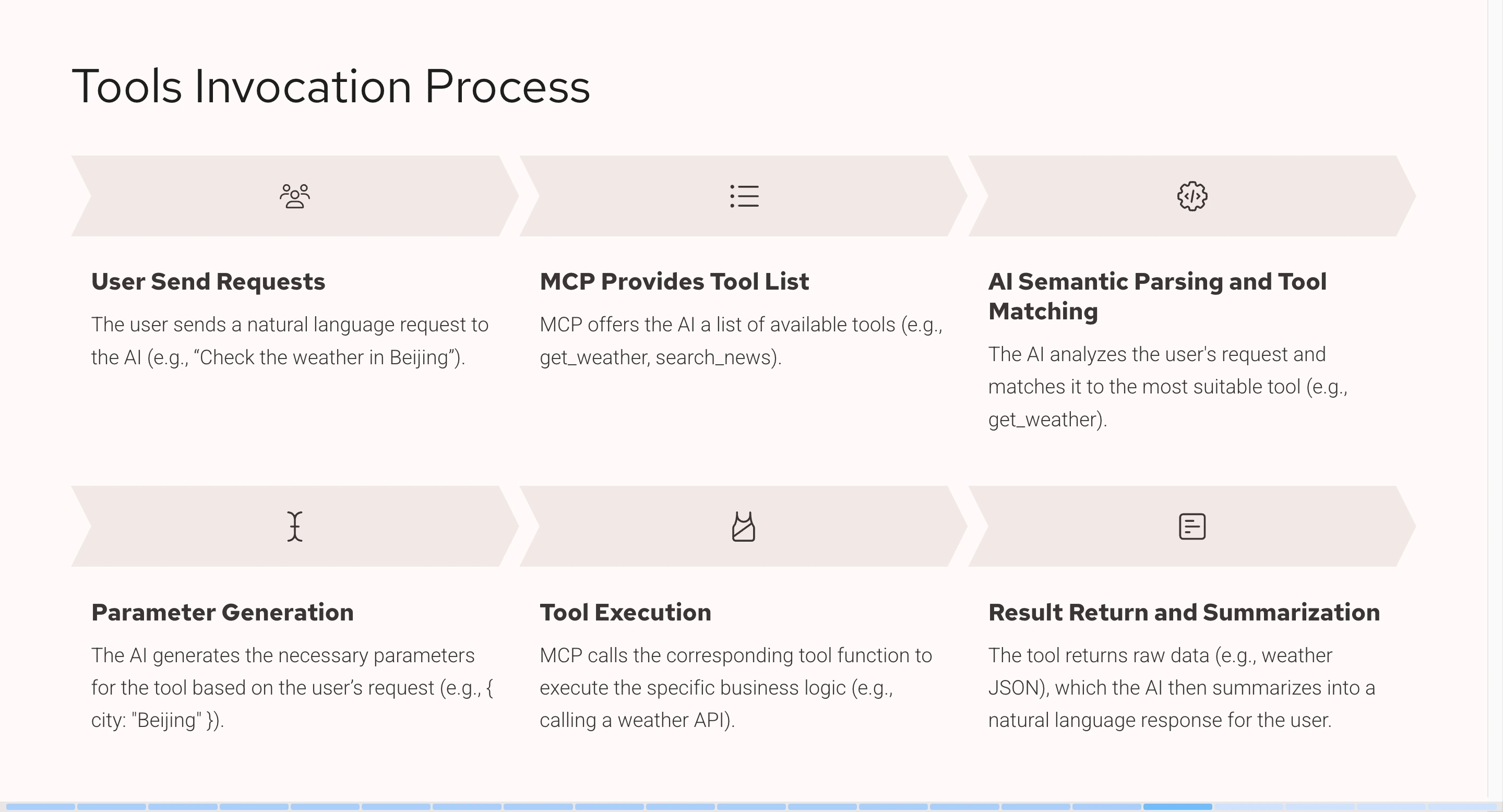
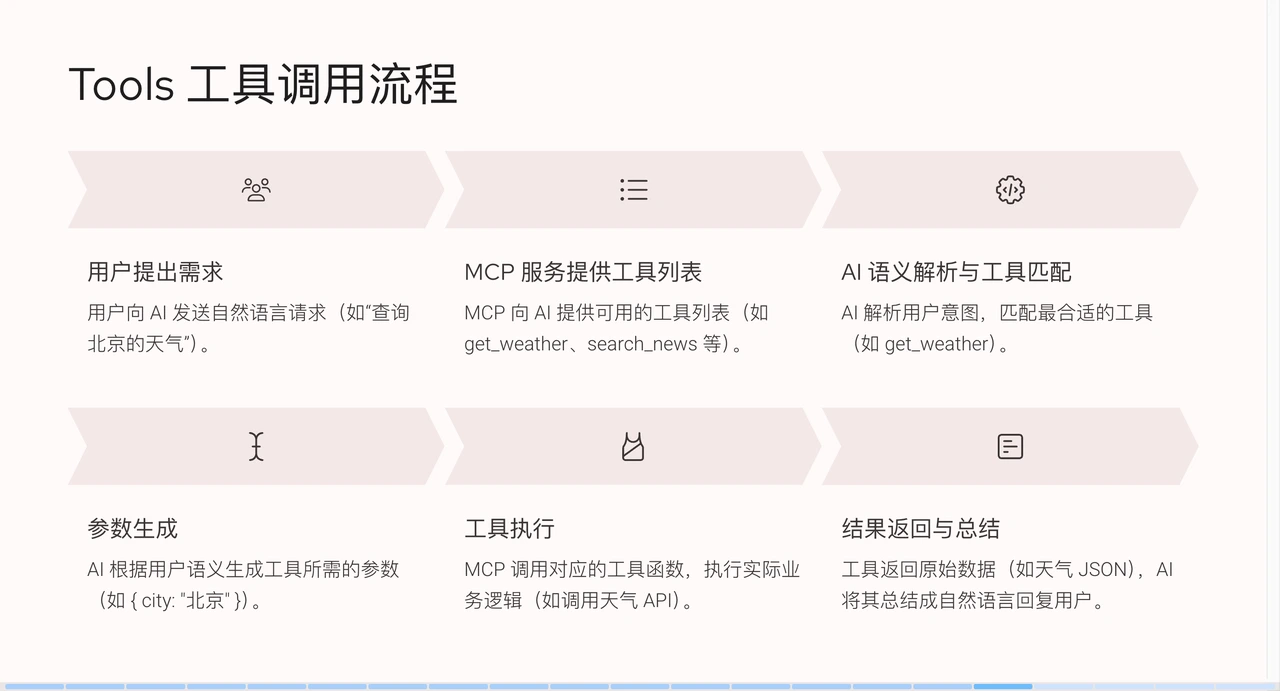
+From the above flowchart, it can be seen that when a user makes a request
(e.g., querying Beijing weather), the system has already integrated an MCP
service to obtain weather information. MCP will provide the AI with a list of
tools, such as `get_weather` or `search_news`, each with a corresponding name
and description. The large AI language model will parse the semantics, match
the most suitable tool (e.g., `get_weather` when querying Beijing weather), and
then generate corresponding pa [...]
+
+After parameters are generated, they are passed to the MCP service. The system
calls the tool and sends an API request, and the tool returns JSON data in
response. Some of this JSON data is simple and easy to read, while some is more
complex, but ultimately it is provided to the large AI language model, which
then summarizes it into a natural language result that humans can understand
and feeds it back to the user.
+
+## APISIX-MCP Practices
+
+APISIX is a high-performance API Gateway. Due to its extensive
functionalities, it contains many resource types, such as services, routes, and
upstreams, making the learning curve for beginners quite steep. To address
this, APISIX-MCP was developed with the goal of simplifying API management
processes and lowering technical barriers through natural language. The core
function of APISIX-MCP is to configure routes and manage upstream services and
various other APISIX resources using natura [...]
+
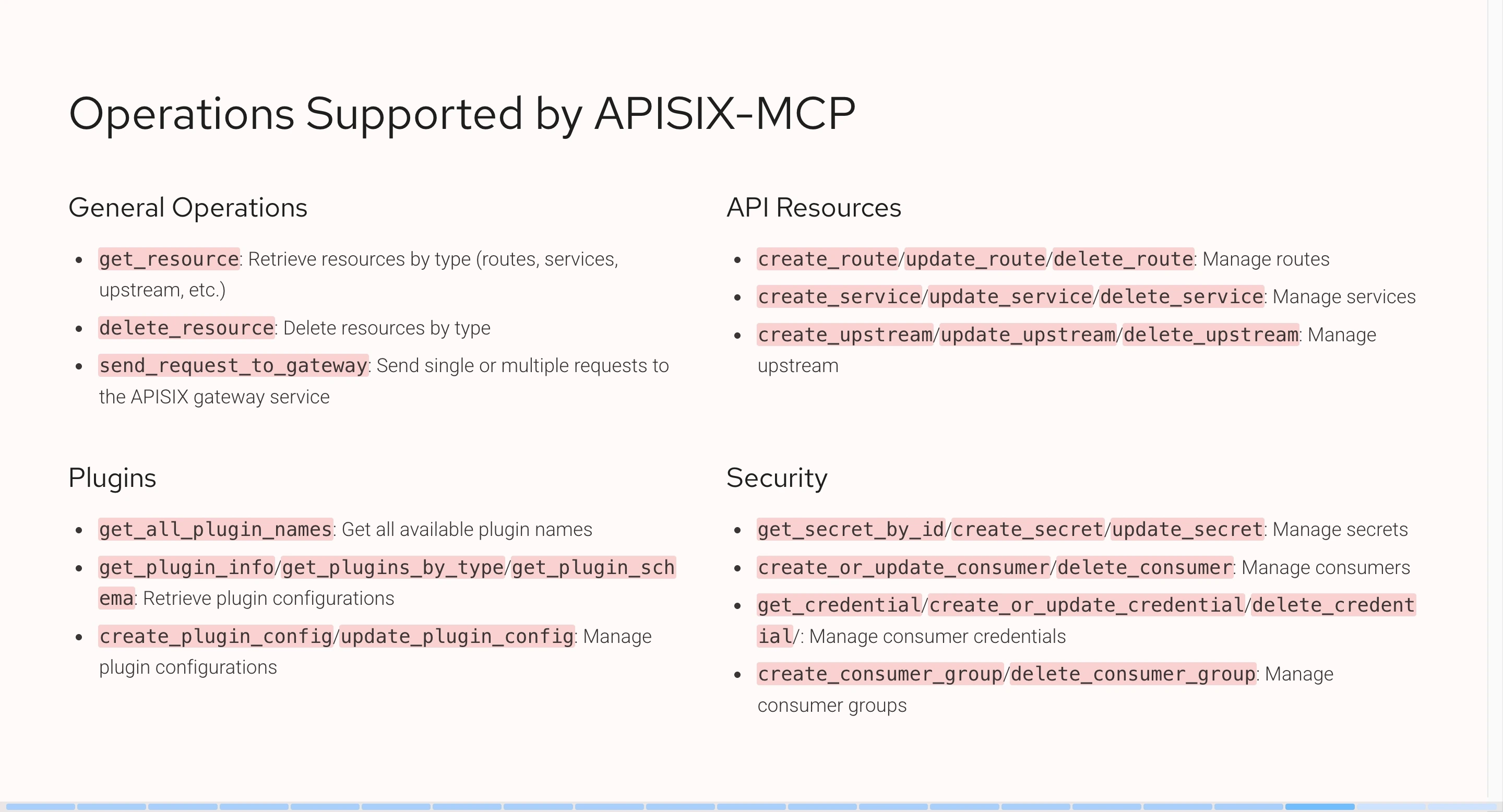
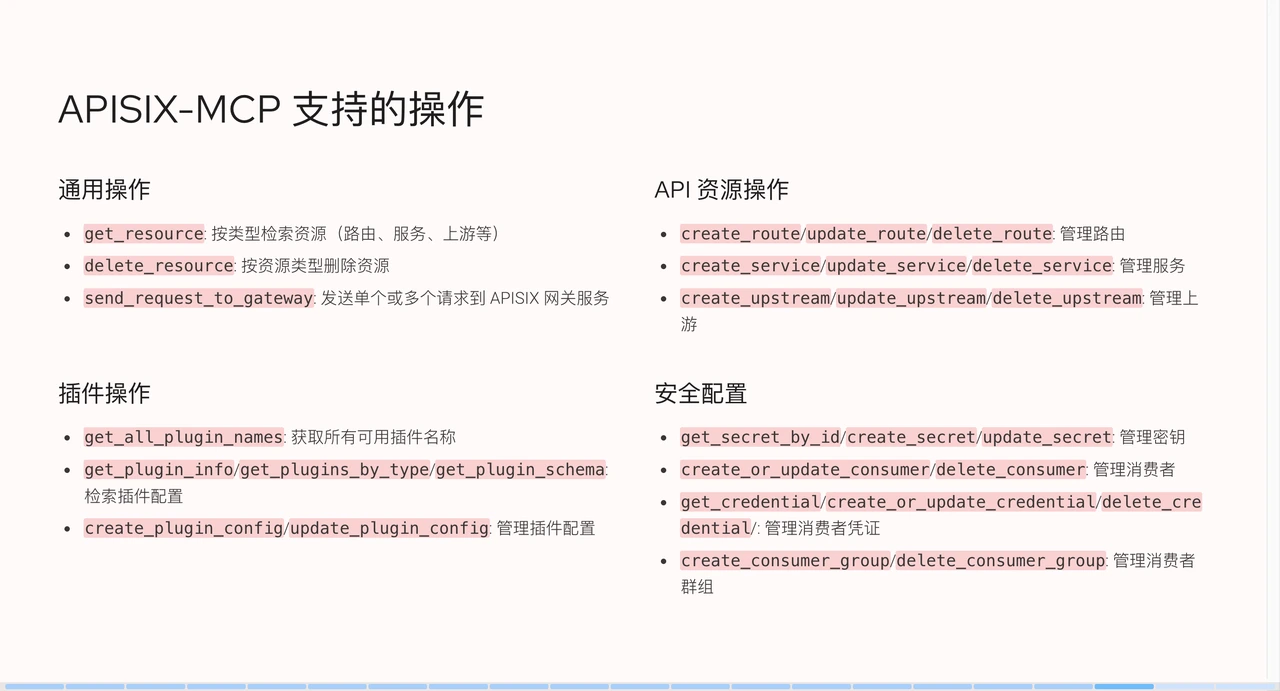
+Currently, APISIX-MCP supports operations on the following resource types:
+
+
+
+Overall, all resources within APISIX can be interacted with using natural
language. We also provide features to verify whether configurations are
effective, such as asking AI to send requests to the gateway to validate and
request results. As long as the APISIX service address is defined in the
environment variables, after performing an operation, AI can verify whether the
operation was successful.
+
+## Demo
+
+### APISIX-MCP Configuration
+
+In this demo, I use Cursor as the AI client. If you use MCP, the process is
similar.
+
+First, click on the settings in the top right corner. In the left sidebar,
there is an MCP section, which I have pre-configured. If it's empty, click "Add
new global MCP" to navigate to the configuration file.
+
+```json
+{
+ "mcpServers": {
+ "apisix-mcp": {
+ "command": "npx",
+ "args": ["-y", "apisix-mcp"],
+ "env": {
+ "APISIX_SERVER_HOST": "your-apisix-server-host",
+ "APISIX_ADMIN_API_PORT": "your-apisix-admin-api-port",
+ "APISIX_ADMIN_API_PREFIX": "your-apisix-admin-api-prefix",
+ "APISIX_ADMIN_KEY": "your-apisix-api-key"
+ }
+ }
+ }
+}
+```
+
+In the "mcpServers" field, I added a service named `apisix-mcp`; you can
customize the name. After configuration, you need to run a command to start the
MCP service. I'm using Node.js's command-line tool npx for this operation.
APISIX's MCP has already been published to the npm package manager and can be
obtained directly online. You can choose the corresponding tool based on your
development language.
+
+The `-y` parameter means to allow dependency installation by default.
`apisix-mcp` refers to the service name. In addition to the first two
parameters, you can also pass extra environment variables, but APISIX-MCP's
environment variables have default values. If your APISIX runs locally without
configuration changes, you can use the default environment variables without
specifying them.
+
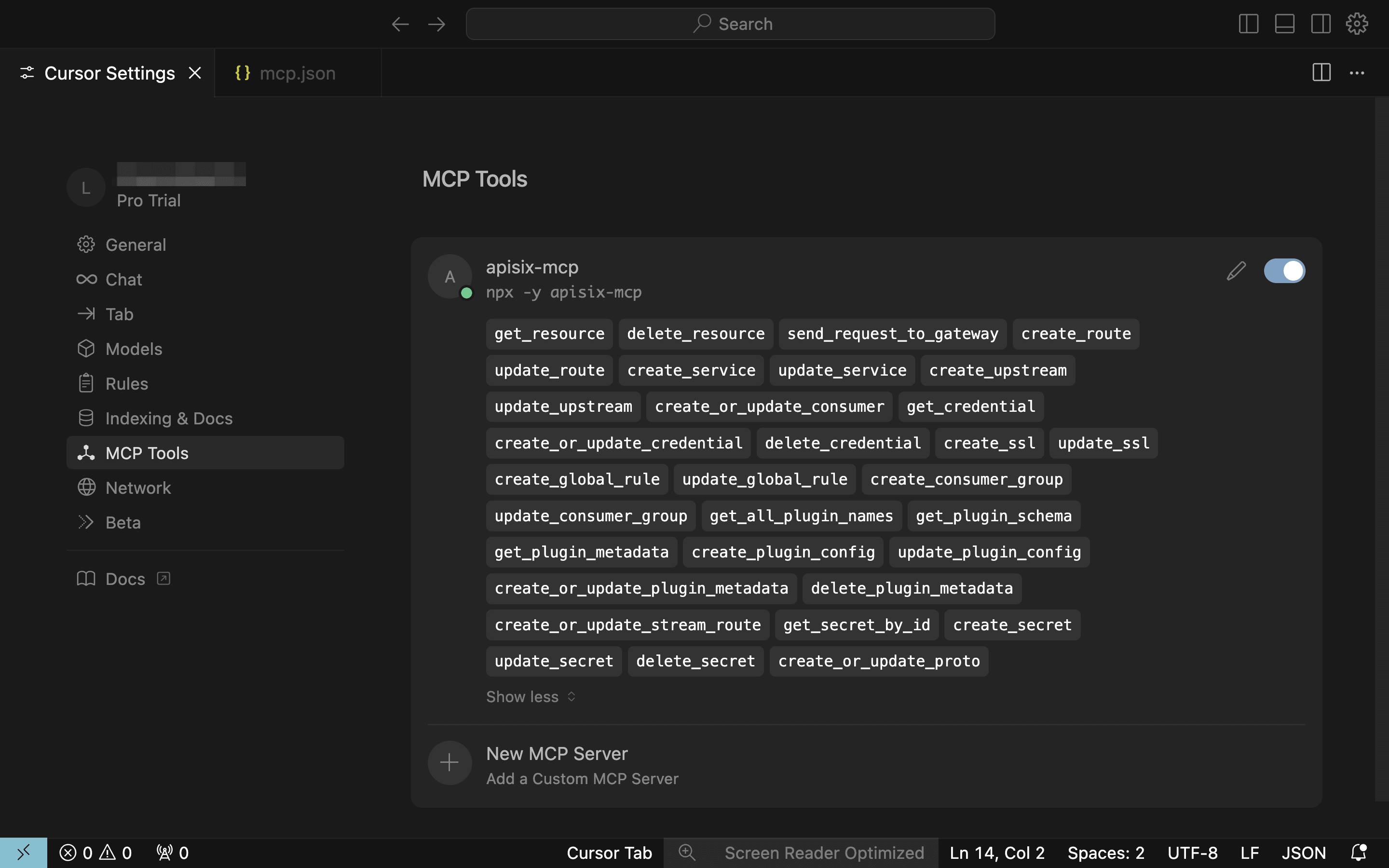
+After configuration, a new service named `apisix-mcp` will appear in the MCP
section. The green dot indicates a successful connection, and it will display
the tools it provides.
+
+
+
+### APISIX-MCP Scenario Demo
+
+Next, I will demonstrate practical examples.
+
+#### Create a Route
+
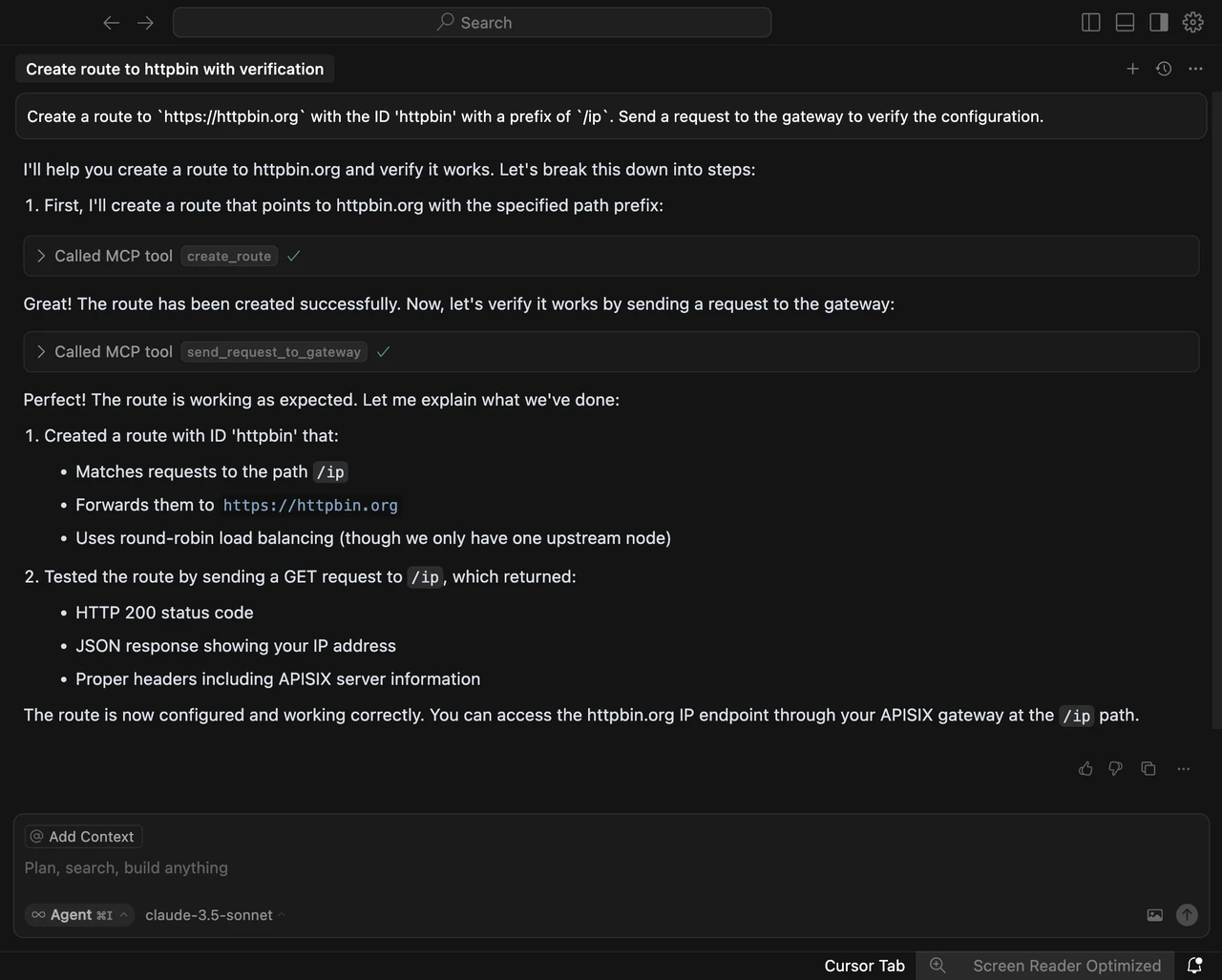
+I've set up some scenarios, for instance, asking APISIX-MCP to "help me create
a route pointing to `https://httpbin.org` with an ID of `httpbin`, proxying
`/ip` requests, and sending a request to the gateway to verify successful
configuration."
+
+After parsing our semantics, it finds that we need to call the MCP service to
implement the functionality. Here, it calls a tool, specifically the parameters
within `create_roots`. We have provided the context, so click "run tool" to
confirm. In a production environment, operations-level configurations are
crucial and cannot be changed arbitrarily, hence this confirmation step is
necessary.
+
+After clicking "run tool," we can see the response, understanding the specific
actions after calling the API, including what functions it will execute,
sending requests to the gateway, and verifying if the route was successfully
created. Click "run tool" again, and the creation is successful.
+
+
+
+We don't need to pay too much attention to these response contents; the system
will automatically create the route and send test requests for verification,
finally summarizing the execution results. If you manually configure these
operations, you'd need to set API keys in the command line and build complete
test commands. If you make a mistake during the operation and don't notice it
in time, you'd have to spend extra time troubleshooting.
+
+#### Configure Load Balancing
+
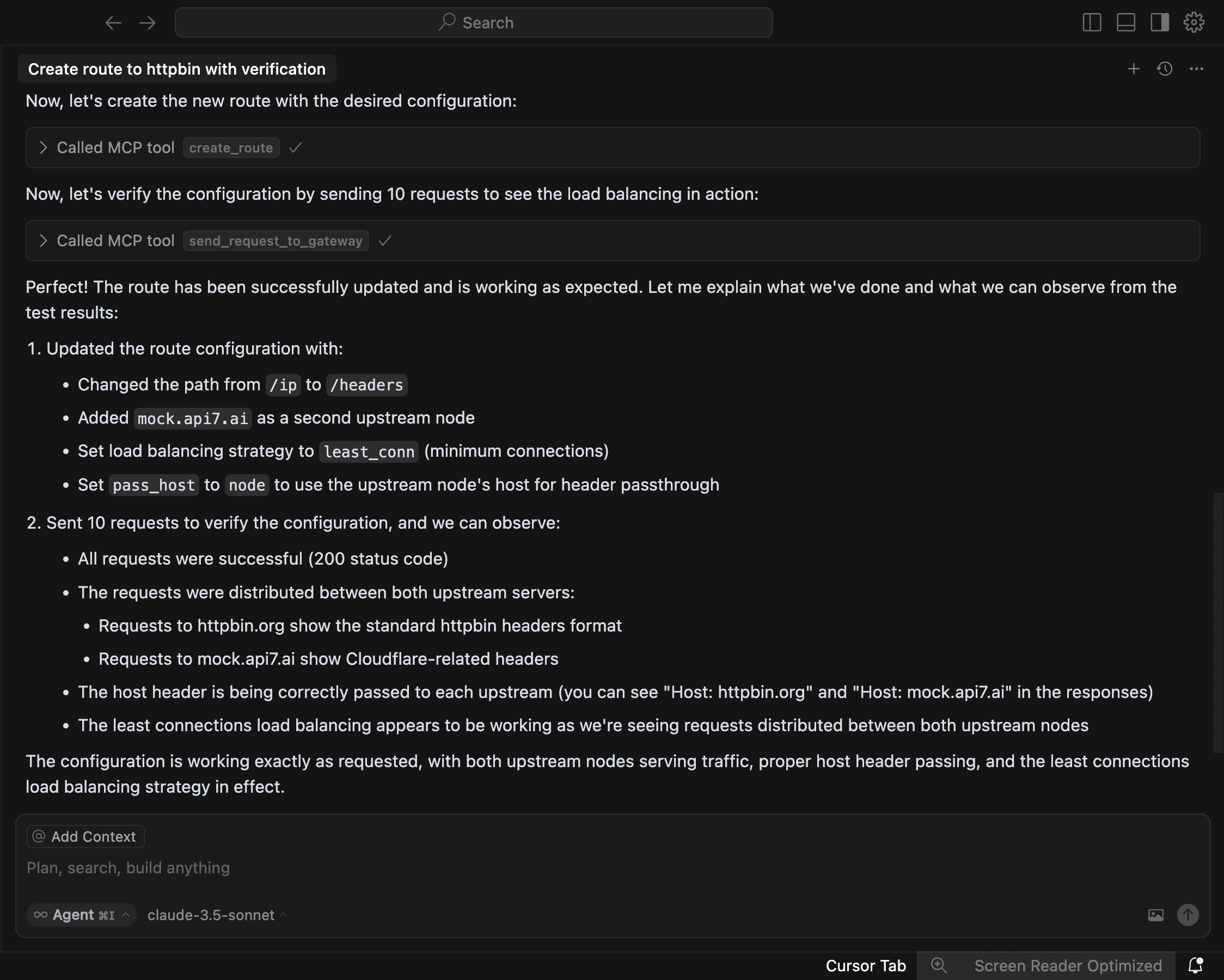
+We will adjust the existing route. We add an upstream node to the route we
just created, pointing to `mock.api7.ai` with the prefix changed to `/headers`,
using the upstream node's host for host pass-through, and applying a
least-connections load balancing strategy. Then, we send ten requests to the
gateway to verify successful configuration.
+
+
+
+#### Configure Authentication
+
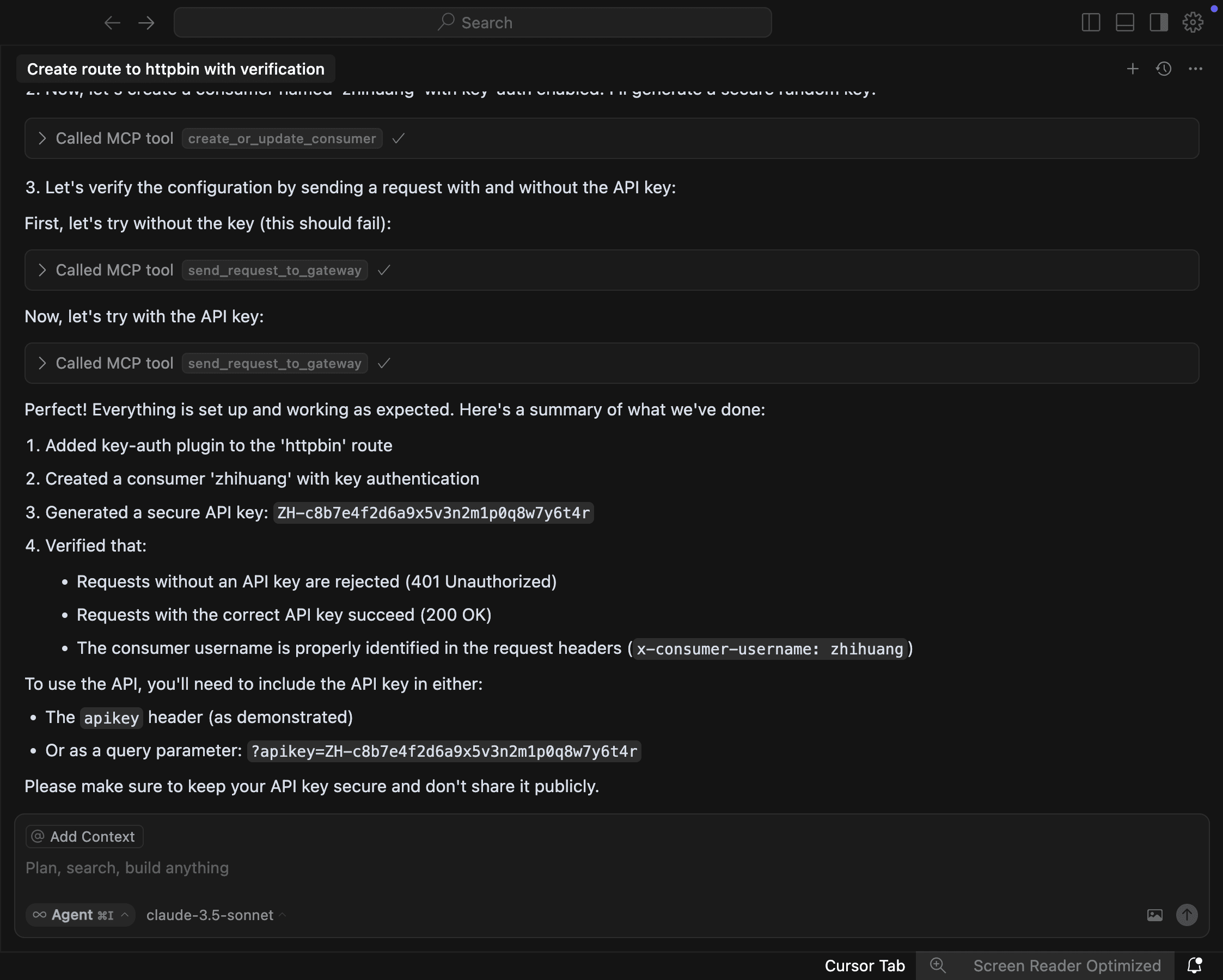
+In the third step, enable the `key-auth` plugin for the route with ID
`httpbin`, then create a consumer named `zhihuang` with `key-auth` enabled. Ask
AI to randomly generate a secure key and tell me, then send a request to the
gateway to verify successful configuration.
+
+
+
+MCP automatically enabled the `key-auth` authentication plugin, created a
consumer, and performed verification based on the randomly generated consumer
credentials. During the verification process, it first tests requests with
credentials, then tests requests without credentials, confirming that the
configuration is correctly completed.
+
+### Configure Plugins
+
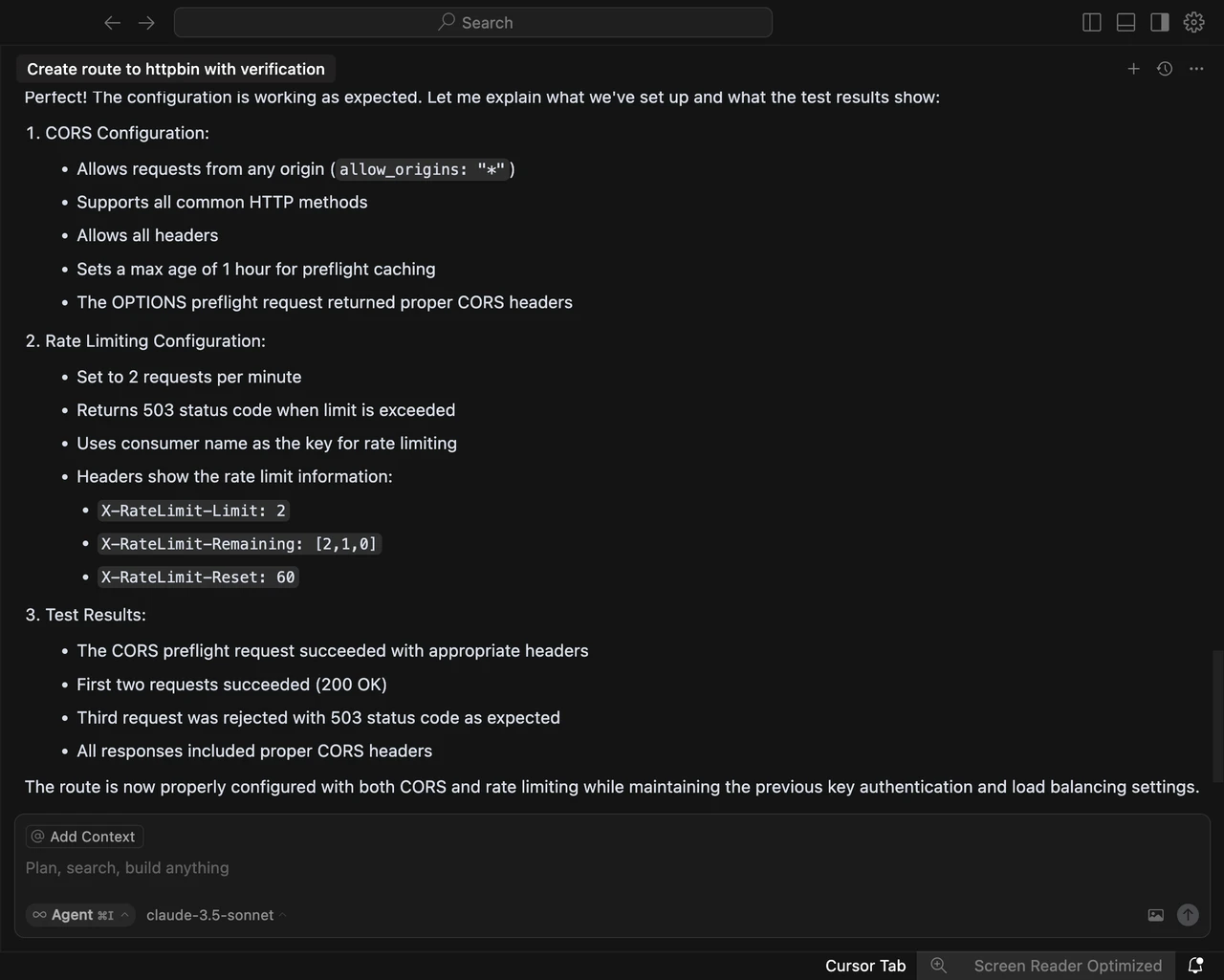
+Finally, configure plugins, asking AI to "enable cross-origin for my `httpbin`
route, then configure rate limiting to allow only two requests per minute,
responding with `503` for exceeding requests, and then send a request to the
gateway to verify successful configuration."
+
+
+
+## Summary
+
+MCP opens up many possibilities. While it might not be entirely stable yet,
its application scenarios will become increasingly rich as model capabilities
improve. We use generalized language to achieve goals, allowing large AI
language models to quickly generate solutions. Now, we only need to state our
requirements, and AI can complete the entire closed-loop demand, greatly
simplifying daily operations and development. This holds significant value at
all levels, and the barrier to entry [...]
+
+If you wish to develop similar MCP services, you only need to be familiar with
any programming language like Java, Go, or JS, and you can complete the
integration in a day, helping enterprises quickly connect their APIs to large
AI language models.
+
+The value of APISIX-MCP lies in helping new users quickly get started with
APISIX and providing an intelligent new solution for complex API management. It
transforms executing specific operations into describing generalized scenarios,
promoting the deep integration of AI and API management. In the future, we will
further explore the integration with AI management at the API management level
and continuously enhance APISIX's ability to handle AI traffic at the gateway
level.
diff --git
a/blog/zh/blog/2025/06/04/configure-apisix-in-a-single-command-with-apisix-mcp.md
b/blog/zh/blog/2025/06/04/configure-apisix-in-a-single-command-with-apisix-mcp.md
new file mode 100644
index 00000000000..62734e16c7a
--- /dev/null
+++
b/blog/zh/blog/2025/06/04/configure-apisix-in-a-single-command-with-apisix-mcp.md
@@ -0,0 +1,258 @@
+---
+title: "MCP 智能化管理实践:一句话搞定 APISIX 网关"
+authors:
+ - name: 林志煌
+ title: author
+ url: https://github.com/oil-oil
+ image_url: https://github.com/oil-oil.png
+ - name: Yilia Lin
+ title: Technical Writer
+ url: https://github.com/Yilialinn
+ image_url: https://github.com/Yilialinn.png
+keywords:
+ - APISIX
+ - API 网关
+ - APISIX AI 网关
+ - MCP
+ - APISIX-MCP
+description: 作者:林志煌,API7.ai 前端开发、产品经理。本文整理自 2025 年 4 月 12 日林志煌在 APISIX 深圳
Meetup 的演讲。
+tags: [Case Studies]
+image: https://static.apiseven.com/uploads/2024/12/25/dxrwyegf_api7-cover.png
+---
+
+> 作者:林志煌,API7.ai 前端开发、产品经理。本文整理自 2025 年 4 月 12 日林志煌在 APISIX 深圳 Meetup 的演讲。
+>
+<!--truncate-->
+
+今天的分享分为五个部分,AI 大语言模型的局限、MCP 是什么以及有什么用、MCP 的实现原理及其优势、APISIX 基于 MCP 的实践、以及
APISIX-MCP 演示。
+
+## 目前 AI 大语言模型的应用
+
+目前 AI 已经融入我们生活的各个方面,下面我列举了一些 AI 大语言模型的应用场景。
+
+- 交互类:面试模拟、语言陪练、智能客服
+- 内容生成:论文编辑、技术文档整理、视频文案创作
+- 编程辅助:代码提示(如 Cursor/Windsurf)和生成、Bug 排查
+- 多模态:图像、音视频生成
+
+随着 AI 能力不断增强而成本持续降低,我们对它的期待也在升高,不再满足于单点功能,而是希望形成完整的需求闭环。我们来看三个典型场景:
+
+- 场景一、日常办公:帮我给客户张经理发送一封跟进邮件,附上昨天会议纪要的 PDF,并且约他下周二下午 3 点进行电话沟通。
+- 场景二、开发:开发一个运动手环上记录每日喝水次数的应用,要有按钮技术功能和图表统计功能,然后发布到应用商城。
+- 场景三、运维:服务器 CPU 负载持续超过 90%,帮我查一下原因并尝试修复一下。
+
+然而即使最先进的 AI,目前也难以完美处理这些场景,根源在于大语言模型存在固有局限。
+
+## AI 大语言模型的局限性
+
+当前模型的局限主要体现在两方面:数据孤岛和“缺失手脚”的问题。
+
+数据孤岛问题就像 “巧妇难为无米之炊”。AI
大语言模型的知识是基于过去某一时间点的知识快照。比如,让它给张经理发邮件,它可能不知道张经理是谁,邮箱地址是多少。再比如,手环应用开发或 CPU
负载排查,如果没有最新文档或系统上下文信息,AI 也无从下手。
+
+
+
+第二个局限是缺乏手脚,模型擅长生成内容,但缺乏执行能力。
+
+想让 AI 真正发送邮件?我们可能需要为它提供邮箱相关的
API;期望自动发布应用到商店?需要对接应用商店的发布接口;处理服务器故障?最终还是要运维人员手动执行排查命令。
+
+AI 的内容消费流程包含四个环节:
+
+1. 用户提问(提供更详尽的信息):用户提供文字、图片等基本背景信息,并提出问题;
+2. 内容生成(模型微调):AI 大模型生成文本、图像、音频或视频等内容;
+3. 消费内容(提供执行对应操作的工具):需要用户手动执行,或者通过工具自动化执行任务;
+4. 任务完成(提供检查执行结果的工具):最终用户或系统获得执行结果。
+
+要优化这个流程,我们可以:
+
+1. 首先在用户提问环节,我们需要提供尽可能详细的上下文信息。例如,在邮件场景中,我们需要将用户的邮箱发送给某个用户,直接将邮箱告诉 AI
大语言模型或者提供系统内的指标,帮助 AI 大语言模型生成更精准的内容。
+2. 在内容生成环节,通过模型微调,让 AI 大模型针对性地学习某个领域的特殊能力,以增强知识储备。
+3. 在消费内容环节和任务确认环节,为 AI 大语言模型提供工具。例如,在邮件发送完成之后,提供读取已发送邮件的 API 让 AI
大语言模型通过发送响应判断操作是否成功。
+
+### 现有解决方案
+
+虽然 AI 大语言模型有它的局限性,但是目前已经有了一些对应的解决方案。
+
+
+
+#### RAG(检索增强生成)
+
+首先是 RAG(Retrieval-Augmented Generation,检索增强生成),它能让 AI 大语言模型接入外部知识库,获取最新数据。比如,给
AI 接入手环开发文档,它就能针对性地学习。当我们提问时,它会先从知识库里检索相关信息,然后把这些信息和问题一起发给 AI,这样 AI 就能生成更准确的内容。
+
+#### Function Calling(函数调用)
+
+其次是 OpenAI 的 Function Calling,它解决了 AI 大语言模型调用工具的问题。借助它,我们能让 AI 调用外部工具,例如 API
或函数,从而解决 AI 无法直接操作现实系统的问题。在与 AI 对话时,可以指定一些工具,比如发送邮件时,提供一个发送邮件的 API 并告知收件人。AI
会分析语义,识别出需要发送邮件后,调用相应工具,根据上下文生成参数,最后把工具执行结果传回模型,生成最终回复。
+
+### 现有工具的局限性
+
+
+
+尽管有了这些方案,但前面提到的三个场景依然没法完美解决,因为现有工具也有一些局限。
+
+首先是技术成熟度不足。RAG 技术依赖分块和向量搜索,分块会导致文本上下文信息断裂。知识库看似能提供额外知识,但实际使用时效果并没有那么理想。例如一个
Markdown 文档,原本有完整的介绍和总结,但分块后可能只检索到其中某一部分。同时,Function Calling 技术需要预先定义 API
的输入输出结构,灵活度较低,若业务频繁变化,如发邮件场景,还要再搭配系统内数据,维护成本很高。
+
+其次是集成成本高。无论是 RAG 还是 Function Calling,企业都需要改造现有数据结构或 API
架构,这对技术储备不足的小团队来说,成本高收益低。而且模型的更新迭代很快,可能今天调得好,明天模型一更新效果反而变差了。另外,Function Calling
是闭源方案,有厂商锁定问题,难以跨模型拓展。企业有敏感数据时,不方便提供给第三方平台,就需要自行处理,这进一步增加了集成复杂度。正因现有工具有这些局限,才促使厂商思考是否有更好的解决方式。
+
+## MCP 详细介绍
+
+MCP(模型上下文协议,Model Context Protocol)的出现,正好能解决现有工具的一些局限。MCP 由 Anthropic 于 2024 年
11 月底推出,目标是成为 AI 应用界的 USB-C 接口,统一模型与外部工具的通信协议。
+
+
+
+这张图片在社区中流传度很高,它很形象地说明了 MCP 的作用:把电脑比作 MCP 客户端,MCP 协议比作拓展坞,不同的 MCP
服务就是数据线。通过拓展坞和数据线,MCP 客户端就能快速接入各种外部服务,比如 Slack、Gmail、Facebook 等。
+
+### MCP 的使用场景
+
+我们来看看 MCP 在实际场景中有什么作用。
+
+
+
+- **GitHub MCP**:我们可以让 AI 大语言模型“基于 `feature/login` 分支的修改,向 `main` 分支提一个 PR,标题为
‘fix:用户登录页面优化’,并且 @ 团队成员 Alice 和 Bob 进行 review”。AI 大语言模型收到请求后,会分析语义,然后调用
`create_pull_request` 工具,根据上下文信息生成参数并填充。
+
+- **Figma MCP**:我们可以让 AI “把 Figma 里登录页的设计转成 React + Tailwind 代码”。AI 分析语义后,借助
Figma MCP 获取设计稿中的精确尺寸、颜色和布局数据。我们通过接入 Figma 开放的 API 获取具体图层数据,再按要求转换为对应代码。
+
+- **Browser Tools MCP**:我们可以告诉 AI:“根据控制台报错的 DOM 节点,帮我修复这个 `React hydration`
错误”。MCP 工具会帮 AI 获取浏览器控制台的日志或 DOM 节点数据,AI 读取分析后,就能定位并修复代码问题。
+
+### MCP 的生态
+
+目前 MCP 服务的生态已经非常丰富,下图截自 mcp.so,其中包含了文件系统、告警系统、自动化测试数据库等等各种 MCP
服务,很多品牌和厂商都推出了自己的 MCP 服务。
+
+
+
+### MCP 爆火的原因
+
+MCP 之所以能够爆火,主要有以下原因:
+
+**1. AI 代理落地的“最后一公里”**
+
+MCP 解决了实际问题,让 AI 能轻松接入各种工具,比如数据库 API 和企业软件。2024 年底,企业都在追求 AI 落地,MCP
正好补上了最关键的一环。
+
+**2. 社区与生态爆发式增长**
+
+- 初始阶段,MCP 并不火热。然而,像 Block、Replit、Codeium 这样的大企业率先采用 MCP
实现功能落地,为其他开发者和企业树立了榜样,带来了信心。
+- 开发者友好:MCP 协议提供 SDK、示例代码和文档,大幅降低了开发门槛。虽然早期 MCP 服务生态不完善,但像 Figma、GitHub 这些主流
MCP 服务,因为方便好用,很快就被开发者广泛使用。随着需求增加,开发者数量也越来越多,MCP 的生态也就慢慢构建起来了。
+
+**3. AI 世界的“普通话”**
+
+- MCP 兼容 Claude、ChatGPT-4、DeepSeek 等多种模型,无厂商锁定,而且由 Anthropic 公司主导,有行业背书。
+- 它基于 LSP(Language Server Protocol / 语言服务器协议) 架构,这就像 VS Code、Cursor
等编辑器支持多种编程语言的原理一样。LSP 架构能帮助编辑器快速接入各种语言特性,通过标准化行为规范,方便开发者实现特定逻辑。
+
+**4. 持续进化的协议标准**
+
+MCP 协议在不断进化。Anthropic
在发布后依然积极推动它的发展,为企业协议和生态补充更多功能,比如身份鉴权、云连接中央注册库等企业级新特性。同时,Anthropic 也积极参加 AI
会议和研讨会,推广这项技术。
+
+### MCP 的架构
+
+
+
+最左边是 MCP 客户端主机,就是我们平时用的 Claude、Cursor 或者 Windsurf 这些 AI 客户端。它们通过 MCP 协议与 MCP
服务进行对接。一个 MCP 客户端主机可以接入多个 MCP 服务,比如 GitHub MCP 或者 Figma
MCP。我们甚至可以把这些服务组合起来用,比如先从 GitHub 拉代码,再生成 Figma 的设计稿。
+
+MCP 服务除了和客户端主机交互,还会和本地数据源或者互联网上的数据源交互。比如,通过 GitHub 的开放 API,我们使用 MCP 服务时传入
token,它就能获取 GitHub 的数据。MCP 的整体架构比较简单,它不会直接和 AI 大语言模型交互,而是通过客户端主机进行交互。
+
+### MCP 中的核心概念
+
+MCP 中有 6 个核心概念,分别是 Tools 工具、Resources 资源、Prompts 提示模板、Sampling 采样内容、Roots
根、Transports 传输方式。这几个概念中,最常用的是 Tools,95 % 的 MCP 服务都用到了它。
+
+
+
+#### Tools 工具
+
+工具 (Tools)是 MCP 服务向客户端公开功能的方式。通过工具,AI
可以与外部系统交互、执行计算,并在现实世界中采取行动。它的实现结构是:`tool(工具名称,工具描述,入参格式,回调函数)`。
+
+
+
+工具可以使用 MCP 服务向客户端公开可执行的内容,通过工具,AI 大语言模型可以与外部系统交互执行计算,tool 是 mcp
实例上的一个函数,最多可以接受四个参数。
+
+举个例子,假设我们要实现一个用于获取天气数据的工具,我们可以将工具名称定为
`get_whether`,工具描述为“获取指定城市的天气信息,可以通过指定城市名称或者经纬度坐标查询”。AI 大语言模型在判断是否调用 MCP
工具时会参考工具名称和描述进行分析。第三个参数是入参格式,入参格式用于描述调用这个工具 AI 需要构建怎么样的一个参数。
+
+第四个参数是回调函数,它决定了 AI 大模型调用工具后,我们需要执行什么操作。比如,我们可以编写一个模拟发送请求的操作,当 AI
大语言模型调用我们的工具后,我们会发送请求对接外部天气服务,获取数据后返回给 AI 大语言模型。
+
+
+
+从以上流程图可以看出,当用户提出需求(如查询北京天气)时,系统已接入 MCP 服务来获取天气信息。MCP 会为 AI 提供工具列表,如
`get_weather` 或 `search_news`,这些工具都有对应的名称和描述。AI 大语言模型会解析语义,匹配最合适的工具(如查询北京天气时匹配
`get_weather`),然后根据预定义的入参格式(如 `city: 参数样式`)生成相应参数(如 `city: 北京`)。
+
+参数生成后传递给 MCP 服务,系统调用工具并发送 API 请求,工具返回响应的 JSON 数据。这些 JSON
数据有些简单易读,有些比较复杂,但最终都会提供给 AI 大语言模型,由它总结成人类能理解的自然语言结果反馈给用户。
+
+## APISIX-MCP 实践
+
+APISIX 是一款高性能 API
网关,由于网关的功能比较多,因此其中包含很多种资源,例如服务、路由、上游等,新手上手学习的成本比较高。为此,APISIX-MCP
应运而生,我们希望通过自然语言来简化 API 管理流程,降低技术门槛。APISIX-MCP 的核心功能就是通过自然语言配置路由、管理上游服务以及 APISIX
中的各种资源。
+
+目前 APISIX-MCP 支持以下资源类型的操作:
+
+
+
+总体来说,APISIX 里面的所有资源都可以通过自然语言的方式进行交互。我们还提供了一些用于验证配置是否生效的功能,例如让 AI
给网关发送请求验证并请求结果,只要在环境变量中定义好 APISIX 服务的地址,执行操作后,就能让 AI 自行验证操作是否成功。
+
+## 演示
+
+### APISIX-MCP 配置
+
+在本次演示中,我使用 Cursor 作为 AI 客户端。若大家使用 MCP,流程与此类似。
+
+首先,点击右上角的设置,左侧边栏有个 MCP,我已经提前配置好了。如果这里是空的,点击“添加新的全局 MCP”就能跳转到配置文件。
+
+```json
+{
+ "mcpServers": {
+ "apisix-mcp": {
+ "command": "npx",
+ "args": ["-y", "apisix-mcp"],
+ "env": {
+ "APISIX_SERVER_HOST": "your-apisix-server-host",
+ "APISIX_ADMIN_API_PORT": "your-apisix-admin-api-port",
+ "APISIX_ADMIN_API_PREFIX": "your-apisix-admin-api-prefix",
+ "APISIX_ADMIN_KEY": "your-apisix-api-key"
+ }
+ }
+ }
+}
+```
+
+在 “mcpServers” 字段,我添加了一个名为 `apisix-mcp` 的服务,大家可自定义名称。配置完成后,需运行命令来启动 MCP 服务。我用
Node.js 的命令行工具 npx 来操作,APISIX 的 MCP 已经发布到 npm 包管理器了,可以直接在线获取。大家可根据开发语言选择对应工具。
+
+`-y` 参数表示默认允许安装依赖。`apisix-mcp` 是指服务名称。除前两个参数外,还可以传入额外环境变量,但 APISIX-MCP
内的环境变量有默认值,如果你的 APISIX 在本地运行后并没有更改配置,那你可以直接使用默认的环境变量,无需指定环境变量。
+
+配置完成后,MCP 处会新增一个名为 `apisix-mcp` 的服务,小绿点亮起表示连接成功,并且会展示它提供的工具。
+
+
+
+### APISIX-MCP 场景演示
+
+接下来为大家进行实际例子的演示。
+
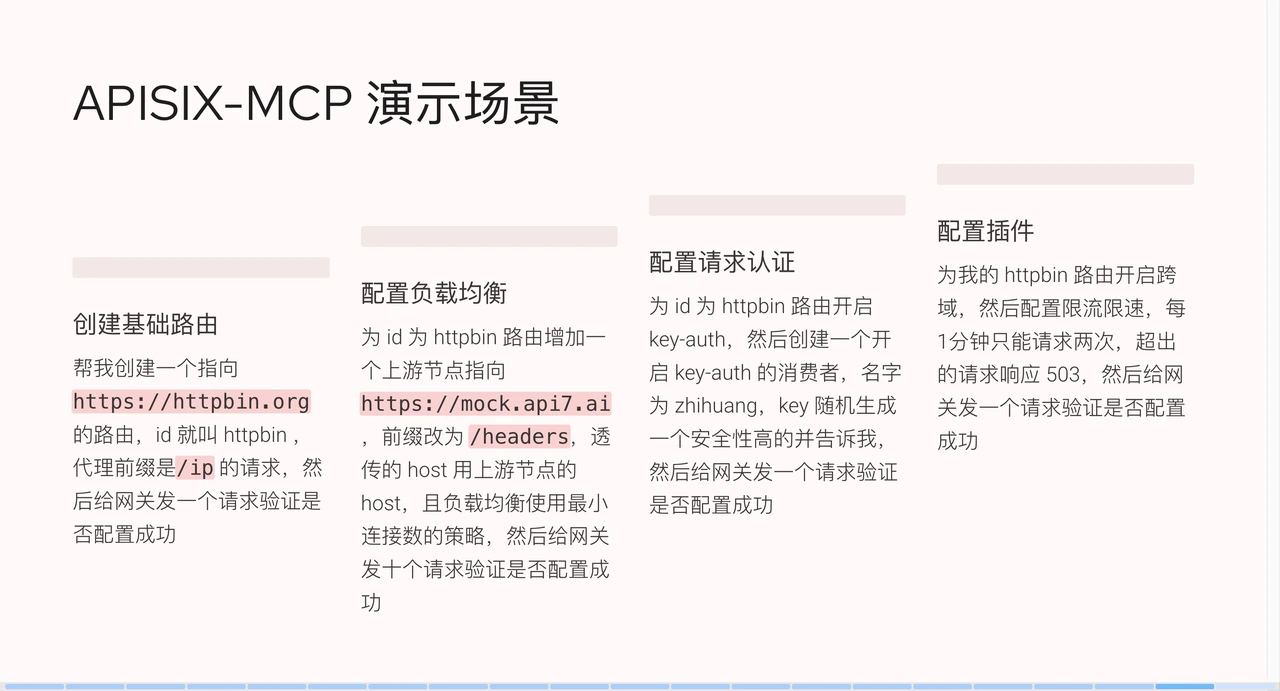
+
+
+#### 创建基础路由
+
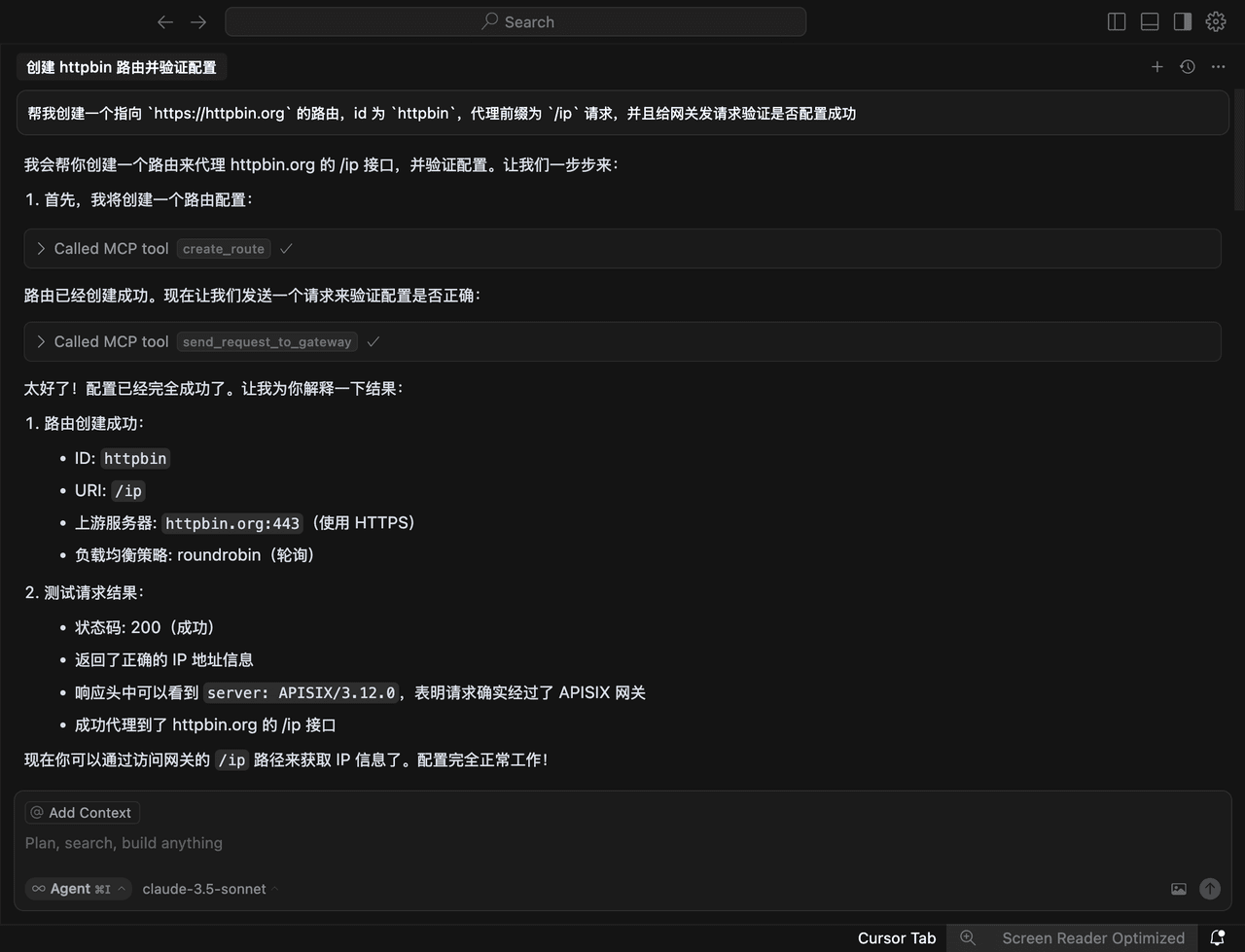
+我设置了一些场景,例如我们让 APISIX-MCP “帮我创建一个指向 `https://httpbin.org` 的路由,id 为
`httpbin`,代理前缀为 `/ip` 请求,并且给网关发请求验证是否配置成功”。
+
+它解析我们的语义后,发现我们需要调用 MCP 服务实现功能。这里调用了一个工具,即 `create_roots` 里的参数。我们已经提供了上下文,点击
run tool 进行确认。在生产环境中,运维层面的配置都很关键,不能随意更改,因而需要进行确认这个步骤。点击 run tool
后,我们可以看到响应,了解调用 API 后的具体情况,包括它会执行什么功能、向网关发送请求,以及验证路由是否创建成功。再次点击 run tool,创建成功。
+
+
+
+这些响应内容我们不用太在意,系统会自动创建路由并发送测试请求进行验证,最后会汇总执行结果。如果自己手动配置这些操作,需要在命令行设置 API
密钥,还要构建完整的测试命令。如果在操作过程中输错了没及时发现,还得花额外的时间去排查。
+
+#### 配置负载均衡
+
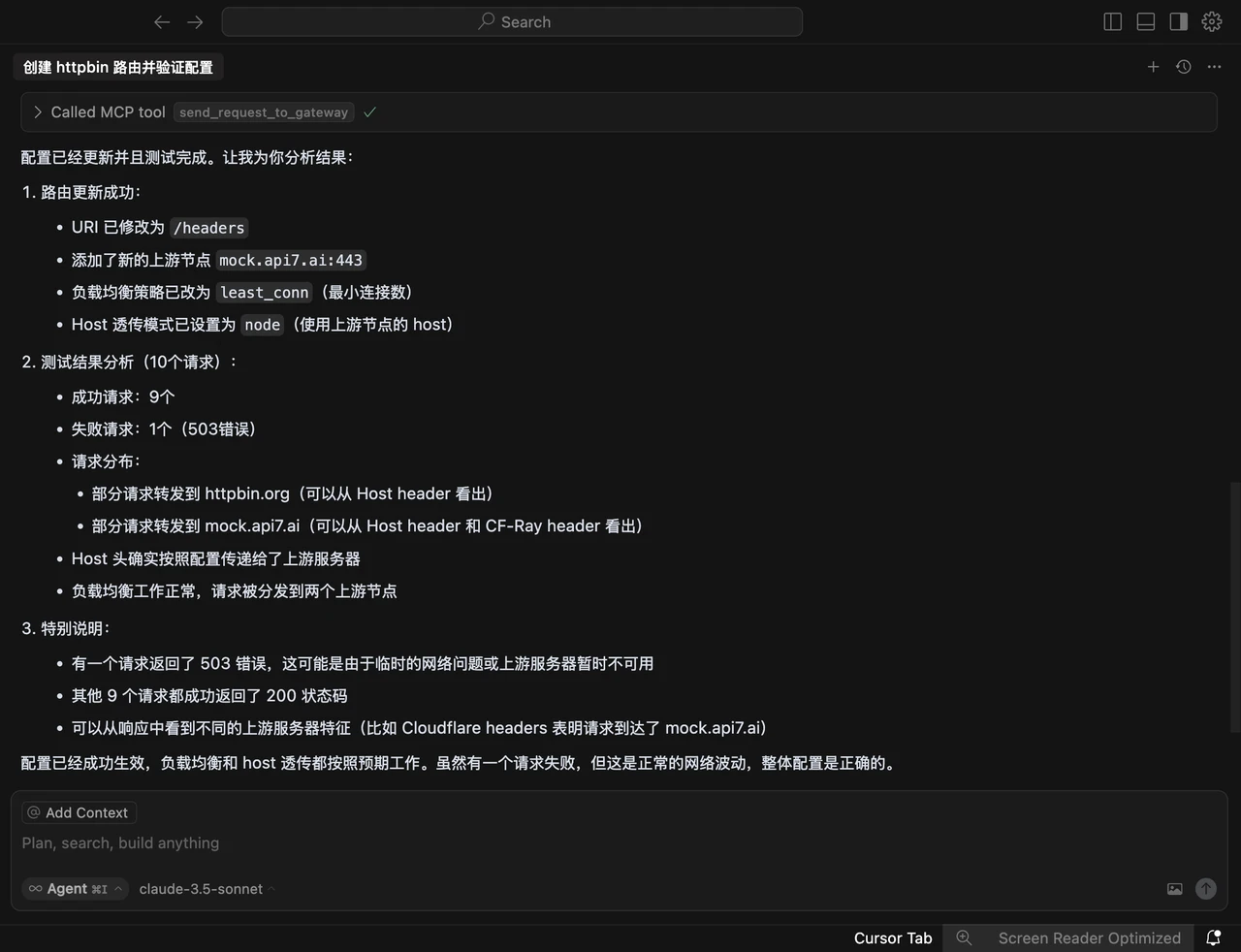
+我们将对现有路由进行调整。我们为刚才创建的路由新增一个上游节点,指向的是将 `mock.api7.ai` 前缀修改为 `/headers`,透传的 host
使用上游节点的 host,且负载均衡使用最小连接数的策略,然后给网关发十个请求验证是否配置成功。
+
+
+
+#### 配置请求认证
+
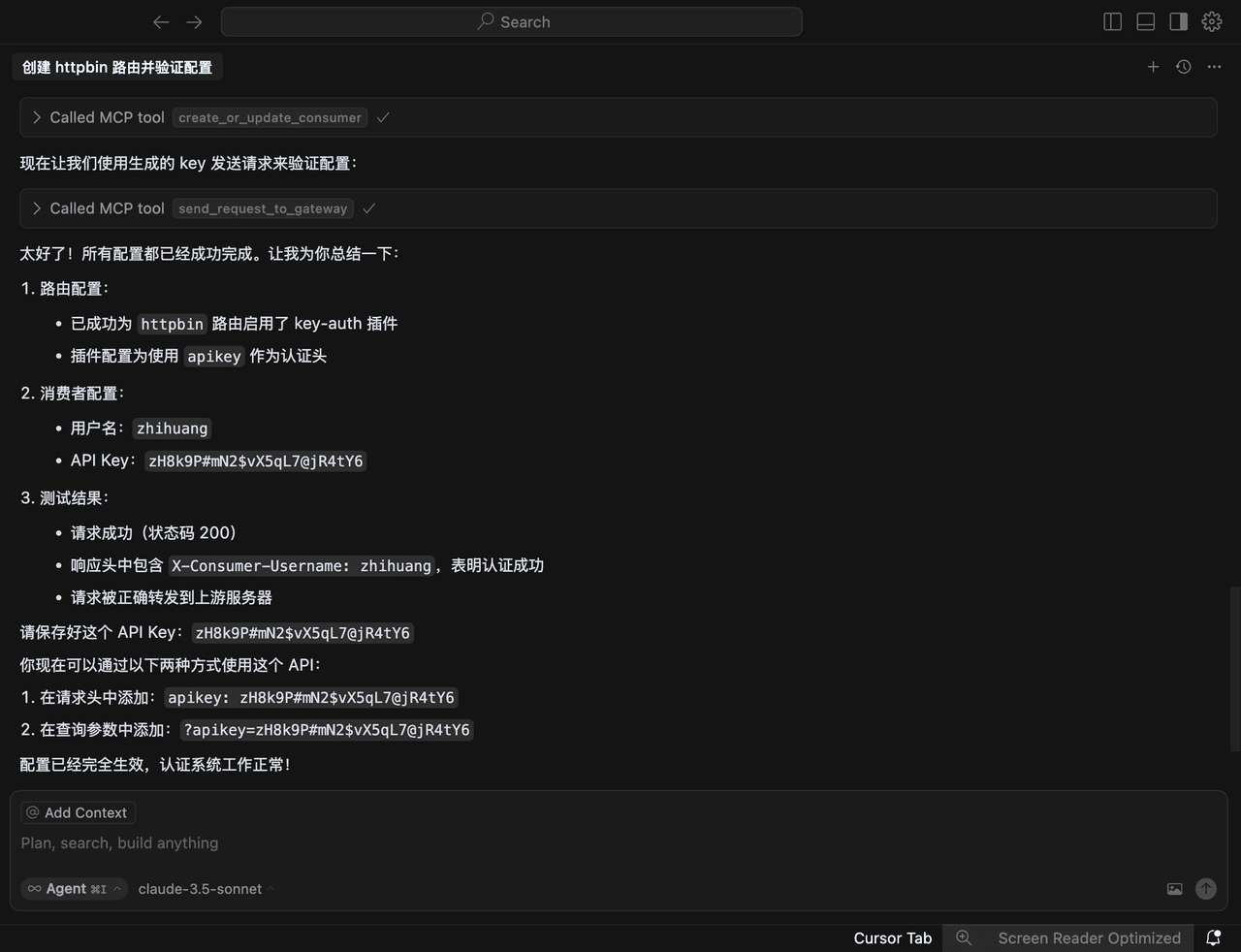
+第三步,为 id 为 httpbin 路由开启 `key-auth` 插件,然后创建一个开启 `key-auth` 的消费者,名字为 zhihuang,要求
AI 随机生成一个安全性高的 key 并告诉我,然后给网关发一个请求验证是否配置成功。
+
+
+
+MCP 自动开启了 `key-auth`
认证插件,创建了消费者,并根据随机生成的消费者凭证进行校验。校验过程中,它先测试携带凭证进行请求,再测试不携带凭证可哦能行请求,从而确认配置正确完成。
+
+#### 配置插件
+
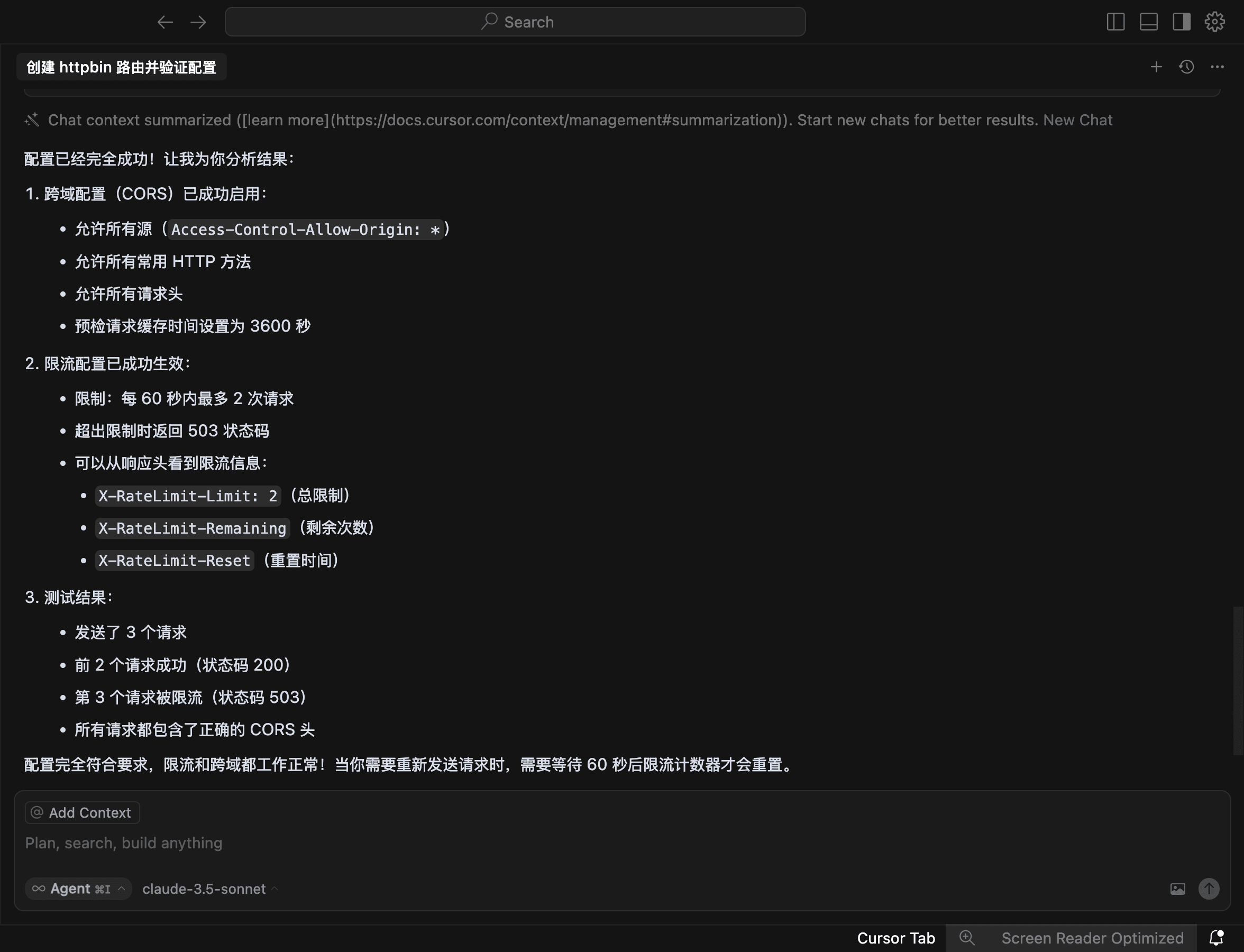
+最后,配置插件,要求 AI “为我的 httpbin 路由开启跨域,然后配置限流限速,每 1 分钟只能请求两次,超出的请求响应
`503`,然后给网关发一个请求验证是否配置成功。”
+
+
+
+## 总结
+
+MCP 带来了很多可能性,虽然现在可能还不够稳定,但随着模型能力的提升,它的应用场景会越来越丰富。我们通过泛化的语言来实现目标,让 AI
大语言模型快速生成解决方案。现在,我们只需要提出需求,AI
就能完成整个需求闭环,大大简化日常运维和开发。这在各个层面都有重要价值,而且上手成本很低。如果你想开发类似的 MCP 服务,只要熟悉 Java、Go、JS
等任意一个编程语言,一天时间就能完成接入,帮助企业快速将 API 接入 AI 大语言模型。
+
+APISIX-MCP 的价值在于帮助新用户快速上手 APISIX,为复杂的 API 管理提供智能化的新方案。它将执行具体操作转变为描述泛化场景,推动 AI
与 API 管理的深度融合。未来,我们还会在 API 管理层面进一步探索与 AI 管理的融合,在网关层面也会持续增强 APISIX 对 AI 流量的处理能力。