https://bugs.kde.org/show_bug.cgi?id=506769
            Bug ID: 506769
           Summary: Gradient button on toolbar is "undefined" if Krita is
                    closed after selecting a custom gradient with a custom
                    tag
    Classification: Applications
           Product: krita
      Version First nightly build (please specify the git hash!)
       Reported In:
          Platform: Appimage
                OS: Linux
            Status: REPORTED
          Severity: normal
          Priority: NOR
         Component: Resource Management
          Assignee: [email protected]
          Reporter: [email protected]
  Target Milestone: ---

SUMMARY

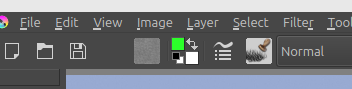
The gradient button on the toolbar becomes empty/blank after reloading Krita
with a custom gradient selected, which leads to crashes under some
circumstances, e.g. https://bugs.kde.org/show_bug.cgi?id=505986

STEPS TO REPRODUCE
1. Click on the gradient button the toolbar
2. Add a new gradient called "Black to White"
3. Add a new gradient tag called "Basic Gradients"
4. Tag the gradient with the tag.
5. Select the "Basic Gradients" tag
6. Select the "Black to White" gradient
7. Close Krita
8. Open Krita
9. Create a new document

OBSERVED RESULT

The gradient button is empty.

EXPECTED RESULT

The gradient that I selected before should be displayed, or some valid fallback
gradient should be selected.

SOFTWARE/OS VERSIONS
I'm on Linux Mint.
Git hash: 3cc9811

ADDITIONAL INFORMATION

This bug is partially documented on this thread
https://krita-artists.org/t/linux-mint-users-lets-try-crashing-krita-with-the-index-colors-filter/128334/

Empty button:
https://krita-artists.org/uploads/default/original/3X/2/8/28e60d57e8351739171af81b4c55786b5b7967a1.png

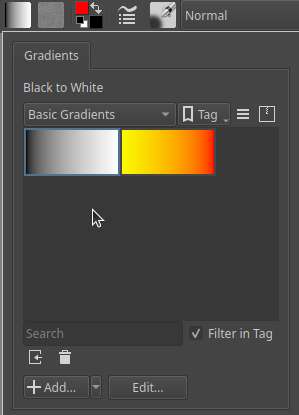
Dropdown with valid gradient selected:
https://krita-artists.org/uploads/default/original/3X/7/c/7cc5eb0c0cb2b228b8b9b88d534030fa23b0b6f5.png

--
You are receiving this mail because:
You are watching all bug changes.