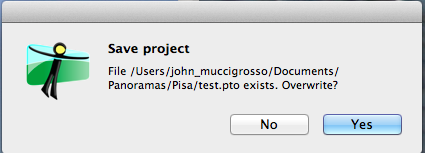
Here's the second window that popped up. I took a screen shot of the
first, but it failed for some reason.
** Attachment added: "Shot of pop-up window."

https://bugs.launchpad.net/hugin/+bug/1364178/+attachment/4192838/+files/Screenshot%202014-09-01%2019.41.18.png

--
You received this bug notification because you are a member of Hugin Bug
Hunters, which is subscribed to Hugin.
https://bugs.launchpad.net/bugs/1364178

Title:
  Overwriting .pto brings up two dialogs

Status in Hugin - Panorama Tools GUI:
  New

Bug description:
  Hugin 2014 RC4 on a MacBook Pro running OS X 10.9.4

  1. Created a new pano for a set of images I had already been playing with.
  2. Decided to save the new settings over the existing ones.
  3. Clicked on the floppy-disk icon to save and chose the same name and place
as the existing file (which I hadn't opened to create the new one).
  4. Was asked if I wanted to overwrite it by a drop-down window. '"test.pto"
already exists. Do you want to replace it?' Clicked "replace".
  5. Was asked again with a pop-up window: 'Save Project    File blah-blah
exists. Overwrite?'

  Clearly one is enough there. :-)

To manage notifications about this bug go to:
https://bugs.launchpad.net/hugin/+bug/1364178/+subscriptions

_______________________________________________
Mailing list: https://launchpad.net/~hugin-bug-hunters
Post to     : [email protected]
Unsubscribe : https://launchpad.net/~hugin-bug-hunters
More help   : https://help.launchpad.net/ListHelp