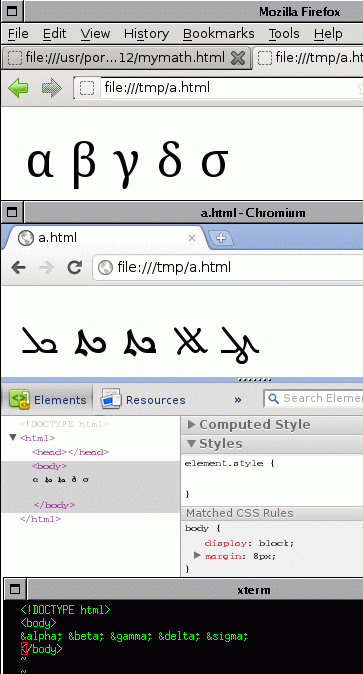
On Wed, Jan 04, 2012 at 05:15:11PM +0200, George Liaskos wrote: > On Mon, Jan 2, 2012 at 9:21 PM, Luigi Rizzo <[email protected]> wrote: > > Hi, > > I just noticed that Chromium 16.0.912.63 ??(on FreeBSD 9.0-RC2 amd64, > > and a basic install of Xorg 7.5.1 does not properly display greek characters > > (such as α β and so on) > > > > A simple offending file is this: > > > > ?? ?? ?? ??<!DOCTYPE html> > > ?? ?? ?? ??<body> > > ?? ?? ?? ??α β γ δ σ > > ?? ?? ?? ??</body> > > > > and it does work on Firefox 8.0 on the same machine, and on Chrome on OSX, > > so i really suspect a bug in chromium and not in the X11 configuration. > > > > Attached (and at > > http://info.iet.unipi.it/~luigi/doc/20120102-chromium-greek-fonts.gif ) > > you can see a snapshot of the screen showing how Firefox displays > > the characters correctly, while chromium completely fails on the main > > window (I cannot map the gliphs to anything i know, but did not try > > too hard, either), and fails in a different mode in the "Developer Tools" > > window (three chars out of five are shown correctly). > > > > Any ideas on what could be wrong and a possible temporary workaround ? > > > > cheers > > luigi > > > > Hi! > > It works fine here [1], what encoding do you use to save the text file?
it is plain ascii, and since i am using html entities i find it
odd that chromium is not getting the correct font while Firefox is.

The problem appears to exist on linux as well

http://code.google.com/p/chromium/issues/detail?id=94198

> I am from Greece, so it happens that i browse content with Greek
> letters a lot. :)

I suppose you have some extra font that gets loaded as part
of the localization.

> I will try to setup a VM the the minimum packages required to run
> chrome, maybe we miss a dependency that happens to be installed anyway
> with KDE / Gnome or whatever.
>
> [1] http://i.imgur.com/2jfOz.png

cheers
luigi
_______________________________________________
[email protected] mailing list
http://lists.freebsd.org/mailman/listinfo/freebsd-chromium
To unsubscribe, send any mail to "[email protected]"