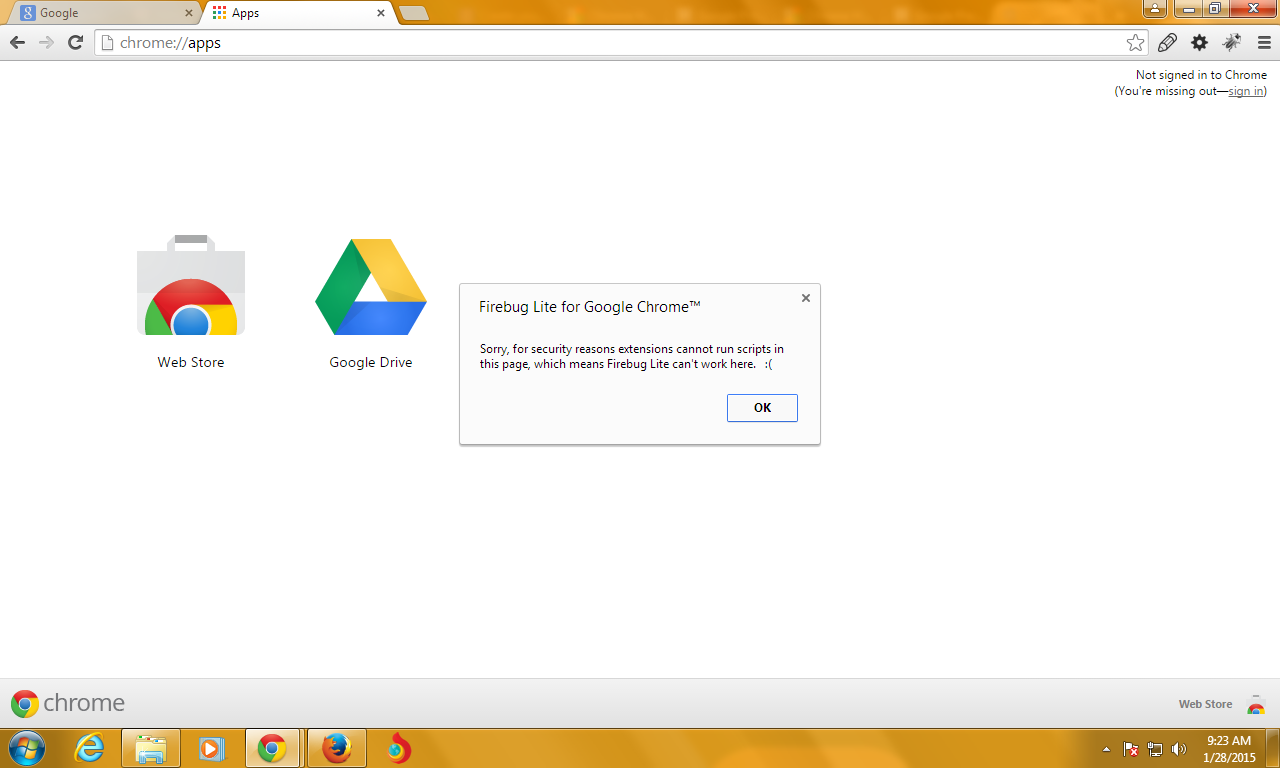
The shown message comes from Firebug Lite itself. It is not the page that
prevents it from being opened.
If you want to prevent it from opening you may create a Mutation Observer
<https://developer.mozilla.org/en-US/docs/Web/API/MutationObserver> and
check when the element with the ID FirebugUI is added and remove it
immediately.

Though note that people can still inspect your page with the built-in
DevTools and there is no way to block them from within your website.
What is the reason you want to block Firebug Lite from being opened?

Sebastian

On Sunday, February 8, 2015 at 9:00:22 AM UTC+1, Prasad H P wrote:
>
>
> <https://lh4.googleusercontent.com/-QsVPetVujcQ/VNcUgwQNKtI/AAAAAAAAARA/Z3GIHANKYCU/s1600/chrome1.png>
>
>
> <https://lh4.googleusercontent.com/-yLjW0NjRuws/VNcUXIL0CzI/AAAAAAAAAQ4/_pZUvOeN8xQ/s1600/chrome.png>
> Hi,
>
>  i want to deactivate firebug lite tool like in chrome page as shown in
> the image which already have the functionality in browser itself  but i did
> not know how to call that default script in chrome browser using java
> script.(I need cross browser usage also).
>
>  Just open a new tab in chrome and click on the firebug lite tool then you
> get the output as shown in image.I need the same functionality in my-site
> and i want know how its working thanks in advance.
>

--
You received this message because you are subscribed to the Google Groups
"Firebug" group.
To unsubscribe from this group and stop receiving emails from it, send an email
to [email protected].
To post to this group, send email to [email protected].
Visit this group at http://groups.google.com/group/firebug.
To view this discussion on the web visit
https://groups.google.com/d/msgid/firebug/7b791e83-3f37-468b-bac2-42e962792ca6%40googlegroups.com.
For more options, visit https://groups.google.com/d/optout.