*** This bug is a duplicate of bug 872805 ***
    https://bugs.launchpad.net/bugs/872805
** This bug has been marked a duplicate of bug 872805
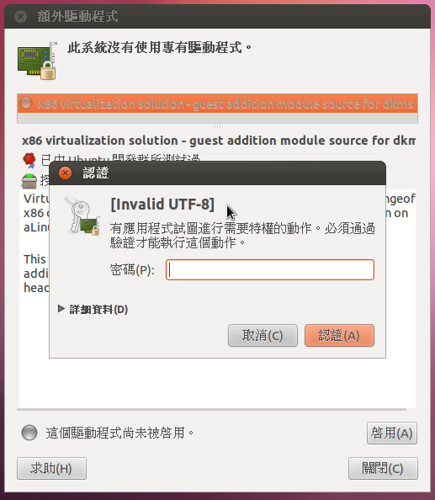
   In Simplified Chinese, authentication prompt says "[Invalid UTF-8]"

--
You received this bug notification because you are a member of Desktop
Packages, which is subscribed to jockey in Ubuntu.
https://bugs.launchpad.net/bugs/870745

Title:
  Authentication String show as [invalid UTF-8]

Status in “jockey” package in Ubuntu:
  New

Bug description:
  Series: yes

  Reproduce Steps:
  1. When Live CD promts "Keyboard = Human", press any key to select language
(Install with live media, ie. i386.iso live CD)
  2. Choose "中文(繁體)"
  3. Choose the second option, "安裝 Ubuntu" (Install Ubuntu), and press Enter
  4. Finish the installation process
  5. Restart
  6. Launch jockey to install extra drivers

  Expected Result:
  You have prompted a string to authenticate your identify while the
information is properly displayed in localized form.

  Actual Result:
  You a information saying "[invalid UTF-8]"
  See http://farm7.static.flickr.com/6092/6250043249_6b8c657f75.jpg

  However, if you install Ubuntu via another way below, you will get a
  properly displayed prompt information.

  Reproduce Steps:
  1. When Live CD promts "Keyboard = Human", press any key to select language
  2. Use "English" as default
  3. Choose "Install Ubuntu", and press Enter
  4. You see the welcome page in English, select "中文 (繁體)" then click "繼續"
(Continue)
  Note: You only choose "中文 (繁體)" after you get into the installer
  5. Finish the installation process
  6. Restart
  7. Launch jockey to install extra drivers

  Expected Result:
  You have prompted a string to authenticate your identify while the
information is properly displayed in localized form.

  Actual Result:
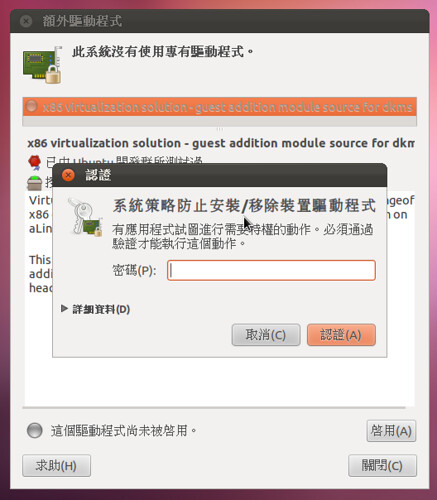
  You get the right display.
  http://farm7.static.flickr.com/6169/6250707590_bcec91ce40.jpg

To manage notifications about this bug go to:
https://bugs.launchpad.net/ubuntu/+source/jockey/+bug/870745/+subscriptions

--
Mailing list: https://launchpad.net/~desktop-packages
Post to     : [email protected]
Unsubscribe : https://launchpad.net/~desktop-packages
More help   : https://help.launchpad.net/ListHelp