Public bug reported:

(As seen in the latest daily build of 32bit Ubuntu Budgie 18.04)
The "Color" page within Settings has a "Learn More" link, which points
to the Ubuntu Desktop Guide. Within this, I found a page called "How do
I test if color management is working correctly?", which suggests that
it's possible to click on a button called "Add profile" to enable a test
colour profile (and presumably other profiles also).

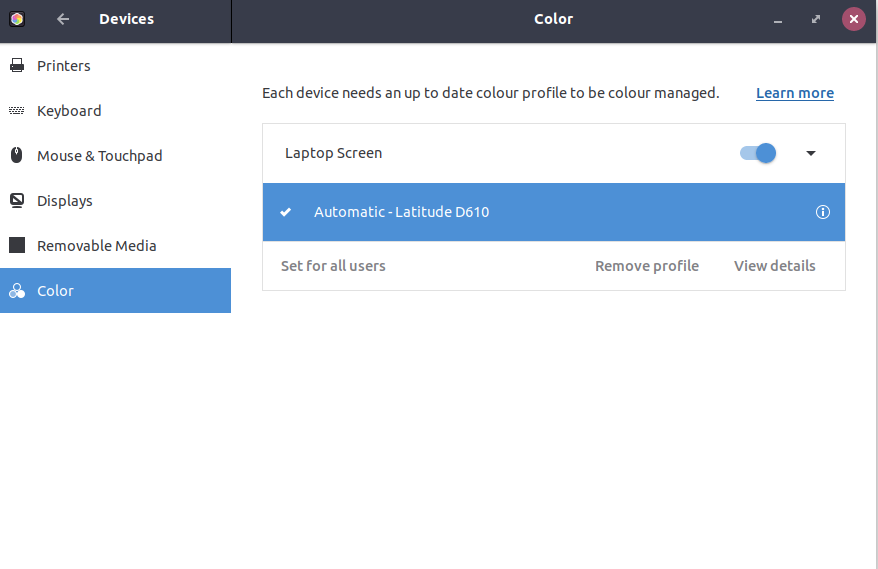
The current development version of Gnome, as seen in the latest daily
build of Ubuntu Budgie 32bit, has no such button visible within Settings
> Color. See screenshot.


Thanks,
Ken.
***

** Affects: gnome-shell (Ubuntu)
     Importance: Undecided
         Status: New

** Attachment added: "No option to add color profile from within GUI.png"

https://bugs.launchpad.net/bugs/1754827/+attachment/5074935/+files/No%20option%20to%20add%20color%20profile%20from%20within%20GUI.png

--
You received this bug notification because you are a member of Desktop
Packages, which is subscribed to gnome-shell in Ubuntu.
https://bugs.launchpad.net/bugs/1754827

Title:
  Gnome settings - color: No ability to add new color profile via GUI

Status in gnome-shell package in Ubuntu:
  New

Bug description:
  (As seen in the latest daily build of 32bit Ubuntu Budgie 18.04)

  The "Color" page within Settings has a "Learn More" link, which points
  to the Ubuntu Desktop Guide. Within this, I found a page called "How
  do I test if color management is working correctly?", which suggests
  that it's possible to click on a button called "Add profile" to enable
  a test colour profile (and presumably other profiles also).

  The current development version of Gnome, as seen in the latest daily
  build of Ubuntu Budgie 32bit, has no such button visible within
  Settings > Color. See screenshot.


  Thanks,
  Ken.
  ***

To manage notifications about this bug go to:
https://bugs.launchpad.net/ubuntu/+source/gnome-shell/+bug/1754827/+subscriptions

--
Mailing list: https://launchpad.net/~desktop-packages
Post to     : [email protected]
Unsubscribe : https://launchpad.net/~desktop-packages
More help   : https://help.launchpad.net/ListHelp