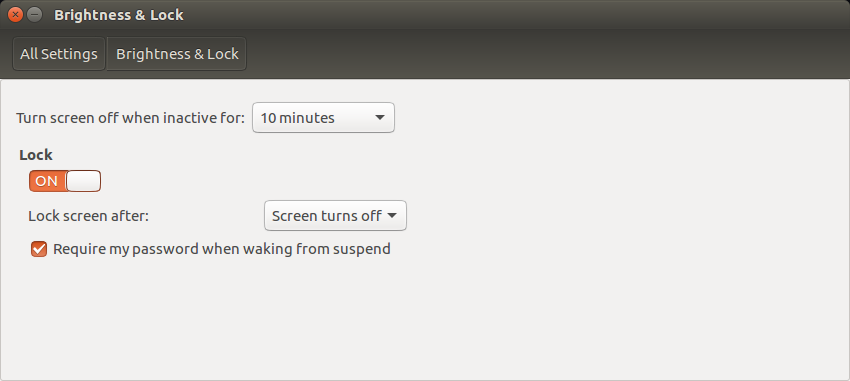
UPDATE: I think I discovered the "root problem"! it looks like the
"Screen Off after xx minutes" function, combined with the "Require
password when waking from suspend" option checked (System Settings,
Brightness & Lock) is causing the problem.  The attached screen capture
shows the relevant settings.  DATA: I DISABLED the "Screen off" function
("Never" option) and un-checked the "Require password when waking..."
option, then activated the Screen Lock and "let it sit".  I was able to
exit Screen Lock via my password.  I then re-enabled the aforementioned
"Brightness & Lock" options (see the attached Screen Capture picture for
the settings) and THE PROBLEM CAME BACK! when I enabled Screen Lock, the
screen "faded out" then the monitor went into "power save" mode (i.e.,
"no input signal detected").  I then moved my mouse/"worked" the
keyboard, and the display NEVER CAME BACK - I had to reboot (via RESET
button) to regain functionality.
For the record, BEFORE the upgrade from 14.04 LTS, the system was set to
use the aforementioned "Screen off..." and "Require password when
waking..." functions and there were no problems in coming out of Screen
Lock by moving the mouse/"working" the keyboard.

** Attachment added: ""Brightness & Lock" settings resulting in reported
problem"

https://bugs.launchpad.net/ubuntu/+source/gnome-screensaver/+bug/1611162/+attachment/4718688/+files/Screenshot%20from%202016-08-10%2017-13-15.png

--
You received this bug notification because you are a member of Desktop
Packages, which is subscribed to gnome-screensaver in Ubuntu.
https://bugs.launchpad.net/bugs/1611162

Title:
  16.04.1 LTS: using "screen lock" requires reboot to use computer

Status in gnome-screensaver package in Ubuntu:
  New

Bug description:
  Updated from v. 14.04 to 16.04.1 via Software Update.  When I activate
  Screen Lock and leave it alone, I have to reboot my system to make it
  active (i.e., the system "goes to sleep").  I didn't have this problem
  with v. 14.04.  Otherwise, things seem to be OK...

  Processor: AMD Athlon(tm) 64 Processor 3500+
  Memory: 4G
  Hard Drive: 250G Samsung SSD

  Additional info: if I have my machine sitting at a "normal" login
  (i.e., after reboot), I have no problems.  It's only when I activate
  "screen lock" that I have to reboot my machine via hardware "reset"
  button or power cycle.

To manage notifications about this bug go to:
https://bugs.launchpad.net/ubuntu/+source/gnome-screensaver/+bug/1611162/+subscriptions

--
Mailing list: https://launchpad.net/~desktop-packages
Post to     : [email protected]
Unsubscribe : https://launchpad.net/~desktop-packages
More help   : https://help.launchpad.net/ListHelp