This is an automated email from the ASF dual-hosted git repository.

alexstocks pushed a commit to branch develop
in repository https://gitbox.apache.org/repos/asf/dubbo-go-pixiu.git
The following commit(s) were added to refs/heads/develop by this push:
new 8c9f7a18 docs: Update README (#698)
8c9f7a18 is described below
commit 8c9f7a1835a14abffee794fea383bad9524684e8
Author: Xuetao Li <[email protected]>
AuthorDate: Sun Jul 20 12:22:25 2025 +0800
docs: Update README (#698)
* update readme
* update readme
* update admin related
---
README.md | 193 ++++++++++++++++------------------
README_CN.md | 196 ++++++++++++++++-------------------
docs/images/group-pixiu-dingding.jpg | Bin 87973 -> 0 bytes
docs/images/invite.png | Bin 0 -> 383395 bytes
docs/images/pixiu-admin.png | Bin 0 -> 87458 bytes
5 files changed, 178 insertions(+), 211 deletions(-)
diff --git a/README.md b/README.md
index f4447aa2..131c4f63 100644
--- a/README.md
+++ b/README.md
@@ -1,173 +1,156 @@
[](http://alexstocks.github.io/html/dubbogo.html)
+# Dubbo-Go-Pixiu: A Next-Generation, High-Performance API Gateway
-[](https://golang.org/)
-[](https://travis-ci.org/dubbogo/dubbo-go-pixiu)
+[](https://travis-ci.org/apache/dubbo-go-pixiu)
+[](https://codecov.io/gh/apache/dubbo-go-pixiu)
+[](https://pkg.go.dev/github.com/apache/dubbo-go-pixiu?tab=doc)
+[](https://goreportcard.com/report/github.com/apache/dubbo-go-pixiu)
+
-English | [中文](./README_CN.md)
+**English** | [中文](README_CN.md)
-# Introduction
+-----
-**Dubbo-Go-Pixiu**(official site:
https://dubbo.apache.org/zh/docs3-v2/dubbo-go-pixiu/) is a high-performance API
gateway and multi-language solution Sidecar in the Dubbo ecosystem
+**Dubbo-Go-Pixiu** is a high-performance API Gateway built with Go. As a key
component of the [Apache Dubbo](https://dubbo.apache.org/) ecosystem, it
provides rich traffic management, protocol conversion, and security protection
capabilities.
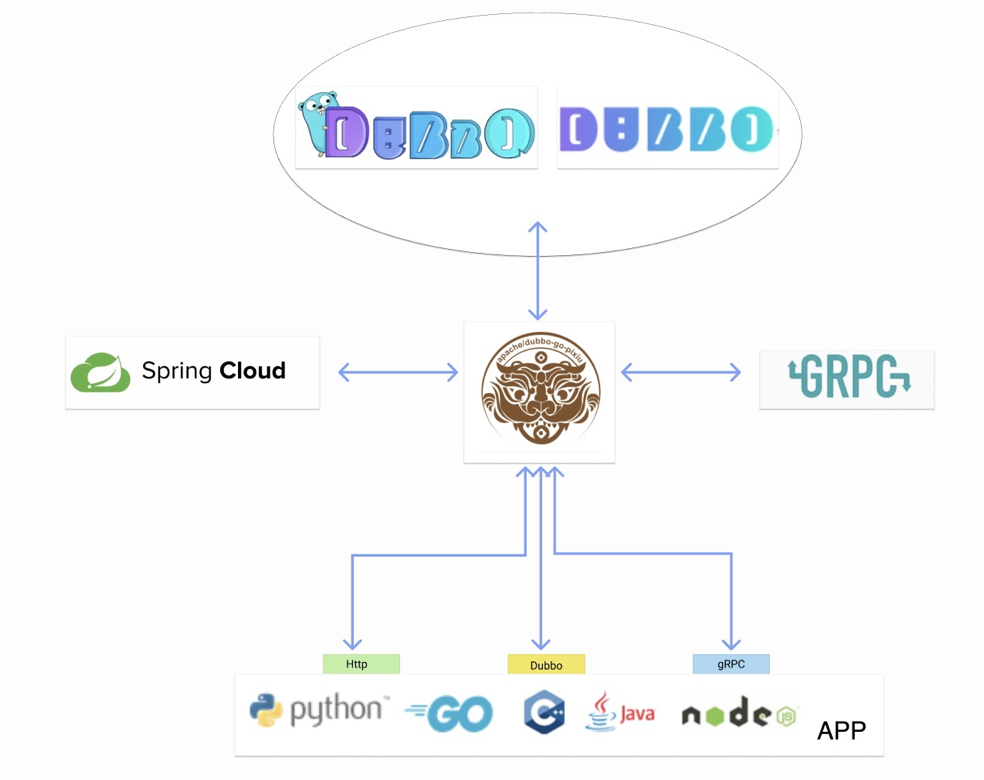
-
+## 🚀 Why Choose Dubbo-Go-Pixiu?
-It is an open source Dubbo ecosystem API gateway, and also a sidecar to let
other compute language program access the dubbo clusters by HTTP/gRPC protocol.
As an API gateway, Pixiu can receive external network requests, convert them
into dubbo and other protocol requests, and forward them to the back cluster;
as a sidecar, Pixiu expects to register to the Dubbo cluster instead of the
proxy service, allowing multilingual services to access the Dubbo cluster to
provide faster solution
+* **High Performance**: Built with Go for low-latency, high-throughput gateway
capabilities.
+* **Seamless Dubbo Integration**: As the official Sidecar solution, it allows
non-Java applications (Go, Python, Node.js, etc.) to easily call Dubbo services.
+* **Cloud-Native by Design**: Built for modern microservices and cloud-native
architectures, with full support for containerized deployment.
+* **Highly Extensible**: A flexible filter and plugin mechanism allows you to
easily customize its functionality.
+## ✨ We are Evolving into an AI Gateway [WIP]
-## Quick Start
+We are upgrading Pixiu into a **next-generation AI Gateway**, designed to be
the bridge connecting users to Large Language Models (LLMs). With Pixiu, you
can:
-#### Requirment
-1. go 1.17 or higher
-2. docker or docker-desktop
+* **Simplify Access**: Access various LLM services in a unified and secure
manner.
+* **Enhance Capabilities**: Leverage the gateway's powerful plugin system to
add features like authentication, observability, and traffic control to your AI
applications.
+* **Cost-Effectiveness**: Optimize your AI service costs through fine-grained
billing, auditing, and caching strategies.
-you can find out all demo in https://github.com/apache/dubbo-go-pixiu-samples.
-download it and operate as below.
-```shell
-git clone https://github.com/apache/dubbo-go-pixiu-samples.git
-```
+**Try the AI Gateway features now**: Visit our [AI Gateway
Samples](https://github.com/apache/dubbo-go-pixiu-samples/tree/main/llm).
-#### update pixiu to latest version
-```shell
-go get github.com/apache/[email protected]
-```
+## Core Features
-#### cd samples dir
+| Feature Category | Description
|
+| :-------------------- |
:-------------------------------------------------------------------------------------------------------------------------------------------------------
|
+| 🚀 **Protocol Processing** | Supports proxying and mutual conversion between
HTTP, gRPC, Dubbo2, and Triple protocols, offering powerful protocol gateway
capabilities. |
+| 🛡️ **Security Protection** | Provides multiple security mechanisms like
HTTPS, JWT token validation, and OAuth2 to safeguard your services.
|
+| 🔗 **Service Discovery** | Seamlessly integrates with registries like
Zookeeper and Nacos to automatically discover services from Dubbo and Spring
Cloud clusters. |
+| ⚖️ **Traffic Governance** | Integrates with Sentinel to provide
fine-grained, multi-protocol rate limiting, circuit breaking, and service
degradation. |
+| 📈 **Observability** | Integrates with OpenTelemetry and Jaeger to provide
distributed tracing, metrics, and logging.
|
+| 🎨 **Visual Management** | The accompanying **Pixiu-Admin** console provides
a friendly web UI for remote service management and visual configuration.
|
-```shell
-cd dubbogo/simple
-```
+## Quick Start
-we can use start.sh to run samples quickly. for more info, execute command as
below for more help
+This guide will walk you through starting a Pixiu gateway and accessing a
backend Dubbo service via the HTTP protocol.
-```shell
-./start.sh [action] [project]
-./start.sh help
-```
+### Prerequisites
-we run [direct] samples step by step as follows.
+* Go 1.17 or higher.
+* Two separate terminal windows.
-#### prepare config file and docker
+### Step 1: Get the Pixiu Source Code
-'prepare' command will prepare dubbo-server and pixiu config file firstly, and
then start docker container.
+In **Terminal 1**, execute:
```shell
-./start.sh prepare direct
+git clone https://github.com/apache/dubbo-go-pixiu.git
+cd dubbo-go-pixiu
```
-if prepare config file manually, notice:
-- modify $PROJECT_DIR in conf.yaml to absolute path
+### Step 2: Start the Backend Sample Service
-#### start dubbo or http server
+In **Terminal 2**, execute:
```shell
-./start.sh startServer direct
+git clone https://github.com/apache/dubbo-go-pixiu-samples.git
+cd dubbo-go-pixiu-samples/http/simple
+# This will start a simple HTTP server as the backend
+go run http/simple/server/app/*
```
-#### start pixiu
+### Step 3: Start the Pixiu Gateway
+
+Return to **Terminal 1** and start Pixiu with the following command. Please
replace `[absolute-path]` with the absolute path to your local
`dubbo-go-pixiu-samples` directory.
```shell
-./start.sh startPixiu direct
+go run cmd/pixiu/*.go gateway start -c
/[absolute-path]/dubbo-go-pixiu-samples/http/simple/pixiu/conf.yaml
```
-if run pixiu manually in pixiu project, use command as below.
+When you see logs similar to the following, Pixiu has started successfully and
is listening on port `8888`:
-```shell
- go run cmd/pixiu/*.go gateway start -c
/[absolute-path]/dubbo-go-pixiu-samples/dubbogo/simple/direct/pixiu/conf.yaml
+```log
+2025-05-19T12:46:00.104+0800 INFO server/pixiu_start.go:127
[dubbopixiu go] start by config : &{StaticResources:{Listeners:[0xc0007b7a20]
Clusters:[0xc0007cc5a0] Adapters:[] ShutdownConfig:0xc00067fb30
PprofConf:{Enable:false Address:{SocketAddress:{Address:0.0.0.0 Port:8881
ResolverName: Domains:[] CertsDir:} Name:}}} DynamicResources:<nil>
Metric:{Enable:false PrometheusPort:0} Node:<nil> Trace:<nil> Wasm:<nil>
Config:<nil> Nacos:<nil> Log:<nil>}
+2025-05-19T12:46:00.104+0800 INFO healthcheck/healthcheck.go:157 [health
check] create a health check session for 127.0.0.1:1314
+2025-05-19T12:46:00.105+0800 INFO tracing/driver.go:76
[dubbo-go-pixiu] no trace configuration in conf.yaml
+2025-05-19T12:46:00.105+0800 INFO http/http_listener.go:157
[dubbo-go-server] httpListener start at : 0.0.0.0:8888
```
-if run pixiu manually in pixiu project and wasm feature, use command as below.
+### Step 4: Send a Test Request
-build pixiu project use command operate
+Test the gateway using `curl` or the provided test files:
```shell
-go build -tags wasm -o pixiu cmd/pixiu/*.go
-```
-
-run pixiu app binary
+# Option 1: Run test files
+go test -v ./http/simple/test/
-```shell
-go build cmd/pixiu/*.go
-./pixiu gateway start -c
/[absolute-path]/dubbo-go-pixiu-samples/dubbogo/simple/direct/pixiu/conf.yaml
+# Option 2: Run the test script using curl
+./http/simple/request.sh
```
-#### Try a request
+## Deploying with Docker
-use curl to try or use unit test
+We also provide Docker images for quick and easy deployment.
-```shell
-curl
http://localhost:8883/UserService/com.dubbogo.pixiu.UserService/GetUserByCode \
--H "x-dubbo-http1.1-dubbo-version:1.0.0" -H "x-dubbo-service-protocol:dubbo" \
--H "x-dubbo-service-version:1.0.0" -H "x-dubbo-service-group:test" \
--H "Content-Type:application/json" \
- -d '[1]'
-```
-```shell
-curl
http://localhost:8883/UserService/com.dubbogo.pixiu.UserService/UpdateUserByName
\
--H "x-dubbo-http1.1-dubbo-version:1.0.0" -H "x-dubbo-service-protocol:dubbo" \
--H "x-dubbo-service-version:1.0.0" -H "x-dubbo-service-group:test" \
--H "Content-Type:application/json" \
- -d '["tc",{"id":"0002","code":1,"name":"tc","age":15}]'
-```
-```shell
-curl
http://localhost:8883/UserService/com.dubbogo.pixiu.UserService/GetUserByCode \
--H "x-dubbo-http1.1-dubbo-version:1.0.0" -H "x-dubbo-service-protocol:dubbo" \
--H "x-dubbo-service-version:1.0.0" -H "x-dubbo-service-group:test" \
--H "Content-Type:application/json" \
- -d '[1]'
-```
+**1. Run Pixiu with Default Configuration**
-```shell
-./start.sh startTest body
+```shell
+docker run --name pixiu-gateway -p 8888:8888 -d
dubbogopixiu/dubbo-go-pixiu:latest
```
-#### Clean
+**2. Run with Custom Configuration Files Mounted**
```shell
-./start.sh clean direct
+docker run --name pixiu-gateway -p 8888:8888 -d \
+ -v /your/local/path/conf.yaml:/etc/pixiu/conf.yaml \
+ -v /your/local/path/log.yml:/etc/pixiu/log.yml \
+ dubbogopixiu/dubbo-go-pixiu:latest
```
-## Start Docker
+For more information, visit the [Pixiu Docker
Hub](https://hub.docker.com/r/dubbogopixiu/dubbo-go-pixiu).
-####
-```shell
-docker run --name pixiu-gateway -p 8888:8888 dubbogopixiu/dubbo-go-pixiu:latest
-```
+## Visual Control Plane: Pixiu Admin
-```shell
-docker run --name pixiu-gateway -p 8888:8888 \
- -v /yourpath/conf.yaml:/etc/pixiu/conf.yaml \
- -v /yourpath/log.yml:/etc/pixiu/log.yml \
- dubbogopixiu/dubbo-go-pixiu:latest
-```
+The powerful Pixiu management plane `pixiu-admin` has been
[migrated](https://github.com/dubbo-go-pixiu/pixiu-admin) to this repository
and can be used for visual configuration of service discovery, traffic
management, and security policies.
-## Features
+**Quick Start with Docker Compose:**
-- Multi-protocol support: Currently, Http, Dubbo2, Triple, gRPC protocol proxy
and conversion are supported, and other protocols are being continuously
integrated.
-- Safety certificate: Support HTTPS, JWT Token verification and other security
authentication measures.
-- Registry integration: Support to obtain service metadata from Dubbo or
Spring Cloud cluster, support ZK, Nacos registry.
-- Traffic management: Integrate with sentinel, support multiple protocols for
rate limiting.
-- Observability: Integrate with opentelemetry and jaeger for distributed
tracing.
-- Admin and visual interface: Have pixiu-admin for remote administration and
visualization
+```shell
+cd /[absolute-path]/dubbo-go-pixiu
+docker-compose up -d
+```
-### Control Plane
+After starting, you can access the management plane by opening
`http://localhost:8080` in your browser.
-The pixiu control plane is forked from [istio](https://github.com/istio/istio)
v1.14.3. Offers a variety of capabilities, including service discovery, traffic
management, security management.
+
-## Contact Us
+## Community & Contribution
-The project is under intensively iteration, you are more than welcome to use,
suggest and contribute codes.
+We warmly welcome all forms of contributions\! Whether it's submitting an
issue, proposing a new feature, or contributing code, your participation is
vital to the project.
+* **Join Our Community**:
-### Community
+Join our discussion group through Ding talk, WeChat, or Discord.
-**DingDing Group (31203920):**
+discord https://discord.gg/C5ywvytg
+
-[](docs/images/group-pixiu-dingding.jpg)
-We welcome the friends who can give us constructing suggestions instead of
known-nothing.
+If you like Dubbo-Go-Pixiu, please give us a ⭐ on GitHub\!
## License
-Apache License, Version 2.0
+This project is licensed under the [Apache License, Version 2.0](LICENSE).
\ No newline at end of file
diff --git a/README_CN.md b/README_CN.md
index a3d87010..daac0390 100644
--- a/README_CN.md
+++ b/README_CN.md
@@ -1,171 +1,155 @@
[](http://alexstocks.github.io/html/dubbogo.html)
+# Dubbo-Go-Pixiu:新一代高性能 API 网关
-[](https://golang.org/)
-[](https://travis-ci.org/dubbogo/dubbo-go-pixiu)
+[](https://travis-ci.org/apache/dubbo-go-pixiu)
+[](https://codecov.io/gh/apache/dubbo-go-pixiu)
+[](https://pkg.go.dev/github.com/apache/dubbo-go-pixiu?tab=doc)
+[](https://goreportcard.com/report/github.com/apache/dubbo-go-pixiu)
+
-[English](./README.md) | 中文
+[English](README.md) | **中文**
-# 简介
+-----
-**Dubbo-Go-Pixiu**(官网:
https://cn.dubbo.apache.org/zh-cn/overview/reference/pixiu/) 是一款 Dubbo 生态下的高性能
API 网关和多语言解决方案 Sidecar
+**Dubbo-Go-Pixiu** 是一款基于 Go 语言构建的高性能 API 网关。作为 [Apache
Dubbo](https://dubbo.apache.org/) 生态系统的关键组件,它提供了丰富的流量管理、协议转换和安全防护等能力。
-
+## 🚀 为什么选择 Dubbo-Go-Pixiu?
-Pixiu 是一款开源的 Dubbo 生态的 API 网关和 接入 dubbo 集群的语言解决方案。作为 API 网关形态, Pixiu
能接收外界的网络请求,将其转换为 dubbo 等协议请求,转发给背后集群;作为 Sidecar,Pixiu 期望可以代替代理服务注册到 Dubbo
集群,让多语言服务接入 Dubbo 集群提供更快捷的解决方案
+* **高性能**:基于 Go 语言构建,提供低延迟、高吞吐的网关能力。
+* **无缝集成 Dubbo**:作为官方 Sidecar 方案,帮助非 Java 应用(Go、Python、Node.js 等)轻松调用 Dubbo 服务。
+* **云原生设计**:为现代微服务和云原生架构而生,全面支持容器化部署。
+* **高可扩展性**:灵活的过滤器和插件机制,让您轻松定制功能。
+## ✨ 我们正在演进为 AI 网关 [开发中]
-## 快速开始
+我们正在将 Pixiu 升级为**新一代 AI 网关**,旨在成为连接用户与大语言模型(LLMs)的桥梁。通过 Pixiu,您可以:
-#### 环境准备
-1. go 1.17或者更高
-2. docker或者docker-desktop
+* **简化访问**:以统一、安全的方式接入各类 LLM 服务。
+* **增强能力**:利用网关强大的插件体系,为您的 AI 应用增加认证、可观测性和流量控制等功能。
+* **成本效益**:通过精细化的计费、审计和缓存策略,优化您的 AI 服务成本。
-#### 下载simples
-你可以在 https://github.com/apache/dubbo-go-pixiu-samples 中找到所有有关 pixiu
功能的案例,可以按照如下的步骤进行操作。
-```shell
-git clone https://github.com/apache/dubbo-go-pixiu-samples.git
-```
+**即刻体验 AI 网关功能**:请访问我们的 [AI
网关示例](https://github.com/apache/dubbo-go-pixiu-samples/tree/main/llm)。
-#### 更新pixiu到最新版本
-```shell
-go get github.com/apache/[email protected]
-```
-
-#### 进入示例代码目录
-```shell
-cd dubbogo/simple
-```
+## 核心功能
-可以使用 start.sh 脚本快速启动案例项目,可以执行如下命令来获得更多信息
+| 功能类别 | 描述 |
+| :--- | :--- |
+| 🚀 **协议处理** | 支持 HTTP、gRPC、Dubbo2、Triple 协议的代理和相互转换,提供强大的协议网关能力。 |
+| 🛡️ **安全防护** | 提供 HTTPS、JWT 令牌验证、OAuth2 等多种安全机制,为您的服务保驾护航。 |
+| 🔗 **服务发现** | 无缝集成 Zookeeper、Nacos 等注册中心,自动发现 Dubbo 和 Spring Cloud 集群中的服务。 |
+| ⚖️ **流量治理** | 集成 Sentinel,提供精细化的多协议限流、熔断和服务降级能力。 |
+| 📈 **可观测性** | 集成 OpenTelemetry 和 Jaeger,提供分布式追踪、指标和日志功能。 |
+| 🎨 **可视化管理** | 配套的 **Pixiu-Admin** 控制台提供友好的 Web UI,支持远程服务管理和可视化配置。 |
-```shell
-./start.sh [action] [project]
-./start.sh help
-```
-
-下列步骤中,我们将启动简单代理[direct]案例项目
+## 快速开始
-#### 准备配置文件
+本指南将引导您启动一个 Pixiu 网关,并通过 HTTP 协议访问一个后端服务。
-使用 start.sh 的 prepare 命令来准备配置文件和外部docker依赖
+### 前置条件
-```shell
-./start.sh prepare direct
-```
+* Go 1.17 或更高版本。
+* 两个独立的终端窗口。
-如果想要手动准备文件,需要注意:
-- 将 conf.yaml 中的 $PROJECT_DIR 修改为本地绝对路径
+### 第一步:获取 Pixiu 源码
-#### 启动 dubbo 服务或者 http 服务,本地需要有docker环境,
+在**终端 1** 中执行:
```shell
-./start.sh startServer direct
+git clone https://github.com/apache/dubbo-go-pixiu.git
+cd dubbo-go-pixiu
```
-#### 开启另一个终端,启动 pixiu
-
-```shell
-./start.sh startPixiu direct
-```
+### 第二步:启动后端示例服务
-使用下列命令来手动启动 pixiu
+在**终端 2** 中执行:
```shell
- go run cmd/pixiu/*.go gateway start -c
/[absolute-path]/dubbo-go-pixiu-samples/dubbogo/simple/direct/pixiu/conf.yaml
+git clone https://github.com/apache/dubbo-go-pixiu-samples.git
+cd dubbo-go-pixiu-samples/http/simple
+# 这将启动一个简单的 HTTP 服务器作为后端服务
+go run http/simple/server/app/*
```
-如果希望启用wasm ,使用下列命令来手动启动 pixiu
+### 第三步:启动 Pixiu 网关
+
+回到**终端 1** 并使用以下命令启动 Pixiu。请将 `[absolute-path]` 替换为您本地
`dubbo-go-pixiu-samples` 目录的绝对路径。
```shell
-go build -tags wasm -o pixiu cmd/pixiu/*.go
+go run cmd/pixiu/*.go gateway start -c
/[absolute-path]/dubbo-go-pixiu-samples/http/simple/pixiu/conf.yaml
```
-手动编译并启动pixiu:
+当您看到类似以下的日志时,表示 Pixiu 已成功启动并正在监听 `8888` 端口:
-```shell
-go build cmd/pixiu/*.go
-./pixiu gateway start -c
/[absolute-path]/dubbo-go-pixiu-samples/dubbogo/simple/direct/pixiu/conf.yaml
+```log
+2025-05-19T12:46:00.104+0800 INFO server/pixiu_start.go:127 [dubbopixiu
go] start by config : &{StaticResources:{Listeners:[0xc0007b7a20]
Clusters:[0xc0007cc5a0] Adapters:[] ShutdownConfig:0xc00067fb30
PprofConf:{Enable:false Address:{SocketAddress:{Address:0.0.0.0 Port:8881
ResolverName: Domains:[] CertsDir:} Name:}}} DynamicResources:<nil>
Metric:{Enable:false PrometheusPort:0} Node:<nil> Trace:<nil> Wasm:<nil>
Config:<nil> Nacos:<nil> Log:<nil>}
+2025-05-19T12:46:00.104+0800 INFO healthcheck/healthcheck.go:157 [health
check] create a health check session for 127.0.0.1:1314
+2025-05-19T12:46:00.105+0800 INFO tracing/driver.go:76 [dubbo-go-pixiu]
no trace configuration in conf.yaml
+2025-05-19T12:46:00.105+0800 INFO http/http_listener.go:157
[dubbo-go-server] httpListener start at : 0.0.0.0:8888
```
-#### 尝试请求
+### 第四步:发送测试请求
-可以使用 curl 或者执行单元测试来验证一下
+使用 `curl` 或提供的测试代码来测试网关:
```shell
-curl
http://localhost:8883/UserService/com.dubbogo.pixiu.UserService/GetUserByCode \
--H "x-dubbo-http1.1-dubbo-version:1.0.0" -H "x-dubbo-service-protocol:dubbo" \
--H "x-dubbo-service-version:1.0.0" -H "x-dubbo-service-group:test" \
--H "Content-Type:application/json" \
- -d '[1]'
-```
-```shell
-curl
http://localhost:8883/UserService/com.dubbogo.pixiu.UserService/UpdateUserByName
\
--H "x-dubbo-http1.1-dubbo-version:1.0.0" -H "x-dubbo-service-protocol:dubbo" \
--H "x-dubbo-service-version:1.0.0" -H "x-dubbo-service-group:test" \
--H "Content-Type:application/json" \
- -d '["tc",{"id":"0002","code":1,"name":"tc","age":15}]'
-```
-```shell
-curl
http://localhost:8883/UserService/com.dubbogo.pixiu.UserService/GetUserByCode \
--H "x-dubbo-http1.1-dubbo-version:1.0.0" -H "x-dubbo-service-protocol:dubbo" \
--H "x-dubbo-service-version:1.0.0" -H "x-dubbo-service-group:test" \
--H "Content-Type:application/json" \
- -d '[1]'
-```
+# 方式一:运行测试用例
+go test -v ./http/simple/test/
-```shell
-./start.sh startTest body
+# 方式二:运行基于curl的测试脚本
+./http/simple/request.sh
```
-#### 清除
+## 使用 Docker 部署
-```
-./start.sh clean direct
-```
+我们也提供 Docker 镜像,以便快速、轻松地进行部署。
+**1. 使用默认配置运行 Pixiu**
-## docker启动示例
-
-####
```shell
-docker pull dubbogopixiu/dubbo-go-pixiu:latest
+docker run --name pixiu-gateway -p 8888:8888 -d
dubbogopixiu/dubbo-go-pixiu:latest
```
+**2. 挂载自定义配置文件运行**
+
```shell
-docker run --name pixiu-gateway -p 8888:8888 \
- -v /yourpath/conf.yaml:/etc/pixiu/conf.yaml \
- -v /yourpath/log.yml:/etc/pixiu/log.yml \
+docker run --name pixiu-gateway -p 8888:8888 -d \
+ -v /your/local/path/conf.yaml:/etc/pixiu/conf.yaml \
+ -v /your/local/path/log.yml:/etc/pixiu/log.yml \
dubbogopixiu/dubbo-go-pixiu:latest
```
-## 特性
+更多信息,请访问 [Pixiu Docker
Hub](https://hub.docker.com/r/dubbogopixiu/dubbo-go-pixiu)。
-- 多协议支持:目前已支持 Http、Dubbo2、Triple、gRPC 协议代理和转换,其他协议持续集成中
-- 安全认证:支持 HTTPS、JWT Token 校验等安全认证措施
-- 注册中心集成:支持从 Dubbo 或 Spring Cloud 集群中获取服务元数据,支持 ZK、Nacos 注册中心
-- 流量治理:集成 sentinel,支持多种协议限流
-- 可观测性:集成 opentelemetry 和 jaeger,便于进行分布式链路追踪
-- 自持 admin 和可视化界面:拥有 pixiu-admin 进行远程管理和可视化
+## 可视化控制面:Pixiu Admin
-### 控制面
+强大的 Pixiu 管理控制台
`pixiu-admin`,已被[迁移](https://github.com/dubbo-go-pixiu/pixiu-admin)至本仓库,可以用于可视化配置服务发现、流量管理和安全策略。
+
+**使用 Docker Compose 快速启动:**
+
+```shell
+cd /[absolute-path]/dubbo-go-pixiu
+docker-compose up -d
+```
-Pixiu 控制面是 frok 自 [istio](https://github.com/istio/istio) v1.14.3
版本。提供包括服务发现、流量管理、安全等多种能力。
+启动后,在浏览器中访问 `http://localhost:8080` 即可进入管理界面。
-## 联系我们
+
-项目在快速迭代中,欢迎使用, 欢迎给出建议或者提交pr。
+## 社区与贡献
+我们热烈欢迎任何形式的贡献!无论是提交 Issue、提出新功能建议还是贡献代码,您的参与对项目都至关重要。
-### 社区
+* **加入我们的社区**:
-**官方钉钉群(31203920)**:
+通过钉钉、微信或 Discord 加入我们的讨论组。
-[](docs/images/group-pixiu-dingding.jpg)
+discord https://discord.gg/C5ywvytg
+
-We welcome the friends who can give us constructing suggestions instead of
known-nothing.
+如果您喜欢 Dubbo-Go-Pixiu,请在 GitHub 上给我们一个 ⭐!
-## License
+## 许可证
-Apache License, Version 2.0
+本项目基于 [Apache License, Version 2.0](LICENSE) 许可证。
\ No newline at end of file
diff --git a/docs/images/group-pixiu-dingding.jpg
b/docs/images/group-pixiu-dingding.jpg
deleted file mode 100644
index f21d9b07..00000000
Binary files a/docs/images/group-pixiu-dingding.jpg and /dev/null differ
diff --git a/docs/images/invite.png b/docs/images/invite.png
new file mode 100644
index 00000000..9b6860fb
Binary files /dev/null and b/docs/images/invite.png differ
diff --git a/docs/images/pixiu-admin.png b/docs/images/pixiu-admin.png
new file mode 100644
index 00000000..33199813
Binary files /dev/null and b/docs/images/pixiu-admin.png differ



