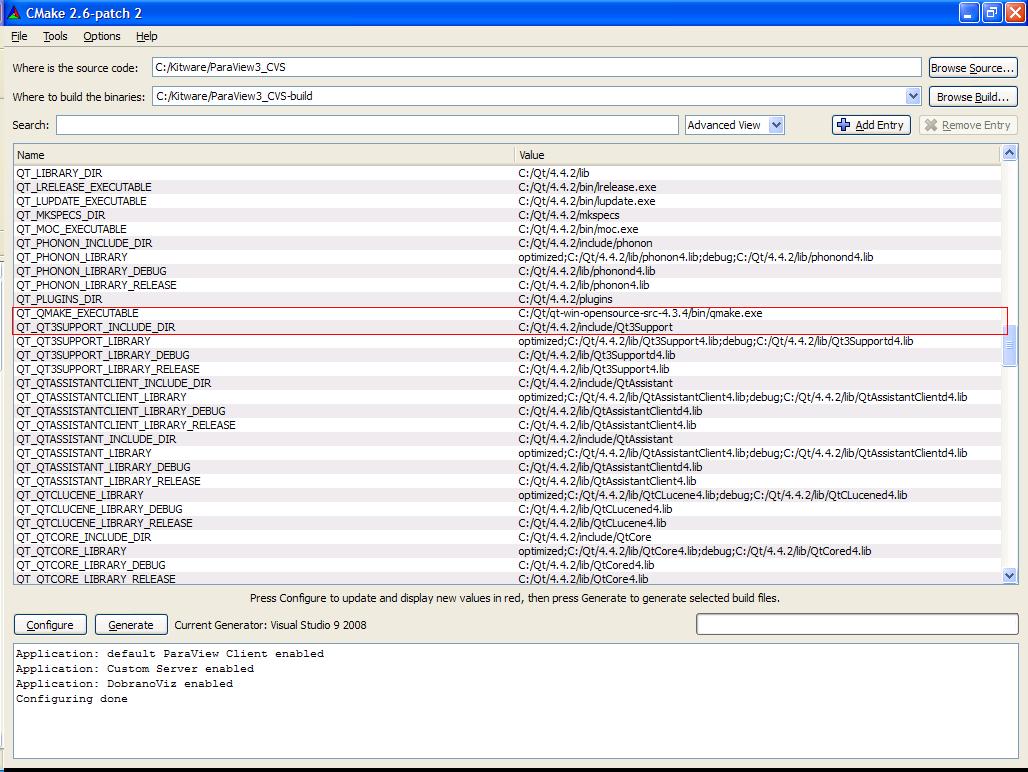
An updated FindQt4.cmake has been committed to CVS that makes this
easier.
If you change the qmake pointed to, the includes, libraries, etc...
are re-found.
So you can change the Qt you're using for your project simply by
changing the QT_QMAKE_EXECUTABLE variable.
Clint


On Oct 8, 2008, at 7:03 AM, Bill Hoffman wrote:
Renato N. Elias wrote:
Hi John, in my case I also tried to clean all files from my build
directory (uncountable times) before changing Qt version, but it
has not worked either (this screen shot was taken from one of my
tries http://www.nacad.ufrj.br/~rnelias/paraview/qt.JPG). The only
thing that I have not tested was the hand edition of cache files.
Something (probably me) must have messed up my system or CMake
really have a big problem in distinguishing between different
versions of the same library (especially Qt).
I finally gave up in struggling with CMake and deleted the older
version of Qt (it's easier to decide when you don't have
options ;o). In fact, I was keeping version 4.3.4 in my machine
just because I thought it were mandatory for ParaView 3.3.x
compilation, and it's not (at least I haven't found any
incompatibility yet).
Anyway, bug or one more weirdness of the software's world...
I am 99% sure, that if you do this it will work:


1. put the correct qmake in your PATH
2. run cmake-gui or CMakeSetup from the shell with the correct
qmake in the PATH
3. Select a new build directory (such that cmake prompts you to
create it), then configure
I have several versions of qt, and this works fine.
The idea is that the environment that you run CMake from should be
setup for the version of qt your are using. Once CMake picks a qt,
it can not be changed.
-Bill
_______________________________________________
CMake mailing list
[email protected]
http://www.cmake.org/mailman/listinfo/cmake
_______________________________________________
CMake mailing list
[email protected]
http://www.cmake.org/mailman/listinfo/cmake