As a workaround, you can probably do something like this:

*FileInputStream  fis = new FileInputStream("/mnt/sdcard/piggy.gif");*
*BufferedInputStream bis = new BufferedInputStream(fis);*
*bis.mark(100000);*
*Movie movie = Movie.decodeStream(bis);*
*int width = movie.width();*
*int height = movie.height();*
*Log.d("gif", "width = " + width + ", height = " + height);*
Basically, you need to create an InputStream where reset() works (or at
least doesn't throw an Exception).

For me, the code correctly showed the width and height of the GIF to be
85x85.

Thanks.


On Wednesday, May 1, 2013 1:10:22 PM UTC-5, bob wrote:
>
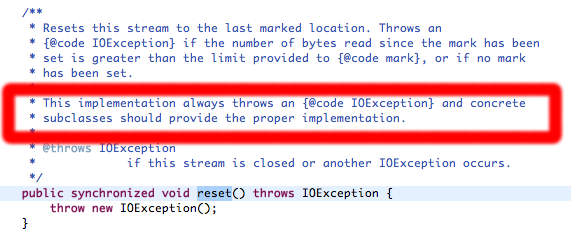
> I have looked further into this issue, and the issue is actually a bug in
> FileInputStream.  Basically, every class that derives from InputStream
> needs to implement the reset() method, and FileInputStream neglects to do
> so.
>
>
> Please see this in the InputStream source code:
>
>
> <https://lh5.googleusercontent.com/-YogltbfLGX4/UYFag1esuRI/AAAAAAAAAbw/SLb_MigbW9Y/s1600/reset.png>
>
>
>
> Thanks.
>
>
>
> On Tuesday, April 30, 2013 9:09:26 AM UTC-5, Beyza Nur Kökcan wrote:
>>
>> Hi,
>> I have found tutorials about how to play animated gifs in android by
>> reading it from an asset or using a drawable object. But what I want is to
>> read a gif file from sdcard.
>> I have changed the project reading gif from assets a little bit.
>>
>> In the main activity, I basically create gifMovieView then setContent(
>> gifMovieView)
>> In the constructor of the GifMovieView class, I have initailized the
>> Movie object like in the project "eu.andlabs.tutorial.animatedgifs". But I
>>  have used decodeFile giving the file path instead of decodeStream
>> getting inputStream.
>>
>>         File file = new File
>> (Environment.getExternalStorageDirectory().getAbsolutePath(),"piggy.gif");
>>
>>         if(file.exists()){
>>
>>                mMovie = Movie.decodeFile(file.getPath());
>>        }
>>
>>
>> I HAVE GİVEN I/O EXCEPTION for this line. It finds the file but
>> decodeFile gives exception.
>>
>>
>> In onDraw ;
>>
>>     @Override
>>     protected void onDraw(Canvas canvas) {
>>         canvas.drawColor(Color.TRANSPARENT);
>>         super.onDraw(canvas);
>>         final long now = SystemClock.uptimeMillis();
>>
>>         if (mMoviestart == 0) {
>>             mMoviestart = now;
>>         }
>>
>>
>>         Log.i("",""+mMovie.duration());
>>
>>         Log.i("",""+mMoviestart);
>>
>>         final int relTime = (int)((now - mMoviestart) %
>> mMovie.duration());
>>         mMovie.setTime(relTime);
>>         mMovie.draw(canvas, 10, 10);
>>         this.invalidate();
>>     }
>>
>>
>> BECAUSE OF THE EXCEPTION, movie.duration becomes 0 causing the error.
>>
>> Any suggestions?
>>
>> Thank you in advance
>>
>

--
--
You received this message because you are subscribed to the Google
Groups "Android Developers" group.
To post to this group, send email to [email protected]
To unsubscribe from this group, send email to
[email protected]
For more options, visit this group at
http://groups.google.com/group/android-developers?hl=en
---
You received this message because you are subscribed to the Google Groups
"Android Developers" group.
To unsubscribe from this group and stop receiving emails from it, send an email
to [email protected].
For more options, visit https://groups.google.com/groups/opt_out.