Here's some code to get you started:
String myFeed = getString(R.strinq.my_feed);
try {
URL url = new URL(myFeed);
// Create a new HTTP URL connection
                URLConnection connection = url.openConnection();
                HttpURLConnection httpConnection =
(HttpURLConnection)connection;
                int responseCode = httpConnection.getResponseCode();
                 if (responseCode == HttpURLConnection.HTTP_OK) {
            InputStream in = httpConnection.getInputStream();
                 processStream(in);
           }
}
catch
(MalformedURLException e) {
Log.d(TAG, "Malformed URL Exception.")
}
catch(IOException e) {
Log.d(TAG, "IO Exception.");
}


*Meier, Reto (2012-04-05). Professional Android 4 Application Development
(Wrox Professional Guides) (Kindle Location 5407). John Wiley and Sons.
Kindle Edition. *


On Thursday, October 18, 2012 2:50:29 PM UTC-5, Speedy31 wrote:
>
> Hi guys,
>
> I'm pretty new to Android software development, but have to say I like it
> more each day!
> I would like my android app to contact my servicebus over a simple HTTP
> post request, in which I'm able to specify: URL, portnumber, path and body,
> etc.
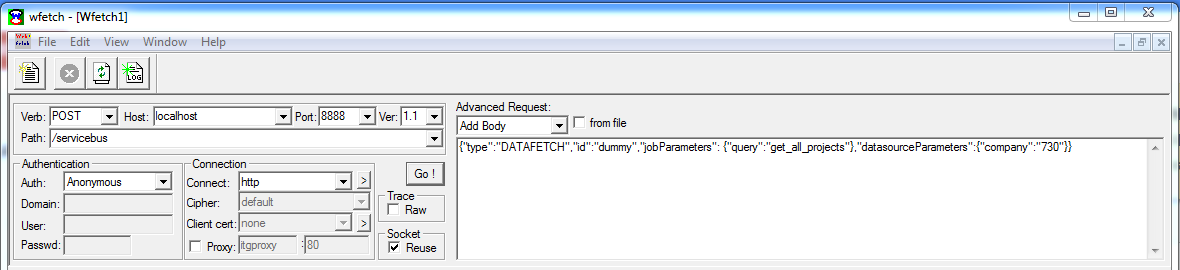
> Below you can see a screenshot of an old application called WebFetch what
> I always use to test the communication and check resulted data objects.
> Can someone explain me how to achieve the same results directly from the
> android code?
>
> Thanks in advance, Wim
>
>
> <https://lh5.googleusercontent.com/-C2x5Lq6g8-0/UIBdIJfEv3I/AAAAAAAAAAM/KRKQPNE73F8/s1600/webfetch.png>
>
>

--
You received this message because you are subscribed to the Google
Groups "Android Developers" group.
To post to this group, send email to [email protected]
To unsubscribe from this group, send email to
[email protected]
For more options, visit this group at
http://groups.google.com/group/android-developers?hl=en